
Your needs, this model
Does it fit your priorities?
Would local QWERTY typing on the machine suit your labeling routine?
Brother's exact PT1100SB page lists QWERTY. It confirms a physical-keyboard route, not a phone or computer workflow.
Explore this need in the finder →Are two lines on Brother TZe tape up to 12 mm enough for your labels?
The exact page lists TZe in widths through 12 mm and a two-line maximum. It does not establish a numeric print height or 18 mm TZe support.
Explore this need in the finder →Does an operator-pressed cutter suit your workflow, or is automatic cutting essential?
Brother’s official support instructions list PT1100SB and tell the user to press the cutter after printing in specified margin modes. This supports a manual cutting step, not automatic cutting.
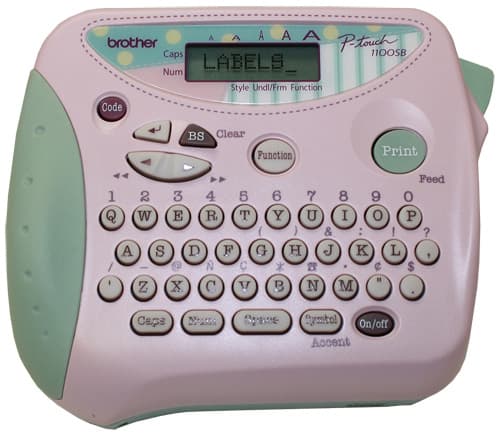
Explore this need in the finder →The Brother PT1100SB is an earlier label maker whose exact U.S. listing is unusually sparse: the page calls it an “Electronic Labeling System” and marks it discontinued. The useful, documented core is still clear—QWERTY keys, Brother TZe cassette tape from 3.5 to 12 mm, thermal-transfer printing, a two-line ceiling, and a label-length setting. It makes most sense to an owner or a used-unit shopper who wants that specific keyboard-and-tape routine, not as a default current purchase.
What the exact model page actually establishes
Brother’s PT1100SB page lists a QWERTY keyboard, laminated tape, thermal-transfer printing, TZe widths of 3.5, 6, 9 and 12 mm, up to two lines, and a label-length setting. That is enough to plan short cassette labels with local text entry, including a two-line layout when the chosen job fits. It is not enough to infer a particular maximum character height, body size, print speed or memory capacity. The page shows “Standard Memory 15” without a unit or explanation; treat that number as uninterpreted rather than as a count of saved labels or a character limit.
Match the cassette code and width
The direct PT1100SB listing identifies TZe, and Brother’s current 9 mm TZEM921 tape page also names PT1100SB among the compatible machines. That example tape uses a laminated cassette and is described for smooth, flat surfaces; Brother does not promise adhesion on every texture, coating or environment. Choose a cassette by its exact code and intended adhesive, not by width alone. A 12 mm tape is the page-listed maximum for this model; an 18 mm requirement is not met by that documented TZe profile.
Some long-lived P-touch families have older TZ documentation as well as current TZe listings. For this exact model, keep your confirmed plan to Brother’s PT1100SB page-listed TZe range unless you can verify the cassette for the individual machine. Do not transfer a wider cassette range or a line-count claim from another PT-1100-family suffix just because its name looks similar.
Two lines are not a print-height promise
A two-line maximum helps when a short name needs a second line, but it does not tell you how tall the combined print can be or which font sizes remain legible on the narrowest cassette. The exact listing does not give a millimeter print-height figure. If small lettering, a precise fit on a narrow container, or a particular viewing distance is essential, the PT1100SB’s documented line count cannot answer that question; compare a better-specified model and its exact cassette instead.
Do not infer scrapbook supplies or package contents from “SB”
The U.S. product page does not spell out a scrapbook-specific feature, identify an acid-free or photo-safe cassette, or establish what came in a particular box. The letters in a model suffix are not a substitute for a tape code or package list. Before considering an individual used offer, ask for the model label and a clear view of the cassette, its code, and any adapter or starter supplies. The exact page confirms label-length setting but does not answer which tape or power accessories remain with a used unit.
Plan on an operator-pressed cutter, not automatic finishing
Brother’s tape-margin support instructions include the PT1100SB among the covered models and direct the user to press the cutter after printing with the narrower-margin settings. That establishes a user-operated cutting step; the support answer does not promise automatic cutting. If you are making many labels in sequence, account for that hand-finished routine. If an automatic cutter is essential, this evidence does not qualify the PT1100SB for that need.
Where the evidence leaves a decision open
The exact product page does not settle battery type, adapter model, dimensions, computer or phone input, or present-day driver support. If you need any of those as a condition of purchase, match the exact machine suffix to its manual and power accessory before choosing an individual unit. Do not transfer a feature from a similar-looking PT-1100-family model to this one without checking its suffix.
Who should consider it—and what to compare
Consider the PT1100SB if you already own one, can verify its condition and supplies, and the QWERTY/TZe/two-line profile covers your task. Skip it if the purchase depends on current support, a specific app or computer connection, a known power adapter, an exact print height, or scrapbook-safe media that the offer does not identify. For a new label maker, compare the documented Brother PT-H110 handheld for a clearly described TZe route or the PT-D410 if you want a larger keyboarded desktop workflow; their different bodies and controls are not PT1100SB features.
Start with Brother’s PT1100SB product page, its tape-margin instructions, and the compatible TZEM921 tape page. For a used unit, match the machine label, tape code and included accessories to the job rather than relying on an abbreviated title.
Key details at a glance
| Print process | Thermal transfer |
|---|---|
| Maximum tape width | 12 mm |
| Compatible cassette | The exact U.S. PT1100SB page lists TZe in 3.5, 6, 9 and 12 mm widths. A Brother guide file whose name includes PT1100SB appears in old web-indexed results as a PT-1100 guide, but the official PDF URL now returns HTTP 404; no original-TZ plan is added from that uninspectable document. Match an actual cassette code before relying on legacy supplies. |
| Maximum lines per label | 2 |
| Line-count note | Exact page gives two as the maximum; tape-width-specific line and print-height limits are not specified. |
| Letter-key arrangement | qwerty |
Use the exact model’s instructions for operating limits, supplied equipment and version differences.
Sources for this assessment
- Brother Office & Home directory row PT1100SB at offset120/index122
- Brother U.S. PT1100SB product page
- Brother U.S. PT1100SB support page
- Brother TZEM921 9 mm TZe tape page
- Brother U.S. support answer: Change tape margins
- Brother Canada PT-1100SBVP bundle page (illustration source only)
- Brother Canada image of PT-1100SB core unit on PT1100SBVP bundle page
Put the device and its tape system together.
Match the exact model, cassette family, computer or network route and any optional power or touch-panel hardware before buying.