
Your needs, this model
Does it fit your priorities?
Are you willing to include an earlier PT-1170 and use the manual-backed Brother TZ tape route?
The exact guide specifies Brother TZ at 6, 9 and 12 mm; the current product page’s TZe table is not treated as settled.
Explore this need in the finder →Would a small QWERTY keyboard work if two-line output is limited to 9 or 12 mm TZ tape?
The guide documents an eight-character scrolling display, built-in QWERTY entry and two lines only on 9/12 mm TZ; 6 mm is one-line only.
Explore this need in the finder →Is a hand-operated cutter acceptable instead of requiring automatic cutting?
The guide depicts and explains a manual cutter lever; it does not establish automatic cutting.
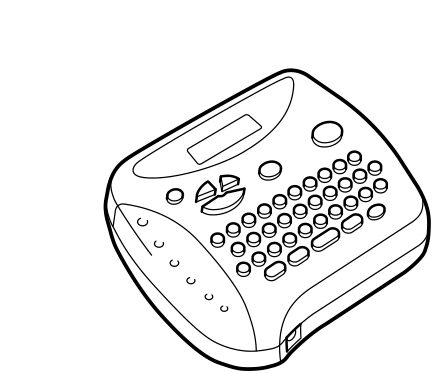
Explore this need in the finder →The Brother PT-1170 is an older cassette label maker for someone who is content to type on a small built-in QWERTY keyboard and cut each label by hand. Brother’s U.S. page marks it discontinued. It is therefore an earlier-model choice for an existing owner or a shopper deliberately considering older equipment, not a default recommendation for a new label workflow. The best reasons to consider it are direct typing, familiar short labels and a few useful formatting functions; the strongest reasons to look elsewhere are uncertainty about replacement media, a narrow maximum width, and the lack of a documented app or desktop-design route in the model guide.
Text entry is local and deliberately simple
The PT-1170 has a one-row LCD that displays eight characters at a time. A longer entry scrolls through that small window, although the guide allows up to 55 characters in one text file. That is workable for short storage-bin names, file tabs or craft labels, but not the same as previewing a complete styled label before printing. Its small physical keys and QWERTY arrangement favor someone comfortable composing on the device itself. Brother’s manual explains a built-in keyboard workflow; it does not establish a phone app or USB computer-design workflow, so a person who requires either should choose a model with that connection explicitly documented.
The guide also documents nine text files with a total capacity of 300 characters, accented characters and 72 symbols. You can change size and choose among nine print styles, add a frame or underline, mirror-print on transparent tape, repeat a label up to nine times, or number a series. These are practical small-batch conveniences, but they are not evidence of a barcode library, reusable template collection or spreadsheet-driven printing. Two-line entry is supported only with the guide’s 9 mm and 12 mm cassettes; the 6 mm route is one line. When using two lines, the manual says output returns to normal style and the standard size, so the selection of decorative type does not carry through to that layout.
Verify the tape family before buying
The model-specific user guide says to use Brother TZ tape and lists 6, 9 and 12 mm widths. Brother’s current product-page specification table for the PT-1170 instead names TZe and 3.5, 6, 9 and 12 mm widths. These are both manufacturer sources, but they do not give the same supply advice. The guide is the stronger description of the original operating setup, so this assessment relies on TZ at 6/9/12 mm and does not treat TZe or 3.5 mm as confirmed for the machine. If an existing cassette or a particular supply is central to your decision, check its marking and verify the exact PT-1170 compatibility before buying; tape families should not be assumed interchangeable from their similar appearance.
That conservative width ceiling matters. The PT-1170 is a poor choice when a panel label, larger equipment tag or other job needs an 18 mm-or-wider original TZ cassette. Laminated tape is a material description, not a guarantee that a label will stick to every surface or survive every cleaning or outdoor condition. Test the actual cassette on the intended surface, and confirm the machine’s condition before relying on an older unit for work where legibility or adhesion matters.
Power and finishing need a little attention
The guide calls for six AAA alkaline batteries and names the Brother AD-30 as an optional AC adapter. It documents a hand-operated cutter lever, not an automatic cutting workflow. That is straightforward for occasional labels, while a long run requires a manual cut after printing. The machine turns off after five minutes without a keypress and retains the active session while power remains connected. Brother warns that text and stored files are lost if power is disconnected for more than three minutes, so do not treat its memory as a lasting archive. The old guide says a cassette came with the original machine; it says nothing about what a used seller has today, and compatibility does not prove that an adapter or tape remains in the package.
The PT-1170 makes sense when a direct QWERTY keypad, short text, manual cutting and the guide-backed TZ widths all fit the job. It is a weak match if you need 18 mm tape, automatic cutting, color output, a guaranteed current TZe supply path, a phone app, computer design, or a confirmed adapter in the box. For a more recent Brother household comparison, read the separate PT-D220 assessment; its facts and consumables are model-specific and should not be transferred to this older machine. Brother also listed PT-1170S separately; that exact model has its own review, and its specifications are not inferred from this guide.
Primary references: Brother’s PT-1170 U.S. product page and the U.S. PT-1170 user’s guide. Their cassette-family and width statements conflict, so the guide-backed TZ route is the conservative basis for compatibility decisions.
Key details at a glance
| Print process | thermal transfer |
|---|---|
| Maximum tape width | 12 mm |
| Compatible cassette | The exact PT-1170 manual says use Brother TZ at 6/9/12 mm. The current exact Brother page lists TZe and 3.5/6/9/12 mm instead. Because these official sources conflict, assessed plans use only the guide-backed TZ widths; TZe and 3.5 mm remain unconfirmed here. |
| On-device preview characters | 8 |
| Display type | LCD |
| Maximum lines per label | 2 |
| Line-count note | The exact guide allows two lines only with 9 or 12 mm TZ tape; at 6 mm it is one line. With two lines, style resets to NORMAL and size to SIZE1. |
| On-device symbols | 72 |
| Saved label files | 9 |
| Power choices | Exact guide documents six alkaline AAA cells and optional Brother AD-30. Adapter inclusion in any current or used offer is not established. |
| What the base package supplies | The guide describes a TZ cassette supplied with the original machine; no package contents for a present-day or used offer are established. |
| Letter-key arrangement | qwerty |
| Specialist media limits | Only the model-specific guide-backed Brother TZ widths are credited in the conservative profile. |
Use the exact model’s instructions for operating limits, supplied equipment and version differences.
Sources for this assessment
Put the device and its tape system together.
Match the exact model, cassette family, computer or network route and any optional power or touch-panel hardware before buying.