
Your needs, this model
Does it fit your priorities?
Are you willing to keep an earlier discontinued PT-1180 supplied with its documented original Brother TZ tape?
Brother's exact U.S. guide and support specification document TZ at 6/9/12 mm. The live product page lists TZe and 3.5 mm in a conflicting specification panel, so this assessment only qualifies the manual-backed TZ route.
Explore this need in the finder →Would a small physical QWERTY keyboard work if two-line labels are limited to 9 or 12 mm TZ?
Brother specifies 42 QWERTY keys and its guide permits two lines only on 9/12 mm TZ; 6 mm is a one-line route. This is not a phone or computer design workflow.
Explore this need in the finder →Does a hand-operated cutter suit your routine, or is automatic cutting essential?
The exact guide and U.S. specification confirm six alkaline AAA batteries and a manual cutter blade. They do not establish an AC adapter or an automatic cutter; the old brochure says batteries were not included in its original package.
Explore this need in the finder →The Brother P-touch PT-1180 is an earlier, discontinued handheld label maker for someone checking an existing machine or a specific used unit—not a current default choice. It is meant for short, on-device jobs, but a cassette conflict changes how I would use it. Brother's model-specific U.S. guide says TZ, while the live product-page table lists TZe and a 3.5 mm width that the guide and detailed specification do not support. I use the narrower, manual-backed profile rather than treating similar tape names as interchangeable.
Typing at the machine is the point
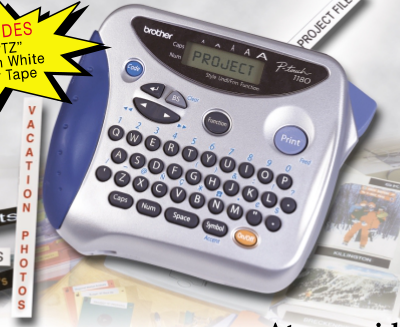
The PT-1180 is built around direct keyboard entry. Brother's U.S. specification lists a 42-key QWERTY keyboard and a one-row, eight-character LCD. You can enter as many as 55 characters in the working text, but the display shows only a small moving window. That is workable for short names, shelf labels, file tabs, and cable identifiers; it is less comfortable when you need to edit a long instruction or preview the finished layout before printing.
Brother's exact guide describes five type sizes, nine print styles when vertical printing is counted, four frame choices, underline, mirror printing, symbols, and repeat/numbered printing. Mirror output is meant for clear tape viewed through glass. The U.S. spec lists up to nine copies and sequential numbering from 1 to 9; neither source establishes editable phone designs, a computer editor, or modern batch software.
Choose the original TZ tape plan carefully
The PT-1180's exact U.S. user's guide says to use Brother TZ tape and lists 6, 9, and 12 mm cassettes. The U.S. support specification names the same TZ family and widths. The live Brother product pages for both PT1180 and PT1180SC instead show TZe in their specification panels, including 3.5 mm; their descriptive text still calls out TZ tape from 6 to 12 mm. Because those official fields disagree, this review qualifies the model only for the manual-backed TZ route. It does not promise that a TZe cassette or the 3.5 mm size will work. For an unfamiliar used machine, check the cassette marking and the exact model label before ordering supplies.
One line is the safe choice on 6 mm tape. Brother's guide permits a second line only on 9 or 12 mm tape; in two-line mode it resets type size and style to normal. A need for two lines and the thinnest cassette do not form one supported plan. Twelve millimeters is the widest documented cassette, not an 18 or 24 mm equipment-label format. Brother lists 180 dpi and 10 mm per second, a small-text profile rather than wide-format batch printing. Lamination is not a guarantee for every surface or environment.
Power and finishing are hands-on
The model-specific guide requires six AAA alkaline batteries. The promotional brochure says they were not included in its original package, but that does not tell you what a used listing contains. I found no verified PT-1180 adapter route, so do not plan on desk power unless the exact machine documentation or a confirmed accessory supports it. Brother specifies a hand-operated cutter blade, not an automatic cut. For occasional labels that is simple; for frequent long batches, feeding and pressing the cutter for each strip adds a manual step.
Do not treat it as a durable label database. The exact specification lists nine text files and 300 characters of memory, but the guide warns that displayed text and saved files can be lost after more than three minutes without power. Keep batteries installed if you depend on saved text. The product page's “Standard Memory 15” field has no unit and is not a saved-label count.
What the PT1180SC suffix does—and does not—tell you
Brother's Office & Home listing also contains a separate PT1180SC row. Its exact U.S. page uses the PT-1180SC name and repeats the same keyboard, style, TZ-width description, and technical fields. I treat it as a covered product-code variant of the same documented operating model, not as proof of a different print mechanism. The pages do not explain what “SC” adds or establish that a carrying case is included. Although a historical brochure lists a separate case model 6991 among optional supplies, do not assume that a PT1180SC used listing includes it.
Brother marks both codes discontinued. Its replacement-model list points from PT-1180 to PT-D220, but a replacement recommendation is not a claim that the newer machine uses the same tape, controls, or workflow. If you need a fresh, readily supported keyboard labeler, compare the Brother PT-D220 review and verify today's tape availability. The PT-D220 is a current-reference alternative, not a substitute for a working PT-1180's TZ cassettes.
When this older machine makes sense
Consider the PT-1180 only when the physical QWERTY keyboard, narrow laminated labels, and manual cutter suit your routine and you can verify the exact unit and its tape. For a two-line job, plan on 9 or 12 mm TZ. If a phone app, USB design, automatic cutting, barcode creation, AC adapter, wider tape, or guaranteed TZe compatibility is essential, this evidence does not qualify the PT-1180 for that need. Unknown current refill availability is a real ownership constraint: confirm that the cassette you need is obtainable before buying a discontinued machine, and test a sample on the actual surface rather than relying on a general durability phrase.
For a used unit, check the model label, cassette bay, battery compartment, display, print key, feed, and cutter with a known-good TZ cassette. A starter tape shown in the original brochure says nothing about a listing's contents or condition. Treat this review as help identifying an older model, not a reason to pay extra for a pictured bundle.
Primary references: Brother's PT1180 U.S. product page and PT1180SC U.S. product page; the PT-1180 U.S. specification; the original PT-1180 U.S. user's guide; and Brother's PT-1180 brochure and recommended-replacement list.
Key details at a glance
| Full-color output | No |
|---|---|
| Print process | thermal transfer |
| Maximum tape width | 12 mm |
| Compatible cassette | Use the original Brother TZ plan only: the exact U.S. guide says to use TZ and lists 6/9/12 mm. The live product pages and their technical panels conflict, listing TZe and 3.5 mm; those alternatives are not counted as confirmed compatibility. |
| On-device preview characters | 8 |
| Display type | LCD |
| Maximum combined print height | 9 mm |
| Maximum lines per label | 2 |
| Line-count note | The exact U.S. manual allows two lines only on 9 or 12 mm TZ. At 6 mm, use one line. Two-line output resets the selected size/style to normal. |
| On-device symbols | 72 |
| Saved label files | 9 |
| Power choices | The exact U.S. guide requires six alkaline AAA batteries. Brother's brochure says the original package did not include them. No PT-1180 AC-adapter route is confirmed in the reviewed exact-model sources. |
| Body dimensions | The brochure gives 6 × 5.1 × 2.4 inches with W×D×H labels; the U.S. specification presents 154 × 129 × 60 mm as W×H×D. Do not use these inconsistent axis labels as a hard shelf-fit width/depth/height claim. |
| What the base package supplies | The original guide says a TZ tape is supplied; the old brochure describes a starter tape and six AAA cells not included. This establishes historic marketing material, not the contents or condition of a present used listing. Brother's exact PT1180SC page does not explain its suffix or confirm a carrying case. |
| Letter-key arrangement | qwerty |
| Specialist media limits | No barcode, full-color, mobile-app, Wi-Fi, or computer-USB workflow is documented for this model; the U.S. specification explicitly says no PC connection/interface. |
| Built-in type styles | ['normal', 'bold', 'outline', 'shadow', 'italic', 'italic bold', 'italic outline', 'italic shadow', 'vertical'] |
Use the exact model’s instructions for operating limits, supplied equipment and version differences.
Sources for this assessment
- Brother U.S. Office & Home directory row PT1180 at offset 120
- Brother exact U.S. PT1180 product page
- Brother exact U.S. PT1180SC product-code variant page
- Brother exact PT1180 U.S. product-support page
- Brother exact PT1180SC U.S. product-support page
- Brother U.S. PT-1180 specification
- Brother PT-1180 U.S. user's guide
- Original Brother PT-1180 U.S. product brochure
- Brother 2024–2025 recommended replacement model list (reused archived copy)
Put the device and its tape system together.
Match the exact model, cassette family, computer or network route and any optional power or touch-panel hardware before buying.