
Your needs, this model
Does it fit your priorities?
Would a familiar QWERTY keypad and Brother-confirmed TZe tape suit your short, on-device labeling routine?
The exact U.S. model page shows QWERTY and TZe widths through 12 mm; Brother's PT-1280-specific FAQ confirms TZe use. The source set does not establish a phone-app workflow.
Explore this need in the finder →Can the PT-1280's 12 mm maximum meet your label-width need, or is 18 mm TZe essential?
Both the exact product listing and the exact older support width table stop at 12 mm. The PT-1280 does not inherit the 18 mm range of other P-touch models.
Explore this need in the finder →Is a hand-operated cutter acceptable, or must labels be cut automatically?
The PT-1280 guide documents a manual cutter lever. Automatic cutting is not confirmed, even though the machine can repeat-print up to nine copies.
Explore this need in the finder →The Brother P-touch PT-1280 is an earlier, discontinued small-desktop label maker for someone who wants to type at the machine and is comparing a known unit or an existing tape supply. Its QWERTY keyboard, scrolling one-line display, six preset label formats and three favorite keys suit short home or office jobs without a phone. The trade is an older hands-on routine: you preview text rather than its finished styling, cut tape yourself, and need to check the cassette family before buying refills.
A self-contained keyboard, with a narrow preview
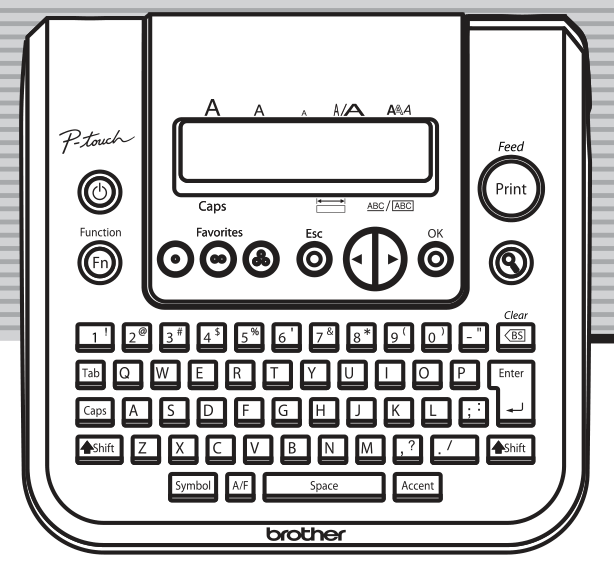
Brother's U.S. specification identifies a 61-key QWERTY layout. The PT-1280 can hold up to 80 characters in its working text, but its LCD shows only one line of 15 characters at a time. The manual's preview scrolls through the text and label length; it does not show the selected font, size, style, underline or frame. That is fine for a box name, file tab or short identifier, but it is less reassuring for a longer instruction whose visual fit matters.
There are six useful auto-format choices in the guide: VHS spine, MiniDV spine, audio-tape spine, CD-case spine, file tab and divider tab. They are fixed-purpose length formats, not a modern library of editable phone templates. Three Favorite keys let you save, open and print frequently reused text; Brother's old specification says each can hold 80 characters, for 240 characters total. The current product page separately displays “Standard Memory 15” without a unit, so I would not read that bare number as a count of stored labels. Brother describes nine type styles and a handful of framing options, although its current description and older specification disagree on the frame count. If a particular frame is essential, confirm it in the manual rather than choosing on the headline count.
Match the tape family, not just the width
The archived PT-1280 user's guide and Brother's older U.S. specification say to use original TZ tape, with 3.5, 6, 9 and 12 mm widths. Brother's later PT-1280-specific FAQ says TZe tape can also be used, and the current exact-model product page lists TZe at those same widths. I treat those as two documented cassette routes, both topping out at 12 mm, rather than extending either one to a wider model's range. On the TZe path, Brother describes the 3.5 mm black-on-white option as non-laminated for narrow indoor uses such as CD spines; the wider laminated tapes are the more general-purpose choice. The older guide says two-line text needs 9 or 12 mm tape, and its 3.5 mm instructions do not allow a frame. Check the mark on the machine's tape bay and the exact cartridge code before ordering for an unfamiliar used unit.
This is thermal-transfer cassette printing, not a full-color photo or sheet-label printer. Brother's specification lists a maximum print height of 9 mm and a maximum speed of 10 mm per second. Those are enough for ordinary short identifiers, but the PT-1280 is not the model to select for wide equipment labels, computer-created batches or fast repetitive runs. No phone-app, USB-computer or automatic-cut setup is documented in the reviewed PT-1280 material.
Desk footprint, batteries and manual finishing
Brother's specification calls it a small desktop machine. It measures 159.6 × 150.9 × 60 mm (about 6.28 × 5.94 × 2.36 inches) and weighs 470 g before batteries and tape. Allow extra room for your hands at the cassette door and cutter; it is compact for a desk, but not a pocket labeler. Six AAA alkaline batteries are the documented portable power route. The manual also lists optional AD-30 or AD-24 adapters; optional compatibility does not mean an adapter comes with an older listing. The machine turns itself off after five minutes without a key press. If it is left without power for more than three minutes, the guide warns that displayed text, saved files, language and unit settings can be cleared, so maintain the batteries if you rely on favorites.
Printing ends with a hand-operated cutter lever. That is straightforward for occasional labels, but each strip is a separate print-and-cut task; an automatic-cutter requirement points elsewhere. The preview limitation matters here too: inspect the scrolling text before printing because the preview does not simulate the finished font or frame.
Keep a working PT-1280, or choose its listed replacement
Brother marks the PT-1280 discontinued. Its 2025–2026 replacement-model list names the PT-D220 as the recommended replacement, which is a useful starting point for someone shopping for a new standalone keyboard machine. It is not proof that the two models are identical: the D220 is a TZe-only model and has a larger built-in template set, while an existing PT-1280 can use original TZ as well as Brother-confirmed TZe. Compare the PT-D220 review if you want the current-reference choice, and the PT-D210 versus PT-D220 guide if their features are your next question.
The PT-1280 makes most sense when the exact machine is already in good condition, its local keyboard suits the job, and you can verify the cassette and power you need. It is a poor fit when a phone workflow, automatic cutting, wide media or a known modern replacement is essential. Treat a used-unit listing as a particular machine to inspect, not as evidence that its old adapter, cassette or saved-label contents are included.
Sources: Brother's exact U.S. PT1280 product page; Brother's PT-1280 U.S. specifications; the original U.S. user's guide; Brother's PT-1280-specific TZ/TZe FAQ; and Brother's 2025–2026 recommended replacement list.
Key details at a glance
| Full-color output | No |
|---|---|
| Print process | thermal transfer |
| Maximum tape width | 12 mm |
| Compatible cassette | Original U.S. guide and support spec say TZ only, but Brother's later exact PT-1280 FAQ states that TZe can also be used; the current exact U.S. PT1280 page lists TZe 3.5/6/9/12 mm. Keep two evidence paths with the same documented 12 mm maximum. The product page describes the 3.5 mm black-on-white option as non-laminated; do not describe all TZe widths that way or infer wider media. |
| Built-in templates | 6 |
| On-device preview characters | 15 |
| Display type | LCD |
| Maximum combined print height | 9 mm |
| Maximum lines per label | 2 |
| Line-count note | The exact user's guide permits two printed lines only with 9 mm or 12 mm tape; a third line is rejected, and 3.5/6 mm tape cannot print two lines. |
| Power choices | The guide lists six AAA alkaline cells or optional AD-30/AD-24. It says text, saved files, language and unit settings clear after more than three minutes without power. Adapter compatibility does not prove inclusion in a used offer. |
| Body dimensions | Exact U.S. support specification gives 159.6 mm width × 150.9 mm depth × 60.0 mm height; conversion rounded to two decimal inches. Leave room to access the cassette door and cutter. |
| Tape cutting | The exact guide depicts a physical cutter lever and tells the user to push it after printing; automatic cutting is not documented. |
| What the base package supplies | The guide says distribution package contents may differ. Do not assume batteries, tape, case, adapter or a used machine's stored text are included in a particular offer. |
| Letter-key arrangement | qwerty |
| Built-in type styles | ['normal', 'bold', 'outline', 'shadow', 'italic', 'italic bold', 'italic outline', 'italic shadow', 'vertical'] |
| Original TZ maximum width | 12 mm |
Use the exact model’s instructions for operating limits, supplied equipment and version differences.
Sources for this assessment
- Brother Office & Home catalogue row PT1280, offset 60/index 69
- Exact Brother U.S. PT1280 product page
- Brother U.S. PT-1280 specification page
- Brother PT-1280 U.S./English user's guide, reference LW6436001
- Exact Brother U.S. PT-1280 TZ/TZe compatibility FAQ
- Brother's 2025–2026 recommended replacement-model list
Put the device and its tape system together.
Match the exact model, cassette family, computer or network route and any optional power or touch-panel hardware before buying.