
Your needs, this model
Does it fit your priorities?
Do you already own the PT-12N and need the Brother TC cassette route that Brother names for it?
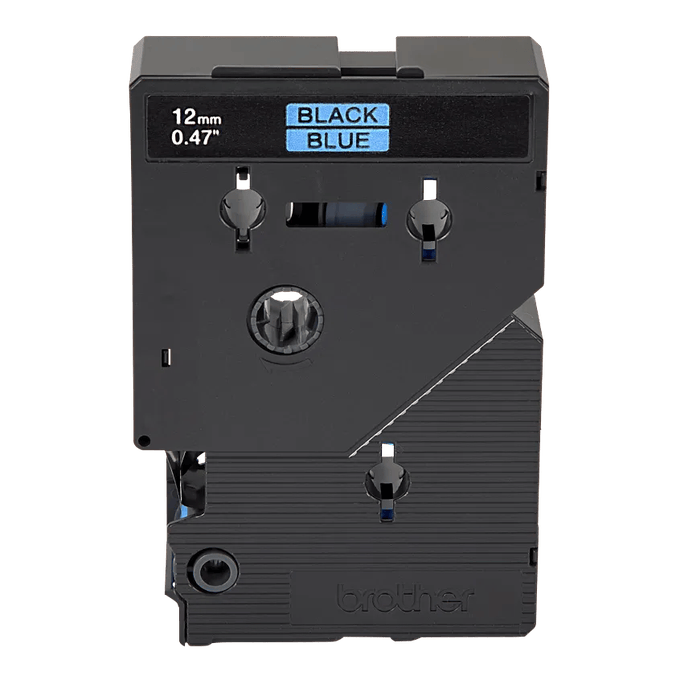
Brother’s TC6001 page specifically lists PT-12N as compatible with that 12 mm cartridge. The PT12N product-page TZe field conflicts with its TC recommendations, so this fact record confirms TC6001 only and does not infer all TC widths or any TZe plan.
Explore this need in the finder →Is a built-in QWERTY typing route more useful than designing on a phone or computer?
Brother’s exact PT12N page lists QWERTY. It does not document an app, computer connection, wireless route or full-display preview.
Explore this need in the finder →Would on-device two-line printing and adjustable label length suit these short labels?
The exact PT12N page lists a two-line maximum and label-length setting. It does not supply a numeric print height or a width-specific line limit.
Explore this need in the finder →A discontinued machine with a cassette question worth resolving first
The Brother P-touch PT-12N is not a sensible casual first label maker today: Brother marks its exact U.S. product listing discontinued and not orderable. It is more relevant to someone who already owns one, is checking a specific used unit, Its strongest documented everyday features are a QWERTY keypad, a two-line maximum, and a label-length setting. The unusual caveat is media: the exact product page lists TZe tape, yet Brother links TC supplies from the same page and its TC6001 supply page specifically names PT-12N as compatible.
Type on the device, but don't turn a two-line limit into a print-height promise
Brother's exact PT12N page lists a QWERTY keyboard, a maximum of two print lines, and label-length setting. For short names, pantry labels, drawer tabs, or identifiers where direct typing matters more than designing a polished layout, that combination is useful. You can enter the words at the machine and choose a controlled finished length without moving the job to a separate app. The page does not state how much text fits on the display, whether it previews a full label, or how the two-line maximum behaves on each cassette width. It also does not establish the actual print height. If large type, a specific number of characters per screen, or a fixed height is essential, treat those as questions to verify on the exact unit rather than infer from the line count.
One product-table value reads “Standard Memory 15,” but Brother gives no unit or explanation. It is not safe to translate that into fifteen stored labels, characters, or templates. The PT-12N page also does not document an app, USB computer route, Bluetooth, Wi-Fi, or prepared on-device formats. That doesn't prove the features are absent; it means a shopper who needs one should choose a model whose exact manual identifies it.
Brother's media records disagree in a consequential way
Brother's exact PT12N product page lists TZe as its compatible tape family and shows 3.5, 6, 9, and 12 mm widths. On that same page, however, its recommended-supplies panel links a range of TC cassettes. Brother's current TC6001 page goes further: it identifies PT-12N among the label makers compatible with that particular 12 mm cassette. So there is direct manufacturer support for at least one TC option, but the surviving product data does not give a clean explanation of the TZe/TC difference or safely establish every TC width for this model. The careful operating boundary is the exact PT-12N-compatible TC6001 at 12 mm, not a general claim that any Brother cassette of the same width will fit. Brother's TC6001 listing identifies the specific cartridge and compatibility list; check the code on any cartridge before using it.
That media distinction matters more than the advertised color or width. A 12 mm TC cassette and a 12 mm TZe cassette are different product identities, not automatically substitutes. If you have an established PT-12N and can confirm a TC6001-type cartridge, this machine may keep an existing routine going. If you're buying an unfamiliar used unit, ask for a clear view of the machine's label, cassette compartment, and actual cassette. A box or retailer title alone is not enough to settle whether the seller has PT-12N, PT-12, or another old P-touch. Do not buy a large supply of one family based only on “P-touch” or a shared width.
What the available support does not settle
The exact Brother support page surfaces FAQ and compatible-supplies areas but no usable PT-12N user's guide. A direct request to Brother's old U.S. manual index ends at its generic error page. That is a source bridge which currently fails, not proof that a guide never existed. The same U.S. product response offers no usable exact-model photo. No PT-12 picture is substituted here: the neighboring PT-12 is a distinct catalogue identity, and its brochure is not evidence that the N model has the same housing or retail bundle.
Power details, an AC-adapter option, body dimensions, weight, cutter actuation, saved-label count, and exact package contents therefore remain open. Don't assume batteries, a case, a separator, or a cassette are included because an older promotional bundle or a used listing happens to picture them. For a secondhand machine, inspect the battery compartment for corrosion, check that the cassette door closes with the exact cartridge, and print a short test label before depending on it. These are sensible inspection steps, not claims that this particular model has been laboratory tested.
Who should consider it—and what changes in the finder
The PT-12N is best treated as an earlier-model option for someone who values local QWERTY typing and can verify the documented cassette that they intend to use. It is not a default current recommendation, and its discontinuation makes current support and refill planning more important than a low used asking price. If your job requires TZe certainty, an exact adapter, a phone app, a computer connection, automatic cutting, or a measured body size, select a documented model rather than making the PT-12N pass on an unknown.
In the finder, leave earlier machines off and the PT-12N stays out of the current pool. Opt into earlier models and choose Brother TC, and the page's exact TC6001 evidence can make it relevant for that cassette; this does not extend to all TC sizes. The current PT12N table's TZe listing is kept as a conflict instead of a second positive media plan, so a TZe-essential answer does not rely on uncertain cross-family compatibility. A two-line need is supported by Brother's exact model table, while an app, adapter, numeric print-height, or exact memory need remains unconfirmed. If the cassette system matters, confirm the cartridge code before treating any old P-touch as a fit.
Sources: Brother's exact PT-12N U.S. product page, PT12N support page, TC6001 supply page, and 2024–25 discontinued-model guide.
Key details at a glance
| Print process | Thermal transfer per the exact PT12N product page |
|---|---|
| Maximum tape width | 12 mm |
| Compatible cassette | Brother’s exact PT12N page has a general TZe 3.5/6/9/12 mm field, but its supply recommendations are TC codes. Brother’s TC6001 product page lists PT-12N as compatible with that exact 12 mm TC supply. The strict profile confirms only TC6001/12 mm; it does not infer TZe compatibility or other TC widths from the conflicting table. |
| Maximum lines per label | 2 |
| Line-count note | Brother’s exact PT12N product page states two maximum print lines; no width-specific limit or guide instructions are available. |
| Power choices | The reviewed exact manufacturer PT12N product and support pages do not establish battery count, battery size or an adapter option; no retailer package text is used. |
| What the base package supplies | No PT12N-specific package contents are established by the reviewed manufacturer source. Do not transfer the PT-12 brochure bundle to PT12N. |
| Letter-key arrangement | qwerty |
| Specialist media limits | Brother TC6001 12 mm black-on-blue is explicitly listed as compatible; other TC widths and the conflicting TZe general field are not encoded as confirmed match routes. |
Use the exact model’s instructions for operating limits, supplied equipment and version differences.
Sources for this assessment
- Brother U.S. Office & Home exact row PT12N at offset90/index94
- Brother U.S. exact PT12N product page
- Brother U.S. exact PT12N support page
- Brother U.S. TC6001 exact supply page
- Brother U.S. PT12N manual-index request
- Brother 2024–25 discontinued-model guide (reused archived bytes)
- Brother U.S. PT12 exact product page used to keep identities separate
Put the device and its tape system together.
Match the exact model, cassette family, computer or network route and any optional power or touch-panel hardware before buying.