
Your needs, this model
Does it fit your priorities?
Do you want to type directly on a built-in QWERTY keyboard, rather than design labels on a computer?
The PT-1800 has a 51-key QWERTY keyboard and no PC connection in Brother’s exact U.S. specification. This is an on-device workflow, not a computer design printer.
Explore this need in the finder →Does your supply plan depend on original TZ through 18 mm, or on TZe tape instead?
The exact U.S. guide and support specification list TZ in 6, 9, 12 and 18 mm. A separate exact PT-1800 FAQ allows TZe, and the product-page table lists 3.5, 6, 9 and 12 mm; the 18 mm option belongs to the TZ path, not the TZe list.
Explore this need in the finder →Can you use the optional AD-60 or six AA cells, or must the original package include the adapter?
Brother names the AD-60 as optional and lists six AA alkaline power. The original package description does not include the adapter; compatibility and in-box contents are separate.
Explore this need in the finder →Do you need a computer-connected or automatic-cut workflow, or is manual keyboard entry and hand cutting acceptable?
Brother’s exact specification lists no PC connection and a manual/scissors-type cutter; the machine has a local QWERTY keyboard.
Explore this need in the finder →Brother P-touch PT-1800 review
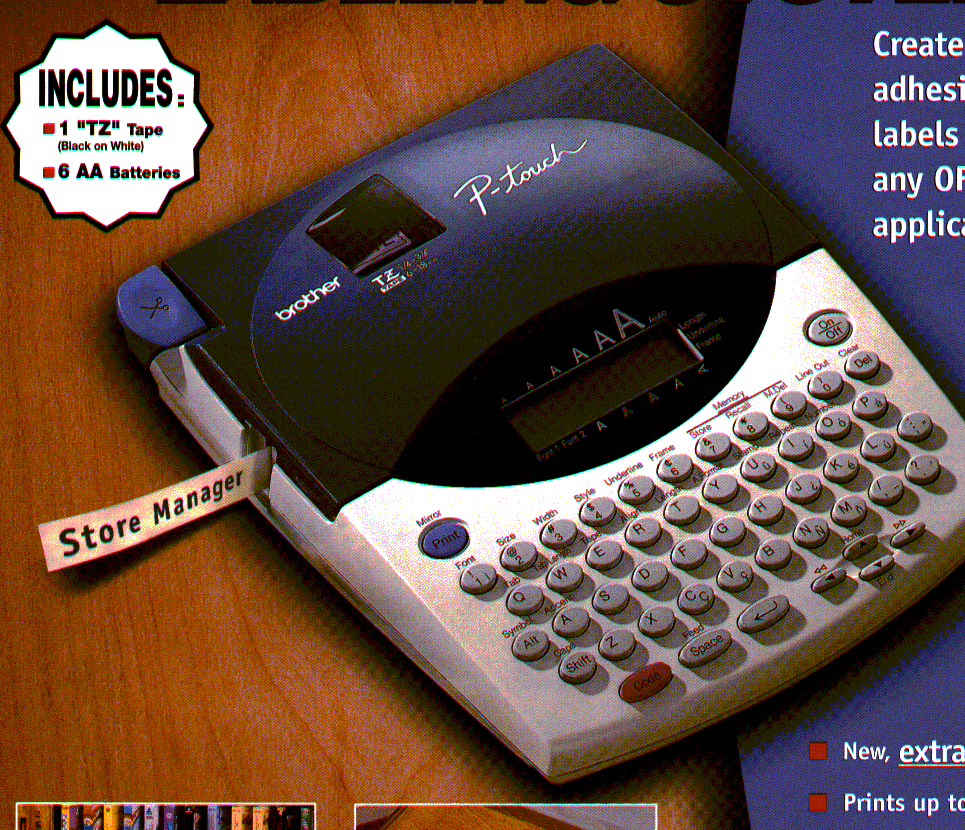
The PT-1800 is an earlier desktop label maker for someone who wants to type directly on the machine, not build each label in an app. Its full QWERTY keypad and two-line LCD offer a more composed input surface than the smallest handheld labelers, while the cassette still makes it a self-contained tool for file tabs, storage bins, shelves and household or office identification. Brother marks it discontinued, so this is best read as an assessment of a working unit someone already owns or is checking secondhand, rather than a current default purchase.
Know which cassette and width you are buying
The PT-1800 has two documented tape paths, and the widths should not be mixed together. Its U.S. User’s Guide identifies original Brother TZ cassettes in 6, 9, 12 and 18 mm widths and says to use Brother TZ tape. A separate Brother support FAQ for this exact model says TZe tape can also be used; the current product-page specification lists the TZe family at 3.5, 6, 9 and 12 mm. That makes a 12 mm TZe label different from an 18 mm original-TZ label, even though both fit the same machine. If a specific cassette is essential, check the tape mark on the actual PT-1800 and the cassette code before stocking up. The older manual and the newer product data describe compatibility differently, so I would not infer that every TZ width exists in TZe or that the two families are interchangeable.
For a wide, stacked label, the original-TZ route is the useful distinction: Brother’s manual and U.S. specification support 18 mm TZ, and the guide says three-line labels are limited to 12 or 18 mm tape. The exact product page’s newer structured fields list two maximum lines, while its own descriptive copy, the detailed U.S. specification and the model manual state three. Because the manual is specific and the support specification agrees, the assessment treats three lines as documented, but the page mismatch is worth knowing if a three-line job is a must-have. The PT-1800 does not offer a modern roll printer’s broad, software-shaped layout canvas; it is a fixed cassette device with on-unit formatting.
Keyboard entry is the whole workflow
The 51-key QWERTY keyboard is useful for names and ordinary words, and the small LCD shows 12 characters across two rows rather than a full label preview. Brother documents two fonts, seven character sizes, eight styles, frames, mirror and vertical printing, numbering and repeat printing. There are also preset lengths and a tab function. There is more than plain text, but the display remains narrow: long entries scroll, and the buffer is 99 characters. The guide allows up to nine files, about 300 characters total, each capped at 99; Brother’s current page separately says “Standard Memory 15,” without defining the figure. Stored files can be lost when power is disconnected, so this suits a few brief repeats rather than a large template library.
This is a standalone machine, not a computer-connected printer. Brother’s specification lists no PC connection or interface, and the reviewed sources document no phone app, Wi-Fi or Bluetooth route. That suits a shared counter where anyone can type a short label without pairing. It is poor for computer or phone batch design, spreadsheet imports, or network printing.
Power, cutting and everyday friction
The original product description lists six AA batteries, a sample TZ cassette and a tape separator in the box; the manual says the PT-1800 and PT-1810 share functions, but only the PT-1810 was sold with a carrying case. The PT-1800 can also use Brother’s AD-60 AC adapter, which is optional rather than an included power supply. The manual recommends an AC connection for large fonts on 18 mm tape because that task can drain the batteries quickly. It also says large fonts cannot be printed if alkaline cells are not used. On a used example, check for corrosion, a working display and cutter, and the exact adapter rating rather than assuming the original package is complete.
The cutter is a hand-operated lever, not an automatic cutter. The manual explains that margin choices can feed extra tape and that shorter-than-full margins may need scissors to trim and center the label. That is manageable for occasional room labels, but it adds a step to repetitive runs. Brother’s own support FAQ also describes clearing jams by removing the cassette, checking that the tape and ink ribbon are taut and correctly guided, and reinstalling the cassette squarely. In other words, the ribbon cassette needs a little more care than a thermal direct roll that can simply be pulled through.
Who should keep or seek one
The PT-1800 makes the most sense for an owner who values local QWERTY entry, uses the older cassette system, and is comfortable with a small screen and manual cutting. It is unusually capable for an offline machine: long-format labels, multi-line text, type styles and a possible stamp function are all described in Brother’s documentation. But the stamp feature requires stamp tape and the matching holder; do not count those as included with the basic label-maker package. Check the cassette family, the power option and what is actually in the seller’s box before treating any one used listing as a ready-to-work kit.
If you are shopping for a current Brother instead, its replacement chart points PT-1800 owners to the PT-D410 or PT-D460BT. That is a starting point, not a promise that either replacement preserves the PT-1800’s exact original-TZ workflow. Read those separate reviews against the media and input method you need. For current buying, a supported model is the more practical direction; the PT-1800 belongs in an earlier-model comparison for a reason, not because a discontinued listing is automatically a bargain.
Primary references: Brother’s PT-1800/1810 U.S. User’s Guide, U.S. specifications, TZe compatibility FAQ, three-line FAQ, and exact product listing.
Key details at a glance
| Full-color output | No |
|---|---|
| Print process | thermal transfer |
| Maximum tape width | 12 mm |
| Compatible cassette | Do not merge the older manual’s TZ profile (6–18 mm) with the exact-model product-page TZe listing (3.5–12 mm) and exact PT-1800 TZe FAQ. The guide says TZ only, while the later model-specific support FAQ says TZe can also be used; preserve both as separate evidence-backed operating plans. |
| On-device preview characters | 12 |
| Display type | LCD |
| Maximum combined print height | 13.5 mm |
| Maximum lines per label | 3 |
| Letter-key arrangement | qwerty |
| Built-in type styles | ['Normal', 'Outline', 'Bold', 'Shadow', 'Italic combinations', 'Vertical'] |
| Original TZ maximum width | 18 mm |
| Carry case in original package | No |
Use the exact model’s instructions for operating limits, supplied equipment and version differences.
Sources for this assessment
- Brother U.S. Office & Home directory row PT1800, offset 105
- Exact Brother U.S. PT-1800 product page
- Brother U.S. PT-1800 detailed specification
- Brother U.S. PT-1800 manual index
- Brother U.S. PT-1800/1810 User’s Guide v01
- Brother PT-1800 product brochure linked from the exact U.S. product page
- Brother U.S. PT-1800 FAQ list
- Brother U.S. PT-1800 multi-line FAQ
- Brother U.S. PT-1800 TZe compatibility FAQ
- Brother U.S. model-neutral TZ/TZe logo FAQ displayed for PT-1800
- Brother U.S. PT-1800 text-too-high FAQ
- Brother U.S. PT-1800 tape-jam FAQ
- Brother official 2025–2026 replacement-model table, existing archive reused
Put the device and its tape system together.
Match the exact model, cassette family, computer or network route and any optional power or touch-panel hardware before buying.