
Your needs, this model
Does it fit your priorities?
Do you need 18 mm tape, and is the cassette specifically original TZ rather than TZe?
The exact PT-1830 guide and U.S. specifications document original TZ through 18 mm. Brother's product table lists TZe only through 12 mm, so an 18 mm TZe requirement needs another model.
Explore this need in the finder →Would a built-in CD, VHS, audio-tape or filing-tab layout help if you are comfortable cutting labels by hand?
The exact PT-1830 specification lists six named application formats and a manual cutter. Brother marks the model discontinued; an older unit is a reference choice, not a current new-model recommendation.
Explore this need in the finder →Can you use an AC power route if the optional adapter must be sourced separately?
Brother's guide supports the optional AD-30 adapter or six AA cells. It does not establish that a particular used package includes the adapter, so check the exact unit.
Explore this need in the finder →A desktop keyboard for labels composed at the machine
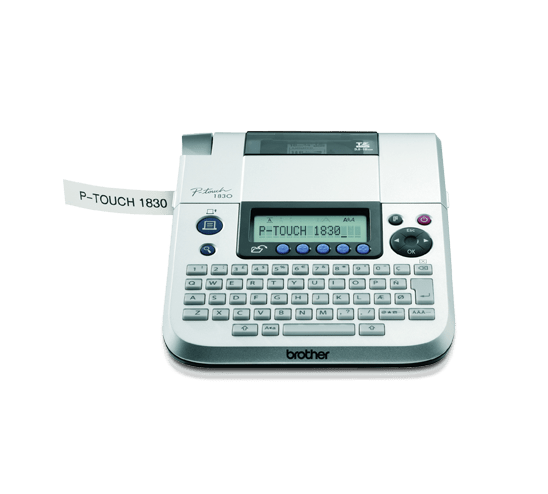
The Brother P-touch PT-1830 is an earlier, discontinued label maker built around a physical QWERTY keyboard. It is most relevant to someone who already owns one, is checking a particular used unit, or wants to understand an older office-oriented design. It is not a current purchase recommendation. The main appeal is direct composition at the machine: no phone or computer is needed to type, format, preview and print an ordinary strip label.
Brother gives it a 15-character, one-line LCD and an 80-character text buffer. That is enough to compose a longer label than the screen can show at once, but it is not the same as a large preview of the entire layout. The keyboard has 63 keys, including dedicated navigation and function controls. The device offers four character sizes and nine styles, plus 10 frame choices. Brother lists 180 dpi thermal-transfer printing, a maximum print height of 9 mm and a top speed of 10 mm per second. Those are the maker's specifications, not a guarantee of identical output from an aged machine.
Templates and saved favorites suit repeated office tasks
The PT-1830's formats are unusually specific to paper-era office organization: VHS spines, Mini DV tapes, audio cassettes, CD cases, file tabs and divider tabs. Its length auto-format is another setting for fitting text to a label. These are convenient starting points if you still label media or file folders, and they save repeated layout work for familiar sizes. They do not turn the machine into a barcode printer: Brother's exact specification lists no barcode function.
Five Favorite keys can store frequently used wording for quick recall. Brother describes each key as holding up to 80 characters, for 400 characters across the five keys. That is useful for common department names or routine short labels, but it is not a library of hundreds of named designs. The guide also shows a tab function, numbering, mirror printing and margin settings. Chain printing can reduce the leading and trailing space on a batch, although it requires feeding and manually cutting the strip.
Check the cassette logo: TZ and TZe are separate choices
The PT-1830 has a real documentation wrinkle worth resolving before you buy a refill. Its U.S. product description and user guide describe original Brother TZ tape through 18 mm, including a very narrow, approximately 3.5 mm non-laminated option for CD spines. Brother's later exact-model FAQ says TZe tape can also be used. The product's width table lists TZe only in 3.5, 6, 9 and 12 mm. In practical terms, treat the two supplies as distinct: the documented 18 mm route is original TZ, while an 18 mm TZe cassette is not established for this model. Match the cassette logo and the width on the machine rather than relying on width alone.
There is a further small-tape limitation: the guide warns that 3.5 mm tape cannot use a frame. It also says 6 mm tape is limited to one printed line; although the specification table gives two lines as the overall maximum, line count depends on the tape width and character size. The maximum combined print height is 9 mm, so this is for narrow identification and filing, not a wide, high-impact sign. The cutter is a hand-operated lever, not an automatic cutter or half-cutter. For frequent batches, remember the extra cut-and-peel step.
Power, footprint and what a used machine needs
At 6.8 inches wide, 8.8 inches deep and 2.4 inches high, the PT-1830 is small enough for a desk but not a pocket labeler. Its listed 1.29-pound weight excludes batteries and tape. It can use six AA alkaline cells or an optional AD-30 AC adapter. The exact guide shows a starter TZ cassette in its unpacking checklist but cautions that included items may differ by distribution, so do not assume the adapter or a particular tape comes with a secondhand unit. Check the cutter lever, cassette compartment, battery contacts and the adapter model before relying on a used example.
Its single-model U.S. specification explicitly says there is no PC connection or interface. The available documentation therefore points to a self-contained keyboard workflow, not a modern app, USB design station or wireless printer. If you need a large two-line preview, connected design, or a powered cut, choose a model whose exact configuration documents that route instead of assuming all P-touch desktops share it.
Who should compare something else?
For a current keypad-and-computer combination, compare the PT-D410: it uses standard TZe tape and documents a USB computer-design route, so it answers a different workflow need. If you want a wider TZe cassette and Bluetooth composition, the PT-D610BT is a more relevant comparison, but its wider tape, connectivity and app-based options are not PT-1830 features. The discontinued PT-2700 is another earlier QWERTY desk model, with a documented historical USB route; it also needs a separate operating-system check. For owners, the PT-1830 remains useful as a compact, self-contained TZ/TZe labeler with helpful media and filing layouts. For a new setup, its discontinued status, manual cutting and narrow tape ceiling make a documented current model easier to assess.
Sources: Brother's U.S. PT-1830 product page, the exact U.S. specification sheet, the U.S. manual index and Brother's PT-1830 TZe FAQ. The guide's TZ-only warning predates the later TZe FAQ, so tape family and width should be checked separately.
Key details at a glance
| Full-color output | No |
|---|---|
| Print process | Thermal transfer |
| Maximum tape width | 12 mm |
| Compatible cassette | Keep two cassette plans separate. The exact U.S. specifications/manual and product-description text identify original TZ in 3.5/6/9/12/18 mm; the sales-page width table separately lists TZe in 3.5/6/9/12 mm, and Brother's 2019 exact PT-1830 FAQ confirms TZe use. The 2011 foldout guide's precaution says not to use TZe, while Brother's later FAQ says TZe works. Use the exact cassette logo and width: do not assume 18 mm TZe support from the 18 mm TZ plan. |
| Built-in templates | 6 |
| On-device preview characters | 15 |
| Display type | LCD, one-line text display with pictograph indicators |
| Maximum combined print height | 9 mm |
| Maximum lines per label | 2 |
| Line-count note | The Brother U.S. exact-model specification table lists two maximum lines. The guide warns that 6 mm tape is limited to one line; the practical number of lines depends on tape width and chosen type size. |
| On-device frames | 10 |
| On-device symbols | 71 |
| Saved label files | 5 |
| Power choices | The manual allows six AA alkaline batteries or the optional AD-30 AC adapter. It does not establish adapter inclusion in the used unit being considered. |
| Body dimensions | Brother lists 6.8 W × 8.8 D × 2.4 H inches; desk-oriented rather than pocket-size. |
| Tape cutting | The foldout guide identifies a hand-operated tape cutter lever; no automatic cutter or half-cutter is listed. |
| What the base package supplies | The indexed U.S. User's Guide shows a TZ cassette among checked package items but says included items may differ by distribution. No adapter-in-box or retail bundle claim is made for a used machine. |
| Letter-key arrangement | qwerty |
| Built-in type styles | 9 |
Use the exact model’s instructions for operating limits, supplied equipment and version differences.
Sources for this assessment
- Brother Office & Home directory row, offset 60, index 63
- Brother U.S. PT1830 product page
- Brother U.S. exact-model specifications page
- Brother U.S. PT-1830 User's Guide, version 03
- Brother U.S. PT-1830 TZe compatibility FAQ
- Brother U.S. PT-1830 tape/TZ/TZe compatibility FAQ
- Brother U.S. PT-1830 supplies and compatible tape listing
- Brother U.S. PT-1830 support and manual index
- Brother France exact PT-1830 product image page
Put the device and its tape system together.
Match the exact model, cassette family, computer or network route and any optional power or touch-panel hardware before buying.