
Your needs, this model
Does it fit your priorities?
Would an on-device QWERTY keyboard let you print routine labels without a computer?
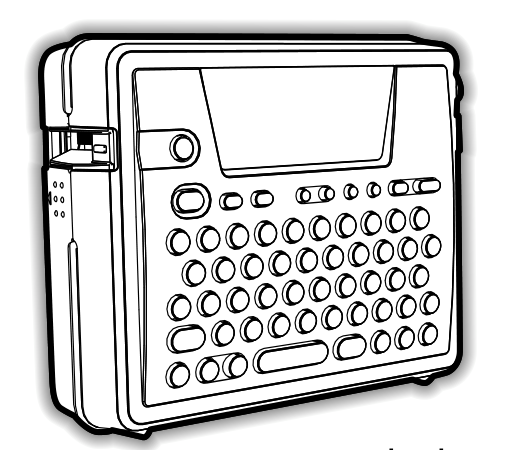
The exact PT-18R guide specifies a 58-key QWERTY keyboard, 15-by-2 dot-matrix LCD and a keyboard-to-preview-to-print routine.
Explore this need in the finder →Do you want a USB-connected computer route and a rechargeable pack in one labeler?
The exact guide documents USB PC design, while the same PT-18R setup uses the rechargeable BA-18R pack and charging stand.
Explore this need in the finder →Is 18 mm original Brother TZ essential, rather than a TZe cassette?
The exact 18eus support specification lists original TZ through 18 mm; TZe is kept in a separate conservative plan.
Explore this need in the finder →Must an AC adapter be guaranteed inside the exact package?
Adapter operation is supported, but the manual and support specification disagree on adapter model and the exact base package contents are not established.
Explore this need in the finder →Brother’s U.S. page marks the P-touch PT-18R discontinued. Its unusual selling point is the combination of a built-in keyboard, a removable rechargeable labeler and a USB-connected computer route. The exact page describes taking the machine off its charging base for work elsewhere, then returning it to the cradle, while the model-specific guide also explains how to create labels from the keyboard or from a computer. That is more flexible than a keyboard-only labeler, but it is not a phone-first or wireless printer.
Two ways to make a label
The PT-18R has a physical QWERTY keyboard and a 15-character-by-two-line LCD. You can enter text on the unit, preview it, and print without opening a computer. That matters for a cart, supply room or home workbench where a label is a small interruption rather than a design project. The keyboard uses familiar QWERTY order; it is a poor fit if you specifically want alphabetic keys.
For more involved work, Brother’s exact PT-18R user guide documents a USB-connected PC workflow with P-touch Editor. Its introductory pages describe block layouts, barcodes and automatic numbering in the software. The model is still tethered when used this way: the inspected PT-18R sources establish USB, not a phone app, Bluetooth or Wi-Fi. Choose a current phone-connected labeler instead if wireless editing is essential, and verify current computer-software compatibility before buying an old unit.
Choose the tape family before the width
Brother’s current exact PT18R product table lists laminated thermal-transfer TZe tape at 3.5, 6, 9 and 12 mm, and lists a two-line maximum. The exact PT-18R user guide describes TZe widths through 18 mm and width-dependent output up to five lines. Those official sources disagree. For a conservative TZe match, this guide uses the current product table’s 12 mm ceiling and two-line limit; it does not promise an essential 18 mm TZe job.
Brother’s separate U.S. support specification for the exact 18eus key labels the tape type TZ, lists 6, 9, 12 and 18 mm, and reports five-line capability. That older original-TZ path is kept separate from TZe rather than blending both families into a made-up maximum. If a particular cassette system is non-negotiable, check the cassette marking and the exact unit before relying on a used listing. A wide-TZ plan does not make the PT-18R a wide TZe model.
Portable power brings its own checks
The PT-18R guide documents a rechargeable Ni-MH BA-18R pack and charging stand, plus operation from an AC adapter. Brother’s exact keyed specification lists AD-60, while the PT-18R guide names AD-18. The adapter identity is therefore not treated as settled here. The guide also describes automatic cutting, a 180-dpi thermal print head, roughly 10 mm per second print speed, and a maximum print height of 15.8 mm. These are manufacturer specifications, not measurements from a test.
The manual’s approximate body dimensions are 149 × 52 × 122.5 mm. For a used machine, check that the battery still charges, the cradle and the adapter are present and compatible, the cutter works, and the tape cassette can be identified. The exact PT18R listing does not establish what a particular seller includes. A rechargeable battery that has sat unused for years should not be assumed to hold a useful charge.
PT-18R is not the PT18RKT package
The U.S. directory lists PT18R and PT18RKT as separate discontinued entries. The PT-18R user guide identifies the printer model as PT-18R; Brother also provides a separate PT-18RKT guide and support key. The family shares a PT-18R core labeler, but the suffix is not proof that a used PT18R listing contains the same kit accessories, tape or box contents as a PT18RKT listing. This review describes the base PT-18R configuration and its documented operating routes, not a guaranteed bundle.
Who should still consider it?
The PT-18R makes sense as an earlier-model reference for someone who wants both on-device typing and a USB design route, and who can verify the particular machine, battery and supplies. It is less compelling if the job is only an occasional short label: a simpler handheld model avoids a charging cradle and software setup. It is also the wrong direction for app control, Wi-Fi, full-color printing or modern parcel-label workflows. Before comparing it with a current model, decide whether the required cassette is TZe or original TZ, whether a computer connection is genuinely useful, and whether a healthy rechargeable pack and compatible power accessories can be confirmed for the exact unit.
Sources: Brother’s PT18R product page, the PT-18R User’s Guide, and Brother’s 18eus support specification. The PT18R/PT18RKT package distinction is retained rather than inferred from a shared device drawing.
Key details at a glance
| Full-color output | No |
|---|---|
| Maximum tape width | 12 mm |
| Compatible cassette | The current exact PT18R product table lists TZe 3.5/6/9/12 mm and two lines; the exact PT-18R guide lists TZe 6/9/12/18 with width-dependent lines up to five. The exact 18eus support specification separately lists original TZ 6/9/12/18 and a five-line capability. Matching keeps the current-page TZe plan conservative through 12 mm/two lines and a separate TZ plan; it does not treat 18 mm TZe as an essential positive. |
| Built-in templates | 10 |
| On-device preview characters | 15 |
| Display type | LCD |
| Maximum combined print height | 15.8 mm |
| Maximum lines per label | 2 |
| On-device frames | 14 |
| Computer design route | Brother’s exact PT-18R User’s Guide documents PC label design/printing; current operating-system compatibility for this base SKU is not asserted. |
| Letter-key arrangement | qwerty |
| Wired Ethernet | No |
| Original TZ maximum width | 18 mm |
Use the exact model’s instructions for operating limits, supplied equipment and version differences.
Sources for this assessment
Put the device and its tape system together.
Match the exact model, cassette family, computer or network route and any optional power or touch-panel hardware before buying.