
Your needs, this model
Does it fit your priorities?
Would a physical QWERTY keyboard let you create ordinary labels without opening a computer?
The PT-18RKT User’s Guide documents 58-key QWERTY input, a 15-character by two-line LCD and a standalone create-preview-print routine.
Explore this need in the finder →Can the original TZ width route meet your need for labels up to 18 mm with multi-line text?
The exact keyed Brother U.S. support specification lists TZ/TZe widths through 18 mm; the exact manual specifies width-dependent line limits up to five on 18 mm. The current product page disagrees on TZe width, so this essential wide-tape answer is the separate TZ route, not TZe 18 mm.
Explore this need in the finder →Would a rechargeable pack plus a compatible AC fallback suit a cart or bench routine?
The model guide documents a rechargeable Ni-MH pack, charging stand and direct AC-adapter use. Adapter model and exact used-package contents are not settled, so do not require a particular adapter in the box.
Explore this need in the finder →Do you need a USB computer editor as well as an automatic cutter for more involved layouts?
Brother’s keyed U.S. specification documents a USB 1.1-or-later connection and automatic cutter; the current exact-model downloads include P-touch Editor 5.x for Windows 11. Wireless and mobile-app routes are not documented.
Explore this need in the finder →An older hybrid: a real keypad plus a computer route
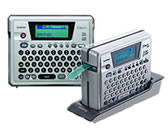
The discontinued Brother P-touch PT-18RKT is more flexible than a keyboard-only labeler, but not as frictionless as a modern wireless printer. Its built-in 58-key QWERTY keyboard and two-row display let you compose and preview a label on the machine itself. When the job grows beyond a short string, Brother also documents USB connection to a computer and P-touch Editor software. That gives it two distinct uses: type and print beside a shelf or cart, or design a more involved layout at the desk. It does not add Bluetooth, Wi-Fi or a phone app.
The on-device screen shows 15 characters across two lines and is not backlit. It is a useful preview for checking text and basic layout, not a substitute for a large computer canvas. The QWERTY layout is easier to navigate if you already type on a standard keyboard; people who prefer alphabetic key order should rule it out. Brother also advertises PC-side drawing, graphics import and linked Excel or Access data. Its model-specific download page currently lists P-touch Editor 5.x for Windows 11, but that is a computer setup, not the same thing as immediate phone printing.
Tape choice matters more than the shared width numbers
PT-18RKT media records do not line up perfectly. The current U.S. product page lists laminated TZe tape at 3.5, 6, 9 and 12 mm. The PT-18RKT User’s Guide lists standard TZe at 6, 9, 12 and 18 mm and HGe at 9, 12 and 18 mm; Brother’s keyed support specification groups TZ/TZe at 6–18 mm. These are exact-model Brother sources, but they conflict on cassette families and width. The conservative recommendation treats the current product-page TZe route as reaching 12 mm, preserves the manual-backed HGe widths separately, and does not count 18 mm TZe as an essential fit. Brother’s exact support spec is the evidence for the original TZ route through 18 mm. If an existing supply is important, match the cassette-family code as well as the printed width.
The print height is at most about 15.8 mm, even on the 18 mm cassette. Line count varies with width: the manual permits up to five lines at 18 mm, three at 12 mm, and two at 6 or 9 mm. That makes this a better candidate for short equipment, shelf and file identifiers than for tiny text on narrow tape. A built-in full cutter handles individual labels; the guide also explains chain and no-cut modes to reduce the blank margin between a run of labels.
Useful on-device tools, with a modest work pace
Brother documents ten auto-format templates, including Asset Tag, Bin Box, Equipment Label, File Tab, Faceplate and Cable Wrap layouts, along with 14 frame patterns, numbering, repeat copies and barcodes. The exact support specification lists common formats such as Code 39, Interleaved 2 of 5, EAN, UPC, Codabar and Code 128. That can save menu work for routine identification, but it is not a printer-side scanner or a networked inventory system. The support spec rates the thermal print head at 180 dpi and about 10 mm per second; the machine is meant for a workbench or occasional mobile labeling, not a high-speed print room.
The key differentiator is its rechargeable nickel-metal-hydride pack. The guide describes charging the pack in a stand that also serves as a storage cradle; a full charge takes about two hours, and Brother’s product description says you can lift the unit and work away from an outlet. It can also run from an AC adapter. The exact guide names AD-18, while the current keyed support specification names AD-60, so confirm the adapter code against the unit and region rather than assuming those labels are interchangeable. The PT-18RKT sources do not establish that every used listing includes a working pack, cradle or adapter. Battery health is especially important on an older unit; ask whether it charges and holds power before relying on its portable advantage.
Who should look for one, and what to compare instead
Choose PT-18RKT only when the combination is genuinely useful: local QWERTY typing, rechargeable operation, an automatic cutter, plus a separate USB computer path. It can be appealing for an existing owner who wants a cart-side labeler and occasional computer-designed layouts. It is a poor match if a phone app, wireless sharing, guaranteed current software support outside Brother’s listed Windows options, or 18 mm TZe tape is essential. A small, unlit display and dated interface are real daily tradeoffs, not just age-related details.
For a newer standalone keypad routine with standard TZe through 12 mm, compare the PT-D220; it trades this model’s rechargeable pack and USB computer design for a simpler on-device setup. If computer design and wider TZe are more important than a physical keyboard or cordless printing, the PT-P700 is the cleaner computer-first comparison, with TZe through 24 mm in its documented setup. Neither alternative duplicates the PT-18RKT’s precise rechargeable keyboard-and-cradle combination. Because Brother marks this exact PT-18RKT discontinued, inspect the battery, charging stand, cutter, cassette path, screen and USB connector on the individual unit rather than assuming a pictured accessory package is complete.
Sources: Brother’s PT18RKT U.S. product page, exact-key PT-18RKT specifications, U.S. manuals index, PT-18RKT User’s Guide, and exact-model Windows 11 software download list.
Key details at a glance
| Full-color output | No |
|---|---|
| Maximum tape width | 12 mm |
| Compatible cassette | Current U.S. product table lists TZe 3.5/6/9/12mm; exact PT-18RKT User’s Guide lists TZe 6/9/12/18 and HGe 9/12/18; keyed support spec groups TZ/TZe at 6/9/12/18. To avoid matching a disputed essential width, TZe is capped at12mm, the exact spec’s TZ width route is separate, and the guide’s HGe widths are separate. |
| Built-in templates | 10 |
| Maximum combined print height | 15.8 mm |
| Maximum lines per label | 5 |
| On-device frames | 14 |
| Letter-key arrangement | qwerty |
| Original TZ maximum width | 18 mm |
Use the exact model’s instructions for operating limits, supplied equipment and version differences.
Sources for this assessment
- Brother Office & Home observed catalogue row PT18RKT, offset105, listing index115
- Brother U.S. PT18RKT product page
- Brother exact-key U.S. PT-18RKT support page
- Brother exact-key U.S. PT-18RKT specification
- Brother exact-key U.S. PT-18RKT manuals index
- Brother PT-18RKT U.S. User’s Guide, version 02
- Brother exact-key U.S. PT-18RKT downloads page
- Brother exact-key PT-18RKT Windows 11 P-touch Editor download list
- Brother exact-key U.S. PT-18RKT consumables and accessories page
- Brother exact-key U.S. PT-18RKT supported OS route
- Brother exact PT-18RKT U.S. support-key product image
Put the device and its tape system together.
Match the exact model, cassette family, computer or network route and any optional power or touch-panel hardware before buying.