
Your needs, this model
Does it fit your priorities?
Would you rather type on a built-in QWERTY keyboard or compose from a computer?
Both local QWERTY entry and a USB PC route are documented. The manual's supported setup is legacy Windows, and its computer-use section says the cable is not included.
Explore this need in the finder →Does an original Brother TZ cassette at 18 mm fit your label routine?
The U.S. guide supports TZ through 18 mm; do not confuse it with the exact product-page TZe table that stops at 12 mm.
Explore this need in the finder →Would a two-line TZe label meet your layout need, or do you need the five-line 18 mm TZ mode?
The PT-1950 page lists two lines for its TZe plan. The separate manual gives five lines only for 18 mm TZ.
Explore this need in the finder →Would you use a legacy USB computer workflow rather than needing a phone app?
USB is documented, but the original software instructions name Windows 98 through XP. Modern computer support is not confirmed, and no phone app is documented.
Explore this need in the finder →Will you need a particular compatible adapter in the actual used box?
AC power is supported, but Brother's manual and support specification name different adapters and its package statements conflict. Check the actual unit and box.
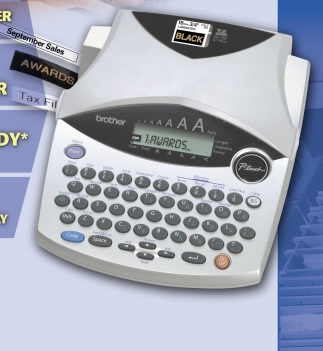
Explore this need in the finder →The Brother P-touch PT-1950 is a discontinued desktop labeler with two ways to make a label: type on its QWERTY keyboard or connect it to a computer over USB. That combination still has a clear appeal for a small workgroup that wants a full-size typing surface and occasional computer layout, but its cassette evidence, aging software and package details need more checking than the familiar P-touch name suggests. Treat it as an earlier-model reference, not a current-stock recommendation.
Two different ways to compose labels
Brother describes the PT-1950 as a USB-ready desktop system. The exact U.S. specification lists a 51-key QWERTY keyboard, a two-line LCD, USB 1.1-or-later computer connection, and support for both keyboard and PC-created labels. The 2006 manual explains the computer route through Brother P-touch Editor and Quick Editor. It says the USB cable was not included with the computer-use materials, so a used machine may need a suitable cable as well as the software.
USB hardware is not the same as current computer compatibility. The manual's software requirements name Windows 98, 98SE, Me, 2000 Professional and XP; they do not establish that the original driver or editor works on today's Windows or macOS. If a computer workflow is essential, check the exact host, software and driver before buying. If you want to avoid that dependency, the built-in keypad remains the more self-contained route.
Keep the original TZ and page-listed TZe profiles separate
The older PT-1950/1960 User's Guide is explicit: this machine should use Brother TZ tape. It lists 6, 9, 12 and 18 mm cassettes. The maximum printed line count depends on the width: two on 6 or 9 mm, three on 12 mm, and five on 18 mm. Its guidance for this five-line desktop format is useful only when you are actually using the documented TZ setup.
Brother's current PT-1950 product page has a separate specification table listing TZe widths of 3.5, 6, 9 and 12 mm, with a two-line maximum. Brother's compatibility FAQ includes PT1950 and says TZe can be used in place of TZ. That supports considering those listed narrower TZe cassettes, but it does not extend TZe to 18 mm or transfer the guide's five-line setting to the TZe profile. If wide output is your reason for choosing this machine, look for a cassette marked TZ and follow the original guide. For TZe, stay within the page's table.
Desktop conveniences and practical limits
The official specification describes an automatic cutter, adjustable label length from 40 to 300 mm, 15 preset-length templates, and a maximum print height of 15.8 mm. The manual explains that continuous chain printing turns automatic cutting off; it also advises scissors for fabric and strong-adhesive tapes. It documents up to nine copies, ten saved text files and about 300 characters of memory, with no single saved file longer than 91 characters. That is helpful for repeating short labels, but it is not a database-driven inventory system or high-volume roll printer.
There are small source differences worth keeping in view. The manual describes a two-line display with nine text characters per row, while the specifications page says ten characters by two lines. The manual's maximum character-height figure is 14.7 mm and the support specification's maximum print-height figure is 15.8 mm; those are not identical measurements. Similarly, the manual says the adjustable label can reach about 310 mm in computer use, while the support specification gives 40–300 mm. These differences do not erase the useful functions, but they are a reason not to buy for a precise dimension, display width or unusually long one-piece label without confirming the exact requirement.
Power, adapter and condition checks
The manual and specification agree that the PT-1950 can run on six AA alkaline cells or an AC adapter. They disagree on the adapter model: the guide says AD-24, while Brother's specification page says AD-60. The product description says an adapter came with the original package, but the detailed attachments table says PT1950 has no attachments. Because the model is discontinued and a used bundle may be incomplete, verify the physical adapter and its markings rather than assuming the one included in a listing fits.
At 7.1 inches wide, 9.2 inches deep and 2.4 inches high, the PT-1950 occupies real desk space; its listed 1.68-pound weight is without batteries or cassette. The automatic cutter and keypad make sense for a stationary labeling station, not a pocket. Tape is laminated and cassette-fed, but adhesion still depends on the surface and environment. Check both the machine and the actual cassette before relying on it for a particular material, temperature or chemical exposure.
Who should consider an earlier PT-1950?
Consider it if you already own compatible supplies, prefer typing locally, and value an automatic cutter plus a USB design option that you have verified on your computer. It is less suitable if you need a currently supported computer workflow, a guaranteed complete box, modern phone-app printing, or an unambiguous 18 mm TZe setup. For a current general-purpose option, compare Brother's PT-D410 and confirm its media and software fit; for wider PC-centered work, the PT-D800W is a different class of system. Do not treat their supplies or capabilities as automatic PT-1950 equivalents.
For an individual used PT-1950, request a clear photo of the model label, tape compartment, power adapter and included cassette. Confirm whether you will use original TZ or the narrower TZe range Brother currently lists, and check the machine's condition rather than relying on its old box description. Brother's PT-1950 product page, U.S. specifications, manual listing and 1950/1960 User's Guide are the best starting points for checking the exact configuration.
Key details at a glance
| Full-color output | No |
|---|---|
| Print process | thermal_transfer |
| Maximum tape width | 18 mm |
| Compatible cassette | The original U.S. guide's TZ profile and the current exact U.S. product page's TZe table are distinct. Brother's FAQ includes PT1950 in its broad TZe-compatible-model list, but only the product-page TZe widths through 12 mm are assigned to that plan. |
| Built-in templates | 15 |
| Maximum lines per label | 5 |
| Letter-key arrangement | qwerty |
| Wired Ethernet | No |
Use the exact model’s instructions for operating limits, supplied equipment and version differences.
Sources for this assessment
Put the device and its tape system together.
Match the exact model, cassette family, computer or network route and any optional power or touch-panel hardware before buying.