
Your needs, this model
Does it fit your priorities?
Is direct QWERTY entry enough if earlier equipment is acceptable?
The exact U.S. PT-200 brochure documents its local 49-key alphanumeric QWERTY keyboard and four-character LCD. A required computer-design workflow is not documented.
Explore this need in the finder →Can you leave the cassette family unspecified until you inspect the exact unit?
Brother’s current U.S. product table says TZe while its exact U.S. original brochure and exact regional guide say TZ. Leave the family flexible only if it is not essential; verify the installed cartridge and manual before buying a refill.
Explore this need in the finder →Would you require 18 mm or wider TZe tape?
No. Brother’s original U.S. PT-200 brochure lists 6, 9 and 12 mm tape widths; the model cannot meet an 18 mm minimum.
Explore this need in the finder →Brother PT-200 review: an earlier handheld built around direct entry
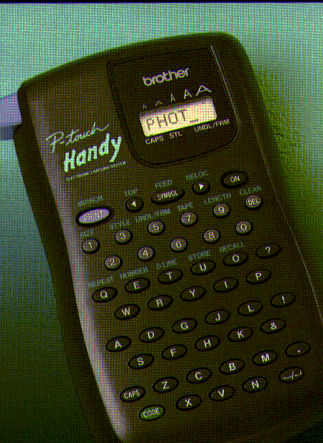
The Brother P-touch PT-200 is an earlier handheld labeling system, not the later PT-D200. That distinction matters: a similar name does not prove the same cassette, keyboard, power supply or package. Brother’s U.S. Office & Home listing identifies the exact PT200 and marks it discontinued. This review treats the PT-200 as useful context for an existing owner or a carefully checked secondhand unit, not as a current model to buy without verifying its condition and supplies. The image shown here is a scan-derived reference from Brother’s original PT-200 brochure, not a contemporary photograph of a particular unit.
The device’s main appeal is a self-contained typing routine. The U.S. brochure describes a 49-key alphanumeric keyboard, a four-character LCD and printing of up to two lines. The key layout is QWERTY. The short display and compact handheld format suit short identifiers better than composing long instructions: type a brief name or code, set the label and print, rather than prepare a multi-page design at a computer. Brother’s current U.S. specification also confirms a label-length setting. The exact materials do not establish a phone-app or computer-design workflow, so do not choose the PT-200 if either connection is essential.
Formatting is richer than the small screen suggests
Brother’s brochure lists eight type styles, five sizes and 74 built-in symbols, plus four types of text frame. It also describes underlining, mirror printing, vertical or horizontal output, automatic numbering from 1 to 9, repeat printing and variable tape feed. Those controls can help with short stock labels, marked containers or a batch of numbered tags. They do not turn the four-character screen into a large preview, and they are not evidence of current desktop software. If your job is a short name plus a qualifier, the documented two-line ceiling may be enough; for longer instructions or a carefully composed layout, look for a model with a separately verified computer or phone workflow.
The brochure shows several color combinations, but that is not proof of full-color printing on one label. The U.S. product record calls the process thermal transfer and the tape laminated. A different color cassette changes the label material; it does not establish multiple-color printing by this machine. Full-color output should therefore remain an unknown rather than a reason to select this model.
Check the cassette before counting on a refill
Media is the key unresolved choice. Brother’s current U.S. PT200 page lists TZe as the compatible family and lists 3.5, 6, 9 and 12 mm widths. The original U.S. PT-200 brochure, however, calls the included cassette “TZ” and displays 6, 9 and 12 mm tape. Brother’s exact-model U.K. user guide also describes TZ tape at those three widths; it is useful evidence about the model family, but it is not a U.S. instruction manual. Since the manufacturer’s materials disagree, this review does not let the PT-200 satisfy a strict TZ or TZe requirement. Before buying any used cassette, check the code on the installed cartridge and obtain instructions for the exact machine. A width alone is not a compatibility test.
The brochure records a historical package with one 26-foot, 12 mm black-on-clear TZ cassette and a tape separator. That is evidence about the original advertised box, not a promise that a used listing still contains the accessory or that a seller’s cassette is usable. The shared 12 mm maximum is a useful physical boundary; a need for 18 mm or wider media rules it out. The exact family should remain flexible until the actual unit’s cassette and regional documentation have been checked.
Power and fit need an actual unit check
Brother’s U.S. brochure says the PT-200 operates on six AA batteries, which are not included, and gives a weight of one pound without batteries. It prints a dimension triplet of 3.9 by 6.5 by 1.9 inches but does not label the axes in the brochure. Do not enter the first number as a confirmed body width for a tight shelf; measure the device itself. The brochure mentions a tape-cutter blade but does not establish an automatic-cut mode. Its product data also expose “Standard Memory 15” without defining what the number means, so that is not fifteen saved labels. If rechargeable power, automatic cutting, a precise shelf limit or saved-file capacity is a hard requirement, the information here does not clear it.
Who should keep one, and what should they compare?
The PT-200 makes most sense for an owner who has the exact machine in hand, likes local QWERTY entry, needs no more than two lines, and can verify a compatible cassette and working feed. Test the keys, screen, tape path and cutter on that unit; a model name cannot describe the wear of a secondhand specimen. Brother’s discontinued status and the missing U.S. manual mean the precise cartridge should be settled before planning a large labeling project.
If you are replacing rather than preserving a PT-200, compare the separate PT-D200 assessment or a currently supported label maker against your exact media, connection and power needs. PT-D200 is a different model, not a guaranteed drop-in replacement. In the finder, the PT-200 appears only when earlier equipment is allowed. It can fit a simple local-keyboard preference, but unknown app support, conflicting cassette-family records, color capability and automatic cutting cannot satisfy hard requirements. That conservative result is more useful than a broad compatibility claim: the device’s keyboard and basic format are documented, while the buyer still has to verify the supply system and condition of the particular unit.
Key details at a glance
| Print process | thermal transfer |
|---|---|
| Maximum tape width | 12 mm |
| Compatible cassette | The exact U.S. product table says TZe and includes 3.5/6/9/12 mm; the exact U.S. PT-200 brochure calls the original cassette TZ and lists 6/9/12 mm, and the regional U.K. exact-model guide likewise describes TZ. Keep the exact cassette family unknown for strict matching until documentation for the specific unit is checked. |
| On-device preview characters | 4 |
| Display type | LCD |
| Maximum lines per label | 2 |
| On-device frames | 4 |
| On-device symbols | 74 |
| Power choices | The original U.S. brochure says the PT-200 operates on six AA batteries, not included. No U.S. source in this archive establishes an AC-adapter route or built-in battery charging. |
| Body dimensions | The original U.S. brochure lists 3.9 × 6.5 × 1.9 inches without identifying axis order; do not use those numbers as an exact width/depth/height fit. Measure the particular unit for a constrained space. |
| Tape cutting | The brochure names a tape-cutter blade but does not establish automatic actuation; automatic cutting is unknown. |
| Letter-key arrangement | qwerty |
| Built-in type styles | 8 |
Use the exact model’s instructions for operating limits, supplied equipment and version differences.
Sources for this assessment
- Brother U.S. Office & Home directory, PT200 observed at offset 120
- Brother U.S. exact PT200 product page
- Brother original U.S. PT-200 brochure linked from the exact U.S. product record
- Brother U.S. exact PT200 support page
- Brother U.S. PT200 manual index request
- Brother U.K. PT-200 chapter guide (regional reference only)
Put the device and its tape system together.
Match the exact model, cassette family, computer or network route and any optional power or touch-panel hardware before buying.