
Your needs, this model
Does it fit your priorities?
Would QWERTY typing and predesigned layouts on the machine cover your routine?
The exact PT-2030 is a QWERTY standalone labeler; Brother describes more than 50 on-device Label Collection designs. This is a direct keyboard workflow rather than a phone app.
Explore this need in the finder →Do you want a particular Brother tape family or a wide cassette?
The exact guide confirms original TZ through 18 mm. Brother’s current PT2030 table separately lists TZe only through 12 mm; an 18 mm TZ claim is not an 18 mm TZe claim.
Explore this need in the finder →Is TZe required, and is 18 mm TZe essential?
Brother’s exact U.S. product table and support answer document a TZe route through 12 mm; 18 mm TZe is not confirmed for this exact model.
Explore this need in the finder →Can you operate a manual cutter and a wall adapter purchased separately?
The exact U.S. base product supports AC adapter operation and manual lever cutting. Adapter inclusion is distinct from compatibility and the seller’s actual package must be checked.
Explore this need in the finder →A desktop maker for people who want the keys on the machine
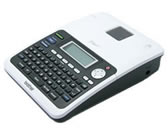
The Brother P-touch PT-2030 is a self-contained desktop labeler, not a phone-first printer. Its physical QWERTY keyboard, 16-character graphic display and direct print controls let you type, preview and print without connecting a computer. The screen has two text-edit lines plus a status line, so it is easier to check a short label here than on a tiny scrolling display. Brother's U.S. support record says the model is discontinued; this is an earlier-model reference, not a safe default for someone shopping for a new, supported machine.
The strength is a broad set of on-device formatting choices. The exact PT-2030 documentation describes four fonts, ten type styles, sixteen frames, 253 symbols and Label Collection designs. Brother's U.S. product page says there are over 50 predesigned labels; the Brother 2030VP machine fact sheet gives 55. That sheet describes a bundle suffix, so its package contents are not transferred to the base U.S. PT2030. You can make common file, office-sign and organizing labels from the keyboard rather than recreate a layout on another device. The guide also documents Auto-Format and block layouts, label preview, mirror printing, numbering and barcode formats. This is more capable than its simple appearance suggests, but every choice is made through the built-in menus.
Know whether you are buying TZ or TZe tape
The PT-2030 is a good example of why the cassette family matters more than one headline width. Brother's exact PT-2030 user guide documents original TZ cassettes at 3.5, 6, 9, 12 and 18 mm. With that TZ route, the guide limits output by width: up to five lines on 18 mm, three on 12 mm, two on 6 or 9 mm, and one on 3.5 mm. Its 15.8 mm maximum print height is stated for 18 mm tape.
Brother's current U.S. product record lists TZe tape at 3.5, 6, 9 and 12 mm, while a Brother support answer covering this exact model says compatible cassettes are TZ or TZe. Those sources support a separate TZe route through 12 mm; they do not establish 18 mm TZe support. Keep the older 18 mm TZ capability separate from the current TZe listing. If your supplies are already TZe, choose a machine plan that explicitly confirms the size you need; do not assume that the shared 18 mm number transfers from TZ. If you are evaluating a used PT-2030, read the cassette label on the actual unit before ordering more tape. Current cassette availability and the condition of a seller's included cassette are separate questions.
Preview helps, but cutting and power remain hands-on
The PT-2030's preview screen and label-length setting are useful for checking a short identifier or a multi-line label before committing tape. It is not a computer layout editor: Brother's U.S. model specification says there is no computer interface, and the checked manufacturer sources do not document a phone-app, Bluetooth or Wi-Fi workflow. If you need to design labels in batches on a computer or phone, or send them wirelessly, choose a model whose exact operating plan documents that route instead.
There is no automatic cutter. The guide shows the tape cutter as a hand-operated lever, which is fine for occasional labels but adds an action to each cut. Full-margin printing also feeds a long lead of tape; Brother's guide describes the Chain margin option for consecutive labels, with a final feed/cut step. That helps reduce waste in a batch, but it is not the same as an automatic cut-after-each-label workflow.
For power, the model accepts six AA alkaline cells or Brother's AD-24ES adapter. The exact U.S. product page identifies the 12 mm TZ starter cassette and user's manual, and says the cells and adapter are sold separately. The model's shared Canadian English guide lists an adapter in its regional package checklist, which is not proof that it comes with the U.S. base PT2030 offer. Treat adapter inclusion as package-specific; the PT2030AD and PT2030VP suffixes refer to different bundles and should not be silently folded into this base-SKU assessment. A used seller's box should be checked item by item.
Who should keep it in the comparison
The PT-2030 suits someone who wants standalone QWERTY entry, printable label designs on the device, saved short jobs and a choice between replaceable AA cells and wall power. It is most convincing for a bench or desk where you already have the right cassette and do not mind pressing the cutter lever. The official guide allows up to nine stored label files, with a 200-character limit per file; its 1,800-character memory-buffer figure is not a promise of long document storage.
Skip it if an automatic cutter, current manufacturer support, phone or computer composition, rechargeable portability, or a guaranteed in-box adapter is essential. Also skip it when your required supply width is 18 mm TZe: Brother's exact U.S. current table stops its TZe listing at 12 mm, even though the original TZ guide reaches 18 mm. A current model with a verified TZe plan at your target width is the safer alternative. For any earlier PT-2030 found second-hand, first check that the machine powers on, the screen and keys respond, the cassette feeds, and the manual cutter moves cleanly; then verify the tape family and accessories against the exact unit.
Bottom line: PT-2030 is a keyboard-led desktop labeler with an unusually deep on-device formatting set for its age. Its exact manual provides a clear original-TZ plan, and Brother's current U.S. sources also list a narrower TZe plan. Because the model is discontinued, package suffixes differ and media claims vary by family, recommend it as a considered earlier reference—not as a broad claim that every modern P-touch cassette or bundle will work.
Key details at a glance
| Full-color output | No |
|---|---|
| Print process | thermal transfer |
| Maximum tape width | 18 mm |
| Compatible cassette | Brother’s exact model-specific U.S. FAQ says TZ or TZe are compatible and HG is not; the full PT-2030 guide documents TZ 3.5–18 mm, while the current exact U.S. product table lists TZe 3.5–12 mm. Do not apply the legacy TZ width or line limits to TZe. |
| Built-in templates | 55 |
| On-device preview characters | 16 |
| Display type | graphic LCD |
| Maximum combined print height | 15.8 mm |
| Maximum lines per label | 5 |
| Line-count note | Exact PT-2030 guide: original TZ permits up to five lines on 18 mm, three on 12 mm, two on 6/9 mm and one on 3.5 mm; current U.S. TZe table separately lists a two-line maximum. Do not transfer a TZ width-specific line limit to TZe. |
| On-device frames | 16 |
| On-device symbols | 253 |
| Saved label files | 9 |
| Power choices | The exact U.S. PT2030 page says six AA batteries and the AC adapter are sold separately. Its product narrative does not name the adapter; exact PT-2030 guide identifies AD-24ES. A Canadian regional package checklist lists an adapter, which is not transferred to the U.S. base package. |
| Body dimensions | Exact U.S. support specification gives 6.5 in W × 8.5 in D × 2.3 in H (164.0 × 215.6 × 57.5 mm). |
| Tape cutting | U.S. support specification says Manual; the exact Brother help answer covering PT2030 describes Chain printing and use of the cutter lever. No automatic cutter is documented. |
| What the base package supplies | The observed SKU is base PT2030. The U.S. product page says a 12 mm TZ starter cassette and manual are included, but six AA cells and AC adapter are sold separately. PT2030AD/PT2030VP are distinct suffix packages; package contents are not borrowed from them. |
| Letter-key arrangement | qwerty |
| Wired Ethernet | No |
| Built-in type styles | 10 |
| Original TZ maximum width | 18 mm |
Use the exact model’s instructions for operating limits, supplied equipment and version differences.
Sources for this assessment
- Brother U.S. observed Office & Home PT2030 catalogue row
- Brother U.S. exact PT2030 product page
- Brother U.S. legacy PT-2030 support specification
- Brother English PT-2030 User’s Guide, Brother Canada download of exact model guide
- Brother U.S. official media compatibility support answer
- Brother U.S. official chain-margin/cutter support answer
- Brother Europe official P-touch 2030VP fact sheet, machine feature only
Put the device and its tape system together.
Match the exact model, cassette family, computer or network route and any optional power or touch-panel hardware before buying.