
Your needs, this model
Does it fit your priorities?
Would a built-in QWERTY keyboard plus USB desktop design support a fixed label station?
The exact model-family guide confirms local QWERTY entry and a USB route, while the separate installation guide is dated. Check current computer compatibility rather than assuming the older software will install.
Explore this need in the finder →Is automatic cutting useful for repeated short labels at your desk?
Brother documents an automatic tape cutter and margin/chain/no-cut options. The guide's cassette-family conflict means this capability does not settle which media to buy.
Explore this need in the finder →Do you need an AC-powered desktop setup rather than a rechargeable-battery workflow?
Brother lists six AA alkaline cells or the AD-24 adapter and the PT-2100 package description includes the adapter. The sources do not establish a rechargeable-cell route.
Explore this need in the finder →Is a phone-app or wireless workflow essential, or is it enough to type locally or by legacy USB?
Brother's exact PT-2100 sources document a physical keyboard and USB, not mobile-app or wireless printing. Those modern connection requirements remain unconfirmed.
Explore this need in the finder →A keyboard-first desktop labeler with a legacy computer route
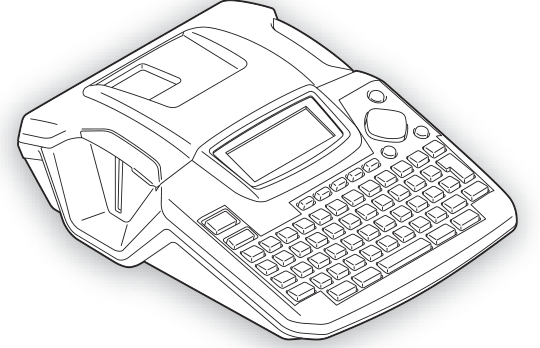
The Brother P-touch PT-2100 is an earlier, discontinued label-making system built around a full QWERTY keyboard and a USB link to a computer. It is more capable than a simple handheld when you need longer text, repeatable formatting or a fixed workstation, but it is not a modern wireless printer. Brother’s exact U.S. listing describes a 16-character by three-line display, four fonts, seven type sizes, ten styles and 92 symbols. A preview key lets you inspect a layout before printing. The model-specific shared guide adds useful detail: its screen has one guidance row and two text rows, while the actual number of printed lines changes with the cassette and width described in that guide.
The cassette documentation does not agree
Do not buy this PT-2100 on the assumption that a familiar P-touch tape name guarantees compatibility. The exact U.S. product page’s structured specifications list TZe cassettes in 3.5, 6, 9 and 12 mm widths, with a two-line maximum. The Brother PT-2100/PT-2110 User’s Guide instead tells owners to use only original TZ tape, lists widths through 18 mm and documents width-specific line limits. The product page’s descriptive copy also advertises media up to 18 mm, but does not resolve which cassette code that wider claim means. Both sources are Brother sources for this model family; neither should be silently merged into a single profile. If your purchase depends on a particular tape family, wide tape or a specific number of printed lines, treat the PT-2100 as unconfirmed until Brother verifies the cassette and setup you intend to use. A width alone is not enough.
What the shared manual does establish
The guide explicitly names PT-2100 and PT-2110 and depicts their desktop keyboard layout. It documents on-device label entry, an automatic tape cutter, label preview, stored files, barcode creation and Auto-Format layouts. That gives the machine practical local flexibility even without a computer: short equipment identifiers, file labels and simple coded labels can be composed at the desk. The guide lists a 16-character display with two text rows, up to nine saved files, a maximum 1,800-character memory and a set of built-in templates and block layouts. These are period features, not a claim that the unit can print arbitrary modern graphics or connect to a network.
Power is more flexible than the age might suggest. The guide describes six AA alkaline batteries or Brother’s AD-24 AC adapter; the PT-2100 product listing includes the adapter in its original package description. The manual also gives the body size as about 6.98 by 9.14 by 2.68 inches and weight as 1.72 pounds without cassette or batteries. It is a desk machine, not a pocket tool, so measure the shelf and leave space to open its cassette cover and feed a label.
USB is a real feature, but software is the main limit
The product is explicitly described as PC-connectable and the shared manual shows a USB workflow. A separate Brother software installation guide names PT-2100/PT-2110 and documents old Windows and Mac operating-system releases. That confirms a historical desktop route, not compatibility with a computer you own today. The shared user guide specifically notes that its PT-2100 package did not include the USB cable. Before choosing the model for computer work, verify that the actual machine, cable and any necessary software work together with your present operating system; a modern support page or a USB-shaped port does not prove that an old driver will install.
Original package claims are not a used-unit checklist
Brother’s exact PT-2100 page describes an AC adapter, black-on-white laminated starter tape, editing software, manual and warranty as package contents. Its shared guide’s PT-2100 unpacking illustration identifies a TZ starter cassette and CD-ROM, while separating the USB cable as not included. These are documentation of the original system, not a promise about a secondhand listing. Ask the seller for the model marking, cassette label, power adapter and any cable or software disc actually included. Do not assume a carrying case: the PT-2110 is the separate catalogue model whose exact U.S. listing names a case.
Who should consider it?
The PT-2100 is most plausible for someone who already has a verified cassette supply, wants to type on the machine, and can make the legacy USB workflow work on a compatible computer. Its keyboard, preview, saved files, barcode function and automatic cutter are more useful for varied short-run labels than a minimal handheld, while the adapter option suits a permanent desk. Its age and the unresolved cassette-family conflict are material drawbacks: don’t count on the manual’s wide TZ layout as a TZe capability, don’t infer present-day software support, and don’t treat an old package list as seller inventory.
For a current phone-created workflow, compare a supported Bluetooth labeler such as Brother’s PT-D460BT, accepting that it is a different generation and workflow. If paper address labels as well as tape are the goal, the earlier PT-2600 has a documented separate Avery cassette path; it is not a drop-in PT-2100 feature. The PT-2110 shares the PT-2100/PT-2110 manual but has its own U.S. bundle description, so compare the exact model page and actual contents rather than assuming the two boxes are alike.
Manufacturer references: Brother PT-2100 U.S. product page, Brother U.S. manuals listing for model family 2100eus, the PT-2100/PT-2110 User’s Guide and Brother’s PT-2100/PT-2110 software installation guide.
Key details at a glance
| Full-color output | No |
|---|---|
| Print process | thermal transfer |
| On-device preview characters | 16 |
| Display type | dot-matrix LCD; the guide describes one guidance line plus two text lines and no backlight |
| Computer design route | Brother P-touch Editor and printer driver; Brother's software guide names PT-2100/PT-2110 |
| Body dimensions | Brother's shared guide gives 6.98 × 9.14 × 2.68 inches and 1.72 lb without cassette or batteries. |
| Letter-key arrangement | qwerty |
Use the exact model’s instructions for operating limits, supplied equipment and version differences.
Sources for this assessment
Put the device and its tape system together.
Match the exact model, cassette family, computer or network route and any optional power or touch-panel hardware before buying.