
Your needs, this model
Does it fit your priorities?
Would a physical QWERTY keyboard plus a USB desktop-design route help with label work at one station?
The exact PT2110 product page calls the model PC-connectable; the shared guide confirms a QWERTY keyboard and USB port, and its software guide names PT-2110. The listed computer systems are old, so current operating-system support needs separate verification.
Explore this need in the finder →Can you use the shared guide’s legacy TZ system if you need the 18 mm width, rather than requiring 18 mm TZe?
The PT-2100/PT-2110 guide says use only TZ and lists widths through 18 mm. Brother’s exact PT2110 page lists TZe only through 12 mm in its structured fields; a width alone does not establish cassette-family compatibility.
Explore this need in the finder →Is the original kit’s AC adapter and carrying case useful, and can you verify those parts in a used package?
Brother’s exact PT2110 page lists a deluxe case and AC adapter with starter tape and software. A used machine may no longer include the case or adapter, so match the actual seller’s contents rather than assuming the original bundle survived.
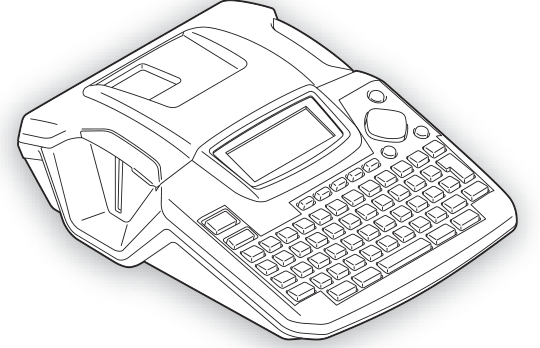
Explore this need in the finder →The Brother P-touch PT-2110 is an earlier desktop label maker listed in Brother’s U.S. Office & Home catalogue as a PC-connectable system with a carry case. It stands apart from the tiny handhelds because it combines a full QWERTY keypad, a USB computer route and an automatic cutter. Its dated software and a material conflict in Brother’s own page and guide make the exact version more important than its familiar P-touch name.
Know which package the PT-2110 describes
Brother’s exact PT2110 page marks the model discontinued and lists a deluxe carrying case, AC adapter, black-on-white laminated starter tape, P-touch Editor, manual and warranty. Those parts make the original kit useful at a desk, but a used listing may be incomplete. Ask for photos of the model marking, cassette bay, adapter and case rather than assuming its contents from a nearby PT-2100 package.
The shared U.S. PT-2100/PT-2110 guide confirms QWERTY keys and a USB port. It says the PT-2100 cable was not included, but that is not a PT2110 package statement. The PT2110 page does not specify the cable, so confirm it with a used seller.
Separate the TZ and TZe evidence
The cassette question is the main specification trap. The exact U.S. PT2110 page’s structured fields list TZe at 3.5, 6, 9 and 12 mm; its marketing copy instead calls the wider media TZ and says it reaches 18 mm. The shared guide says, “Use only Brother TZ tapes,” and lists TZ through 18 mm. The exact page and model-family guide therefore conflict about whether the page-listed TZe cassette is actually usable; a strict TZe requirement remains unconfirmed, rather than being treated as an alternate matching path. The page’s TZ language and shared guide agree on the wider legacy route, but check the cassette marking and the manual before relying on it.
The PT2110 page describes the starter only as laminated black-on-white tape and gives neither cassette code nor length. Verify the actual cartridge in a used kit before planning a replenishment order.
Display description and printed line count do not agree
The page calls the LCD 16 characters by three lines, while its structured table says two maximum print lines. The shared guide specifies a 16-character display with one guidance line plus two text lines and no backlight; it allows up to five printed lines on 18 mm TZ, three on 12 mm, and fewer on narrower tape. The manual’s 15.8 mm height figure is also specific to 18 mm TZ. Keep the screen and print claims separate instead of promising a three-line preview or transferring the five-line limit to TZe.
The guide further documents four fonts, 16 frames, 14 Auto-Format templates, width-specific block layouts, barcode creation and up to nine saved files. Its automatic cutter offers large-margin, small-margin, chain and no-cut settings. That is a more capable desk routine than a basic handheld, not a modern network printer.
Computer editing is a legacy route
Brother calls the PT-2110 PC-connectable, includes P-touch Editor in the listed kit and documents USB. The software guide names Windows 2000/XP/Vista and Mac OS X 10.3.9–10.5. That proves a historical route, not present-day compatibility; a current download link alone cannot prove an old driver works with your OS. Check before choosing this discontinued model for computer work. The shared guide documents no phone-app or wireless path.
Size, power and day-to-day use
At about 6.98 by 9.14 by 2.68 inches and 1.72 pounds without tape or batteries, the PT-2110 is desktop-sized, even though its original package has a case. The guide lists six AA alkaline cells or the AD-24 adapter; Brother’s PT2110 page says the adapter is included. Disconnecting power for over two minutes clears text, formats and stored files, so keep a stable power route while editing unsaved work.
The automatic cutter and chain-print settings reduce hand-finishing but do not make this a bulk roll-label system. Brother cautions that adhesion varies by surface, material and environment; “laminated” is not a guarantee for every chemical, heat source or cable jacket.
Who should consider it—and what to verify
The PT-2110 is worth investigating for a stationary workshop or office that wants a local QWERTY keyboard and a computer-design option, can accept legacy software, and values an automatic cutter or the model’s saved-label tools. Its exact bundle is more complete than a bare desktop listing because the U.S. page includes a case and adapter. It is a poor fit when a current supported computer workflow, phone app, wireless printing, 24 mm TZe, or unambiguous tape-family support is essential.
The smaller PT-7100 is a different earlier-model choice: it is handheld, stops at 12 mm on its source-specific media paths, and adds date/time and saved-label functions, but its guide shows a manual cutter and no computer-design route. For either discontinued machine, check the physical condition and cassette marking before buying. See Brother’s PT2110 product page, its U.S. PT-2100 manuals listing and the shared PT-2100/PT-2110 User’s Guide; confirm the actual kit, software needs and cassette family rather than relying on a nearby model number.
Key details at a glance
| Full-color output | No |
|---|---|
| Maximum tape width | 18 mm |
| Built-in templates | 14 |
| On-device preview characters | 16 |
| Display type | dot-matrix LCD; manual states 16 characters with one guidance line and two text lines, no backlight |
| Line-count note | The PT2110 product page’s structured field says maximum two print lines; the exact PT-2100/PT-2110 guide allows five on 18 mm TZ, three on 12 mm, two on 6/9 mm and one on 3.5 mm. A single global ceiling would erase a real source conflict, so no global value is offered. |
| Saved label files | 9 |
| Computer design route | Brother P-touch Editor and printer driver; installation guide names PT-2100/PT-2110 |
| Power choices | The exact PT2110 product page says an AC adapter is in the package. The shared manual says the PT-2100/PT-2110 accepts six AA LR6 alkaline batteries or the AD-24. It separately lists PT-2100 package contents and states its USB cable is not included; that PT-2100-only box statement is not transferred to the PT2110 package. |
| Body dimensions | Brother’s PT-2100/PT-2110 User’s Guide gives 6.98 × 9.14 × 2.68 in (W × D × H) and 1.72 lb without tape cassette or batteries. |
| Letter-key arrangement | qwerty |
| Carry case in original package | Yes |
Use the exact model’s instructions for operating limits, supplied equipment and version differences.
Sources for this assessment
- Brother U.S. Office & Home directory row PT2110, offset 75
- Brother U.S. PT2110 product page
- Brother U.S. PT2110 support page
- Brother U.S. PT-2100 manuals listing associated with PT2110 support ID 2100eus
- Brother U.S. PT-2100/PT-2110 User’s Guide, English/Spanish v01, released 2007-07-02
- Brother software installation guide listing PT-2100/PT-2110, English and other language editions, v01, released 2008-12-03
- Brother U.S. PT-2100 downloads listing associated with the PT2110 support page
- U.S. CPSC recall listing snapshot, manually searched for PT2110/PT-2110 and Brother P-touch
Put the device and its tape system together.
Match the exact model, cassette family, computer or network route and any optional power or touch-panel hardware before buying.