
Your needs, this model
Does it fit your priorities?
Is a USB-connected computer your preferred way to compose and print labels?
The PT-2430PC is PC-first: its exact guide documents Editor Lite in EL mode without a separate install, while full Editor 5.0 in E mode needs software and a driver. It has no on-machine typing keyboard.
Explore this need in the finder →Do you need original Brother TZ media through 24 mm rather than TZe?
The exact U.S. model guide and 2430eus support specification identify original TZ through 1 inch; the current TZe product-page field conflicts and is not treated as confirmed.
Explore this need in the finder →Would an automatic cutter and computer-side editor suit the job?
Brother's exact specification lists an automatic full cutter and its model guide documents EL and E computer modes. No phone app or wireless path is included in this plan.
Explore this need in the finder →Can it sit beside your computer and run from its included AC adapter?
The exact guide specifies the included AD-24ES adapter or six AA cells. At 2.6 inches wide it fits a compact desk footprint, though the body is 7.4 inches deep.
Explore this need in the finder →A computer-first label maker, not a miniature standalone keyboard unit
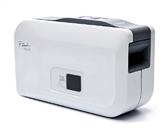
The discontinued Brother P-touch PT-2430PC makes most sense when a computer is already central to the work. It connects by USB, uses the computer’s screen and keyboard to lay out a label, and includes an automatic cutter. There is no physical typing keyboard or label-preview display on the machine itself. That distinction matters more than the word “PC-connectable”: if you want to print a one-off label away from a computer, a keypad model is a better fit.
Choose between the no-install and full-editor routines
Brother’s U.S. User’s Guide describes two modes. In the default EL position, P-touch Editor Lite is stored on the labeler; the documented routine is to connect USB, switch the unit on, and open the editor, without installing a separate program or driver. This is useful for occasional desk work when you do not want to configure a full label-design application. The Lite workflow can insert text boxes, frames, symbols, images or a screen capture, and its manual describes two-row labels, vertical text, numbering and automatic cutting options.
The other position, E, is for the fuller P-touch Editor 5.0 workflow and its printer driver. That is an install-and-driver path, not another name for the no-install Editor Lite mode. The U.S. installation guide is old and names Windows XP, Vista and 7 for its original setup instructions. Brother’s supported-OS page now includes PT-2430PC among the Windows 11 choices, but it does not explain whether every detail of the old Lite auto-launch or full-editor workflow is supported in the same way. If your exact computer is a must-have constraint, check that route before buying a discontinued unit.
Use the documented original TZ tape plan
The exact U.S. user guide tells owners to use Brother TZ cassettes, and the Brother support specification for the matching 2430eus support identity lists TZ tape from 9/64 inch through 1 inch. The guide’s size list spans the familiar narrow and wide cassette choices, ending at about 24 mm. That opens a useful desktop range: small file tabs can use narrow tape, while shelf labels, equipment names or larger headings can use the wider widths. The machine’s maximum print height is about 18 mm, so even with 24 mm tape the printable text area is smaller than the tape itself.
There is an important manufacturer-page conflict to keep visible. Brother’s present U.S. product page calls the printer compatible with TZe and lists TZe widths only through 12 mm; that same page’s description says it designs labels up to 24 mm. The model-specific U.S. support specification and the older model guide instead identify original TZ. Because those official fields do not agree, the conservative matching profile here counts the manual-and-support-confirmed TZ route and does not count a TZe requirement. If you already own cassettes, check the code printed on the cassette rather than choosing by width alone.
Automatic cuts and deliberate margin settings
The PT-2430PC has an automatic full cutter and a separate Feed & Cut button. For repeat work, the manual also describes chain printing, which minimizes the blank gap between successive labels; the final strip is left for the user to feed and cut. The U.S. support specification rates printing at up to 0.39 inch per second (about 10 mm per second) and 180 dpi. That is suitable for names, drawers and ordinary office identifiers, but not a reason to treat this older compact machine as a high-throughput barcode or database station. Brother’s exact specification marks barcode printing, database/file-link support and auto-format as unavailable in the Lite-feature table.
Power is not supplied by the USB cable. The exact guide and support specification list the included AD-24ES AC adapter or six AA alkaline cells. The body is about 2.6 inches wide by 7.4 deep by 4.4 high, and Brother lists 1.3 pounds without batteries or tape. It can sit beside a computer, but it still needs its adapter or batteries. On a used listing, inspect the adapter, cable, cutter area and cassette door rather than assuming an old package is complete; Brother’s current page marks the model discontinued.
What changes the recommendation
Choose this model when you can work at a computer, need an auto-cut option, and have a real reason to use the original TZ cassette family—especially the wider widths its exact support specification documents. Requiring a phone app, wireless printing, an on-machine QWERTY keyboard, or TZe specifically changes the result: none is included in the conservative verified plan. Leaving the finder on current-reference products also excludes this discontinued machine; opt into earlier models only if you are comparing a unit you already own or a specific used offer.
For a newer USB-connected option that uses TZe, compare Brother’s PT-P700: it is a separate model and media plan, not a compatible replacement cassette for the PT-2430PC. If you would rather type directly on the labeler, compare the PT-D220 instead; it has a different standalone workflow and narrower tape ceiling. The right decision is therefore not “which one has more features?” but whether you want the computer to provide editing, whether the original TZ route is acceptable, and whether a discontinued machine’s software and used-unit condition suit your work.
Sources: Brother’s PT-2430PC product page, exact U.S. manual index, U.S. User’s Guide, U.S. support specifications, and supported-OS page.
Key details at a glance
| Full-color output | No |
|---|---|
| Print process | Thermal transfer |
| Maximum tape width | 24 mm |
| Compatible cassette | The exact U.S. guide says original TZ only and the keyed support specification gives the TZ range from 9/64 inch to 1 inch (~3.5–24 mm). The current Brother product page lists TZe through 12 mm; that conflict is not treated as verified TZe compatibility. |
| Built-in templates | 0 |
| Display type | Green LED status indicator; no LCD text preview or physical keyboard documented. |
| Maximum combined print height | 18 mm |
| Maximum lines per label | 2 |
| Line-count note | Exact product page lists two maximum lines; the manual illustrates a two-row label in the PC editing workflow. |
| On-device frames | 10 |
| Saved label files | 0 |
| Computer design route | ['P-touch Editor Lite stored on the labeler in EL mode; full P-touch Editor 5.0 and driver installation in E mode.'] |
| Power choices | USB is the data interface, not the documented power source. The guide specifies the included AD-24ES adapter or six AA alkaline cells; a used listing may omit original accessories. |
| Body dimensions | Brother exact U.S. support specification: 2.6 × 7.4 × 4.4 in (W × D × H). |
| Tape cutting | The exact specification lists an automatic full cutter. The manual describes Auto Cut; in chain mode the last segment is not cut until Feed & Cut is pressed. |
| What the base package supplies | The exact U.S. guide identifies an included AD-24ES AC adapter and USB cable. The available product page does not document the full carton list or starter-tape contents; the completeness of a used unit is unknown. |
| Wired Ethernet | No |
Use the exact model’s instructions for operating limits, supplied equipment and version differences.
Sources for this assessment
- Brother Office & Home directory row PT2430PC, offset 105/index 114
- Brother U.S. PT2430PC product page
- Brother U.S. PT2430PC support route
- Brother U.S. PT-2430PC manuals index
- Brother PT-2430PC U.S. English User's Guide version 03
- Brother U.S. PT2430PC support specification, support ID 2430eus
- Brother PT2430PC U.S. Software Installation Guide
- Brother PT2430PC U.S. supported-OS page
- Brother exact PT-2430PC U.S. support-key image
- Brother PT2430PC download page
- Brother PT2430PC consumables and accessories page
Put the device and its tape system together.
Match the exact model, cassette family, computer or network route and any optional power or touch-panel hardware before buying.