
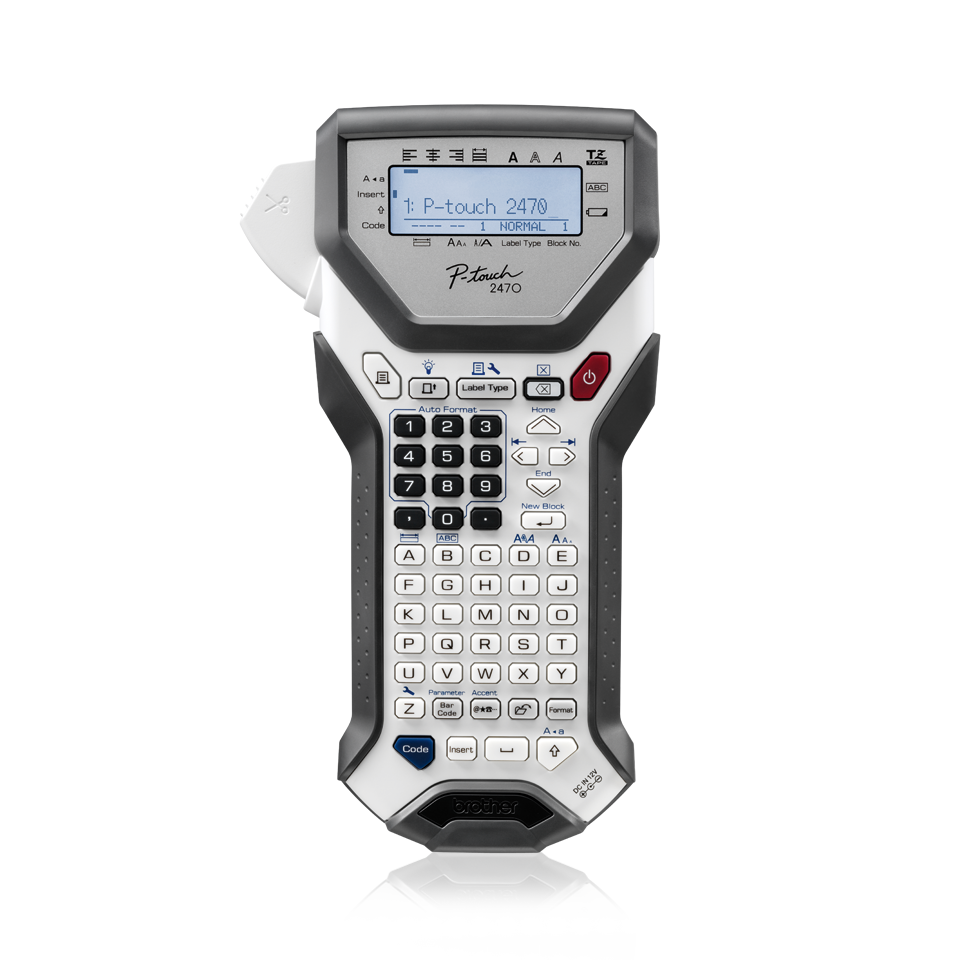
Your needs, this model
Does it fit your priorities?
Do you need a handheld keyboard that can make 24 mm original-TZ labels?
The exact US PT2470 support specification and manual document original TZ through 24 mm. Its page also reports seven lines at that width, but this is a discontinued machine, not a current shopping pick.
Explore this need in the finder →Would a two-line backlit screen and on-device barcode entry be useful without relying on a phone app?
The PT-2470 guide documents a two-line backlit display and a barcode function. Brother cautions that this model is not designed specifically for specialized barcode production and scanner readability depends on tape/color choices.
Explore this need in the finder →Can you use a manual cutter and verify the tape logo on an older unit?
This PT-2470 cuts by hand. Its exact manual says TZ only, while Brother’s newer US page lists TZe through 12 mm; treat these as distinct records and check the cassette logo/width on the individual machine.
Explore this need in the finder →A more capable handheld workspace
Brother’s PT-2470 has the shape of a handheld label maker, but it is more substantial than a pocket organizer labeler. The manual describes a 56-key keyboard, a separate number-entry area, 16 characters across two LCD lines and an adjustable display backlight. That extra line lets you review a longer name or the next line of a multi-line label before printing. The display remains a small monochrome work window, not a touch screen or phone-sized design canvas; if you plan visually elaborate labels, a computer-connected current model or app-based printer is a better fit.
Typing takes place on the machine. The PT-2470 includes a dedicated barcode key, symbol access, label-type modes and ten Auto Format layouts; Brother’s guide lists 15 frame patterns and 164 symbols. You can store up to 2,000 characters in memory, but the guide cautions that stored files and formatting can be lost when power is disconnected for more than two minutes. This is useful for repeated text at one station, not a substitute for dependable long-term template storage or a synced address book.
Keep the two tape records separate
The model’s official U.S. technical specification and its 2010 User’s Guide document original Brother TZ cassettes in 6, 9, 12, 18 and 24 mm. At 24 mm, the documented maximum rises to seven lines and 18.1 mm print height; narrower widths allow fewer lines. This is the PT-2470’s clearest advantage over a simpler handheld: a broad original-TZ strip can carry a stacked equipment description, shelf note or larger heading without moving the work to a desktop printer. Printing is 180 dpi and up to 10 mm per second, so treat it as a readable office labeler rather than a high-throughput barcode system.
There is a source conflict worth taking seriously if you are buying a used unit for old tape stock. The exact U.S. manual says to use TZ tapes, while Brother’s newer U.S. product-page compatibility table lists TZe widths only through 12 mm and gives a two-line figure. The exact older technical specifications and manual support original TZ through 24 mm and seven lines on the widest tape. These are not interchangeable claims. Because the older guide explicitly says to use TZ only, the newer table alone is not enough to treat TZe as a dependable PT-2470 workflow. Do not infer that 24 mm TZe works because 24 mm TZ does. On an individual used machine, check the cassette logo and width printed on that unit before opening a cassette; until the documentation conflict is settled for that exact machine, choose a model with unambiguous TZe support if TZe is essential.
Useful for barcodes, with a real limitation
The built-in barcode function supports several common formats, including Code 39, Interleaved 2 of 5, EAN, UPC, Codabar, EAN-128 and Code 128. That can be handy for small inventory or filing jobs that need the code and a short description on one label. Brother also warns in the guide that this machine was not specifically designed for special barcode-label work and that some readers may fail, especially with certain tape and ink colors. Brother recommends black on white for best readability. A label maker that can print a barcode is not automatically a verified retail scanning system; test the exact stock, dimensions and reader before relying on a code for a critical process.
Power, cutting and day-to-day fit
The guide specifies six AA cells or the optional AD-18ES AC adapter. The adapter is not established as part of every used package, so do not treat compatibility as inclusion. The cassette advances at 10 mm per second, and the cutter is manual: press the cutter button when the label is ready. That avoids assuming a powered auto-cutter, but it adds a hand step when you are making a batch. The body is 134 × 235 × 78 mm and weighs 635 g before tape and batteries. It is portable between a workbench and storage area, though the longer shell and full keyboard take more room than a small modern handheld.
The PT-2470 is an earlier model that Brother now marks discontinued. That matters more than a new feature checklist: used-unit condition, cutter wear, battery leakage, missing cassette doors and uncertain bundled adapters affect the practical value. Brother’s guide warns that label adhesion and removal depend on the surface and environment; laminated tape is not a promise for every material or curve. There is no documented phone-app or wireless workflow in the exact U.S. support sources. A computer or mobile connection is not a safe assumption for this model just because another P-touch from the same period had one.
Who should choose it—and who should pass
Consider the PT-2470 if you already own one, can verify its condition and want a handheld physical keyboard, backlit preview, barcode entry and the older 24 mm original-TZ format. It is a stronger fit for an occasional office or workshop station than for someone who only needs short household names on narrow tape. Compared with the PT-1830, it is more portable, has a two-line backlit display, adds barcode controls and uses original TZ up to 24 mm; the PT-1830 is a desk-style QWERTY machine with a one-line display and a narrower original-TZ ceiling. If a connected workflow, automatic cutting or a guaranteed current cassette supply matters, compare a current TZe model such as the PT-D460BT or PT-D610BT instead. Those alternatives answer different needs; they do not make this discontinued machine a current purchase recommendation.
Key details at a glance
| Print process | thermal |
|---|---|
| Maximum tape width | 24 mm |
| Compatible cassette | The exact US v02 manual says use only TZ, and the exact US technical specification lists original TZ 6/9/12/18/24mm. The current US product page separately lists TZe 3.5/6/9/12mm, but the conflicting model-specific manual has not been reconciled; TZe remains unconfirmed for matching and no TZe plan is offered. |
| Built-in templates | 10 |
| On-device preview characters | 16 |
| Display type | backlit monochrome LCD |
| Maximum combined print height | 18.1 mm |
| Maximum lines per label | 7 |
| Line-count note | Exact US specification gives width-dependent maximums: 6mm:2, 9mm:2, 12mm:3, 18mm:5, 24mm:7 for the original TZ system; current page TZe table instead reports two lines. |
| On-device frames | 15 |
| On-device symbols | 164 |
| Power choices | Exact manual describes six AA cells or optional AD-18ES; inclusion depends on used package and is not assumed. |
| Body dimensions | Converted from exact US specification 134 x 235 x 78 mm. |
| What the base package supplies | US contents not established; exact guide package list is model guide and sample cassette. Do not infer that a used unit includes AD-18ES adapter. |
| Letter-key arrangement | qwerty |
Use the exact model’s instructions for operating limits, supplied equipment and version differences.
Sources for this assessment
- Brother US Office & Home directory row offset 60, index 64
- Brother US exact PT2470 product page
- Brother US exact PT2470 technical specifications
- Brother US support manual index
- Brother PT-2470 User Guide v02 linked from US manual index
- Brother Europe exact PT2470 tape-family logo FAQ
- Brother Belgium exact PT2470 product image
Put the device and its tape system together.
Match the exact model, cassette family, computer or network route and any optional power or touch-panel hardware before buying.