
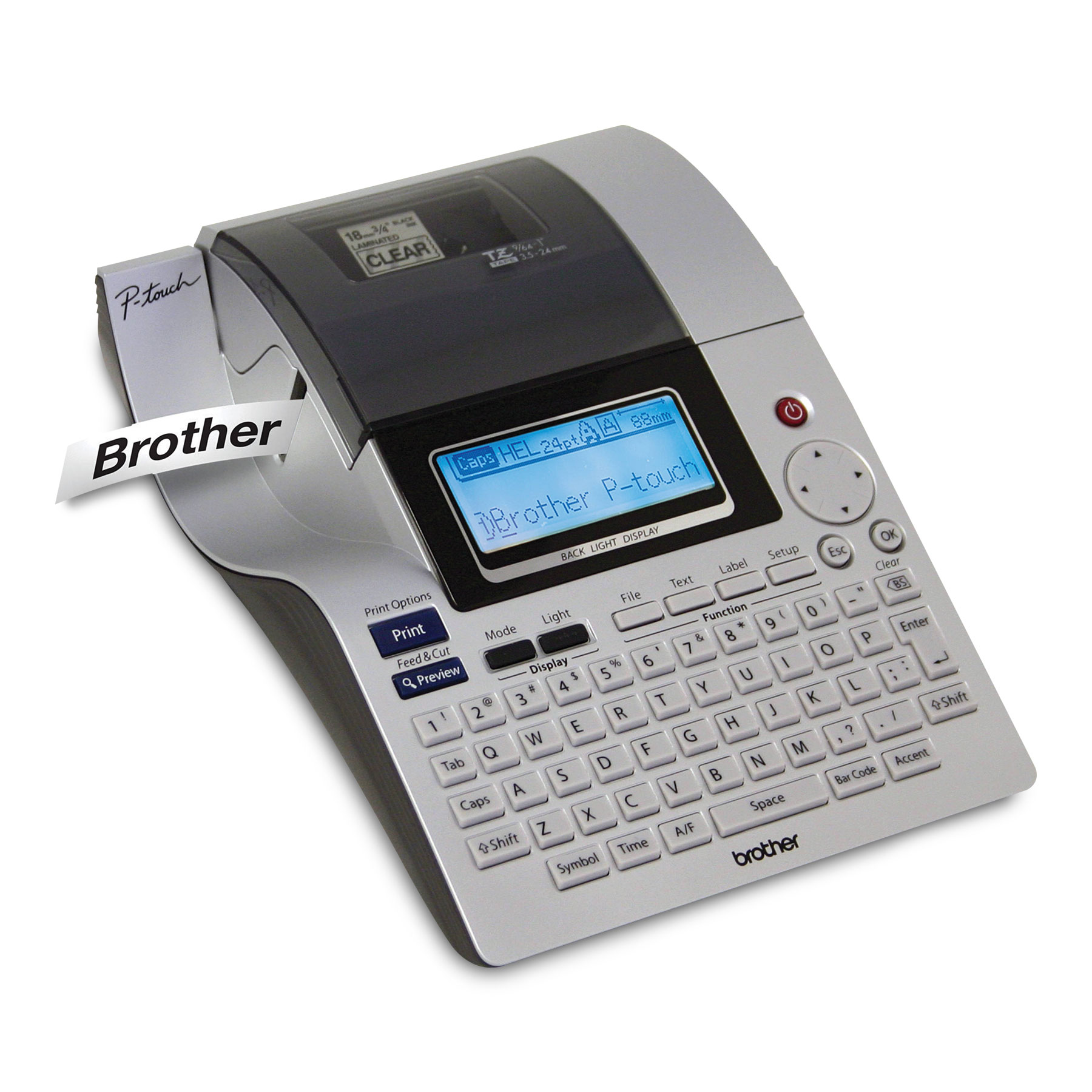
Your needs, this model
Does it fit your priorities?
Would a large physical QWERTY keyboard plus a USB computer-design route cover your label routine, or is a phone app essential?
The PT-2700 combines on-device QWERTY entry with a USB connection for Brother P-touch Editor. That is useful for local editing and computer-prepared work, but it does not document phone-app printing; confirm current driver compatibility before relying on an older PC workflow.
Explore this need in the finder →Do you specifically need original Brother TZ at 24 mm, rather than 24 mm TZe?
The U.S. User’s Guide lists original TZ through 24 mm. Brother’s current exact U.S. PT2700 page lists TZe only through 12 mm. Select the family printed on your cassette; the same width does not make the two plans interchangeable.
Explore this need in the finder →Can you use a desktop cutter-and-adapter workflow without wireless printing?
The PT-2700 has an automatic cutter and Brother lists its AC adapter in the original package; the manual also gives an optional eight-AA route. No wireless print route is documented, so Wi-Fi-essential jobs need a different machine.
Explore this need in the finder →A discontinued desktop P-touch built around a broad keyboard and a large display
The Brother P-touch PT-2700 is an earlier, discontinued label maker for a workbench or office where someone wants to type at the machine itself, but may also prepare layouts on a computer. Its defining combination is a 67-key QWERTY keyboard, a backlit 16-character-by-three-line display, an automatic cutter, and USB computer connection. It is much more of a desk-sized work station than a pocket labeler. Brother’s current U.S. page marks it discontinued, so this assessment is useful for an existing machine or a carefully checked used unit, not as a prompt to buy an untested listing.
Two ways to create a label, neither a phone workflow
For one-off organizing, the built-in keyboard keeps the routine self-contained: compose, preview and print without opening a phone or computer. The three-row backlit screen shows more of a label than the two-row displays on many older handhelds, while the familiar QWERTY layout is less of a learning curve for people who already type at a computer. Brother’s user guide also documents saved files, time-and-date printing, barcodes, frames, templates, numbered copies and different text blocks. These are useful for recurring shelf, bin, equipment or filing labels, rather than proof that every office database workflow is supported.
For a larger batch, a USB cable and Brother P-touch Editor provide a separate computer route. That is a meaningful advantage over the PT-330, whose inspected documentation does not establish a computer connection. It is not Wi-Fi, Bluetooth or a mobile app: a computer design requirement can be met, but an app-first or wireless requirement cannot be assumed. The software and operating-system material is from the product’s original era. Before choosing a second-hand PT-2700 for a particular laptop, check Brother’s driver and software support for that computer; the existence of a USB port does not establish modern operating-system compatibility.
Do not collapse TZ and TZe into one width claim
The width question needs a little care. The PT-2700 user guide identifies original Brother TZ cassettes in 3.5, 6, 9, 12, 18 and 24 mm sizes. On that manual-documented TZ route, 24 mm media permits up to seven lines, 18 mm up to five, 12 mm up to three, and the narrower tapes allow fewer. The guide gives a maximum print height of 18.1 mm when using 24 mm TZ tape. Brother’s current exact U.S. product page separately identifies TZe as a compatible family, but its current width list stops at 12 mm. The page’s media table and the older manual describe different source-era evidence, so the finder keeps the original-TZ 18/24 mm choice separate from the current-page TZe width choice. If your stockroom has 24 mm cassettes, read the cassette code rather than buying by width or appearance alone.
For either route, this is a thermal-transfer cassette machine, not a full-color printer, a die-cut address-label appliance, or a roll-fed shipping-label printer. The manual describes Brother’s standard TZ cassette system; the current product page lists TZe. Neither source establishes that every specialty tube, flag, fabric, or other Brother cassette will work, so do not infer unusual media support from a physical fit or similar-looking cartridge.
Made for repeat work, with a desktop footprint
The automatic cutter can reduce hand-finishing when making many separate labels; the manual also provides chain and no-cut modes when you want connected strips or less blank leader. The printer can store as many as 99 files, and the built-in templates and barcode functions make it more capable than a simple alphabetic labeler. It remains a monochrome printer with a fixed screen, so there is no touchscreen editing or modern shared-workspace interface. If a label is occasional and short, a smaller current handheld is easier to store. If the job is designing and printing from a PC without a keyboard, the PT-P700 is a different computer-first layout rather than a direct equivalent.
Brother documents an included AC adapter and an alternative eight-AA alkaline-battery route. The batteries are optional and not included in the documented original package. On a desk, the supplied adapter is the practical default; batteries make it movable between rooms but do not turn the roughly 7.06-by-9.75-by-2.82-inch body into a pocket device. The documented weight is about 1.87 pounds before adding tape and batteries. Check the adapter, tape cassette, USB cable and software media when assessing an individual used package—the contents of a surviving box can differ from Brother’s original list.
Who should keep it on the shortlist?
The PT-2700 makes sense to someone who already owns the machine, wants on-device QWERTY entry with a readable three-line preview, needs automatic cutting, and values an optional USB editing route. It is a poor fit when phone control, wireless printing, a compact handheld body, current driver assurance, or color output is essential. Compared with the PT-330, it adds a much larger desktop layout and a documented computer route; compared with a current PT-D610BT, it gives up current-model support and mobile connectivity. Read the exact media and operating-plan notes before treating its older 24 mm TZ capability as interchangeable with TZe. For a new purchase, start with the current-model reviews and verify the exact cassette, package contents, and software support for your own setup.
Key details at a glance
| Print process | thermal transfer |
|---|---|
| Maximum tape width | 12 mm |
| Compatible cassette | Keep cassette families separate: the Brother U.S. User’s Guide identifies original TZ at 3.5, 6, 9, 12, 18 and 24 mm; the current exact U.S. PT2700 product-page specification lists TZe only at 3.5, 6, 9 and 12 mm. The site’s TZe-width field intentionally follows that current U.S. TZe ceiling; the old TZ plan separately retains 24 mm. Do not infer that TZe reaches 24 mm from the TZ manual or combine widths by label appearance. Specialty-media support is not established. |
| Built-in templates | 17 |
| On-device preview characters | 16 |
| Display type | Backlit dot-matrix LCD |
| Maximum lines per label | 7 |
| Line-count note | The exact U.S. User’s Guide documents width-specific line counts for original TZ (1 line at 3.5 mm; 2 at 6/9 mm; 3 at 12 mm; 5 at 18 mm; 7 at 24 mm). The current U.S. page also has a contradictory two-line value under its software table; do not apply TZ line limits to TZe. |
| On-device symbols | 120 |
| Saved label files | 99 |
| Computer design route | ['Brother P-touch Editor'] |
| Power choices | Brother’s exact U.S. product description includes the AC adapter and says eight AA batteries are optional. The used machine’s package may be incomplete; the eight cells are not in the documented base bundle. |
| Body dimensions | Brother U.S. manual dimensions are 7.06 W × 9.75 D × 2.82 H inches (179.5 × 247.9 × 71.8 mm); desk-oriented, not pocket-size. |
| Letter-key arrangement | qwerty |
| Die-cut Avery AV paper-label cassettes | No |
Use the exact model’s instructions for operating limits, supplied equipment and version differences.
Sources for this assessment
- Brother U.S. Office & Home directory observed PT2700 row at offset 45, item position 13 (index 57)
- Brother U.S. exact PT2700 product page
- Brother U.S. PT-2700/2710 User’s Guide v01
- Brother U.S. PT-2700 support manual index
- Brother U.S. PT-2700 Quick Setup Guide
- Brother U.S. PT-2700 computer software installation guide
- Brother Europe PT-2700 support specifications (corroborative, non-U.S.)
- Brother Canada exact PT2700 product page
- Brother Canada exact PT2700 product image, original CDN bytes
Put the device and its tape system together.
Match the exact model, cassette family, computer or network route and any optional power or touch-panel hardware before buying.