
Your needs, this model
Does it fit your priorities?
Would a built-in QWERTY keyboard let you make a short label without opening a phone or computer?
The original PT-300 materials show a QWERTY letter layout and Brother currently identifies QWERTY on the exact U.S. product page. The four-character LCD is a moving text window, so check the complete string by scrolling before printing.
Explore this need in the finder →Can an optional AD-30 adapter be useful alongside replaceable AA cells?
Brother’s exact brochure specifies six AA cells and an optional AD-30 adapter. That supports a battery-or-adapter power route; the adapter is optional, so inspect the exact used offer rather than assuming it is included.
Explore this need in the finder →Can you operate a cutter lever after each label, or is an automatic cutter essential?
The model-era brochure/user-guide view shows a manual lever cutter. Automatic cutting is not documented; select that requirement only when a hand-operated cut would not work.
Explore this need in the finder →Can you inspect the cassette on the exact PT-300 instead of requiring a family-specific recommendation?
The original guide/brochure and the current product table disagree on TZ versus TZe. With no essential family choice, the keypad may still suit an owner who can verify the installed cassette; a hard family/width requirement is not passed.
Explore this need in the finder →A self-contained keypad, not a phone printer
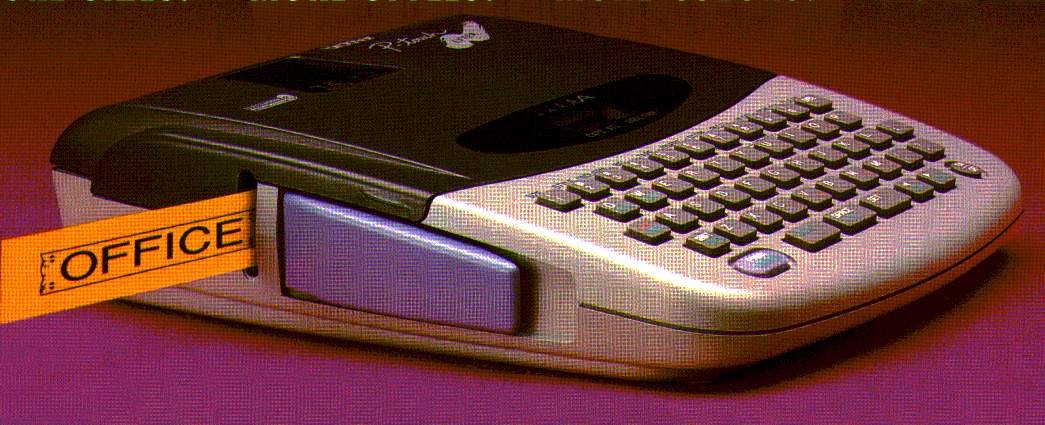
The discontinued Brother P-touch PT-300 makes sense mainly as a machine someone already owns or is evaluating second-hand. It has a physical QWERTY keyboard, a four-character LCD, and a direct print routine: enter a short label, scroll through the text, choose a style, and print. You do not need to open an app or keep a computer connected for ordinary text. That is the PT-300's lasting appeal for quick file, pantry, storage, or school labels. Brother's current U.S. product page confirms the exact PT-300 name and marks it discontinued.
There is a real compromise in that tiny display. Brother's model-era brochure identifies a four-character LCD. That is a narrow working window rather than a full-layout preview: simple names and short identifiers are easier to check than a long label whose line breaks need careful review. It suits names, brief identifiers, and simple household labels better than frequent long text or intricate layouts where line breaks must be checked at a glance. The exact current product page lists a two-line maximum, but the display should not be mistaken for a two-line preview panel.
Old cassette claims do not line up
Media is the biggest reason to pause. The original Brother PT-300 brochure and the PT-300 user-guide materials call for Brother TZ tape and describe 6, 9, 12, and 18 mm widths. Brother's current exact-model product table instead says TZe and lists 3.5, 6, 9, and 12 mm. Those statements cannot be combined into one confident cassette promise. Do not assume that a PT-300 accepts every modern TZe cartridge simply because both descriptions show some of the same widths, and do not assume 18 mm is usable on the unit in front of you. Check the cassette family and exact machine documentation before buying supplies. If compatibility with a named tape family or a minimum width is essential, this model is a poor match until that particular unit is verified.
Brother describes the print system as thermal transfer and the original brochure calls its TZ output smudge-proof and laminated. The brochure also illustrates several tape colors and creative treatments. Those marketing examples are not a promise that any pictured cassette is still available, included, or suitable for a particular surface. For a used unit, verify the cassette label and the instructions for that exact machine before buying more supplies. The original and current Brother sources disagree, so overlapping width numbers are not enough to infer compatibility.
Power and finishing are simple but hands-on
The PT-300 runs from six AA cells, and Brother's brochure lists an optional AD-30 AC adapter. It does not document an internal rechargeable battery. A battery-first owner can move the device around without a cord; for a permanent bench, an adapter could avoid repeated cell changes if the correct one is present. Do not assume that an adapter, batteries, tape, or other listed original-box items are included with a used machine. The brochure's package description is historical, not a current seller's inventory.
The cutter is a lever operated by hand, not an automatic cutter. For one-off labels, that is a straightforward trade: print, move the lever, apply the label. In a run of repeated labels, each cut adds a manual action, so buyers who require automatic cut-off should look elsewhere. The original brochure describes eight type styles, six size settings, 57 built-in symbols, framing/underlining, mirror printing, repeat printing, and automatic numbering. Those options add useful variety for a simple standalone labeler, but they remain button-driven formatting features, not the computer-editor or phone-template workflow of a connected model. The PT-300 is not documented for USB, Bluetooth, Wi-Fi, or phone-app printing.
Memory claims also need a little restraint: the original brochure says 300-character memory, while Brother's current page has a "standard memory 15" field without explaining whether it is counting saved items or something else. I would not choose this unit because of a claimed number of stored designs. The practical advantage is its keyboard-first routine; the practical limit is that the display and controls are basic and the cassette question is unsettled.
Who should choose it—and what to compare
If a PT-300 is already on your shelf, inspect the battery contacts, test the screen and cutter, then make a short test label only with a cassette whose family is verified for that machine. Its QWERTY keys and AA operation remain useful when the task is simple and offline. If you are shopping for a dependable current setup, compare the Brother PT-D220 for a familiar standalone keypad and the PT-D410 for a more spacious display and a different everyday workflow. Those newer models have their own documented tape and power configurations; choose by the supplies and features you can actually use, rather than treating an older PT-300's overlapping width numbers as proof of compatibility.
Bottom line: the PT-300 is an interesting earlier label maker for an owner who values direct typing and does not need automatic cutting. Its discontinued status, very short display, manual cutter, AA-only portable power, and unresolved TZ-versus-TZe evidence make it a reference choice rather than a safe default for someone buying a machine and supplies together.
Key details at a glance
| Full-color output | No |
|---|---|
| Print process | Thermal transfer |
| Compatible cassette | Media is intentionally not matched: Brother's exact-era PT-300 brochure/user-guide says TZ tape through 18 mm, whereas the current exact Brother product table says TZe through 12 mm. Verify the cassette family for a particular unit before seeking supplies. |
| On-device preview characters | 4 |
| Display type | LCD |
| Maximum lines per label | 2 |
| On-device symbols | 57 |
| Power choices | Six AA batteries; optional Brother AD-30 adapter. Package-specific inclusion is unknown. |
| Body dimensions | Brother's original brochure lists dimensions but does not label their axis order; directional fit is unknown. |
| Tape cutting | Manual lever cutter; no automatic cutter is documented. |
| Letter-key arrangement | qwerty |
| Built-in type styles | 8 |
Use the exact model’s instructions for operating limits, supplied equipment and version differences.
Sources for this assessment
- Brother Office & Home observed catalogue row PT300, offset 105, listing index 116
- Brother U.S. PT-300 product page
- Brother PT300 U.S. product-support route
- Brother original PT-300 product brochure, linked from exact U.S. product page
- Brother originally indexed PT-300/300B U.S. User's Guide (manufacturer URL currently returns 404)
Put the device and its tape system together.
Match the exact model, cassette family, computer or network route and any optional power or touch-panel hardware before buying.