
Your needs, this model
Does it fit your priorities?
Would original Brother TZ tape through 18 mm cover the job on an existing PT-310?
The exact PT-310 brochure documents original TZ widths of 6, 9, 12 and 18 mm. The 18 mm route belongs to TZ; it is not a TZe width claim.
Explore this need in the finder →Is Brother-listed TZe through 12 mm enough, or is wider TZe essential?
Brother's exact PT310 page lists TZe through 12 mm and its official replacement-tape FAQ names PT310. The original 18 mm TZ brochure spec does not satisfy an 18 mm TZe need.
Explore this need in the finder →Do familiar QWERTY keys and a local keyboard workflow suit the task?
The PT-310 product page and exact brochure document QWERTY and a built-in keyboard. They do not document a phone-app input route.
Explore this need in the finder →Can optional AC power work, or must an adapter already be included?
The brochure documents the optional AD-30 adapter and six AA cells; it does not list an adapter in the original package. Compatibility is not package inclusion.
Explore this need in the finder →Can the labels be cut by hand, or is automatic cutting essential?
Brother's tape-margin guidance describes the PT-310 cutter lever. Automatic full cutting is not documented, so a required automatic cutter should exclude this model.
Explore this need in the finder →What the exact PT-310 offers
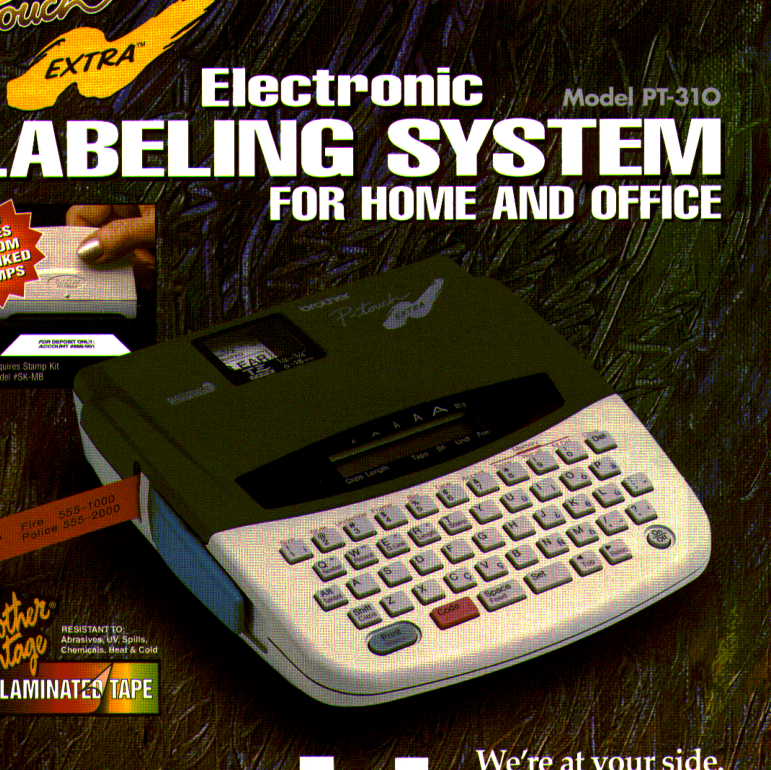
Brother’s P-touch PT-310 is a discontinued, tabletop electronic labeling system from the late 1990s, not the separately listed PT-310B. The exact U.S. product page still describes a QWERTY keyboard, two-line output, a label-length setting and thermal-transfer printing. Its original Brother brochure adds the more useful operating picture: a 49-key alphanumeric keyboard, a 12-character display, six text sizes, eight styles, framing and underlining, mirror and vertical printing, and 53 built-in symbols. This is a local-entry labeler for short household or office runs, not a connected layout workstation.
Keep original TZ and listed TZe plans distinct
The brochure identifies the PT-310’s original cassette system as Brother TZ, with four widths: 6, 9, 12 and 18 mm. Brother’s current PT310 product table separately lists TZe from 3.5 through 12 mm. Brother’s official tape guidance describes TZe as a replacement for TZ on compatible models, and names PT-310 among them. Taken together, those are two documented paths—not a reason to carry the old 18 mm limit over to TZe. If you are evaluating a used unit, read the cassette code on the machine you will actually use and verify it against instructions for that exact unit. The exact U.S. manual index returned Brother’s generic error page, so the guide for PT-310 remains an open evidence gap.
Typing, preview and print limits
The familiar QWERTY arrangement favors someone who wants to type at the device rather than compose on a phone. A small 12-character display is enough to check a brief name or location, but it is not a large preview for long wording. The brochure says up to two lines and characters as tall as 3/8 inch (about 9.5 mm); it also describes repeat and automatic numbering up to nine copies, adjustable tape feed and horizontal or vertical printing. Those controls make a few repeatable drawer, shelf or equipment labels plausible. They do not make the PT-310 a batch-production printer: read the output on screen, choose the length and style carefully, and expect manual finishing.
Memory and specifications need context
There is a real conflict worth keeping visible. The brochure says “200 character memory,” while the current exact product page renders “Standard Memory 15” without a unit or explanation. Neither line establishes a number of saved label files. I would not plan a library of reusable designs around either figure. The brochure is more specific about what it actually lists: a 49-key keyboard, 12-character display, six type sizes, eight styles and 53 symbols. Its five framing styles and mirror-print option can help with a particular project, but a needed template, stored-file count or special application should be confirmed from a working machine rather than inferred from a nearby P-touch.
Power, box contents and finishing
The original brochure says the PT-310 operates on six AA cells or an optional Brother AD-30 AC adapter. It lists six AA batteries and one black-on-clear 12 mm by 26-foot TZ cassette with a separator stick in the original package; the adapter is optional, not included. It also names a separate model 6993 carry case and an SK-MB stamp kit as optional accessories. A secondhand unit may have lost any of those items, so treat the brochure as the original package description, not an inventory of an online listing. Brother gives weight as 1.4 lb without batteries. It prints dimensions as 6.9 by 7.9 by 2.0 inches without labeling the axes, so measure a unit before relying on a close shelf fit.
Brother’s tape-margin help page includes PT-310 in its guidance and describes advancing tape before pressing the cutter lever. That supports hand-actuated cutting; it does not support automatic cutting. No phone app, computer connection or wireless path is documented in the checked PT-310 sources, so those requirements should remove this model rather than be treated as hidden extras.
Who should consider it?
The PT-310 is most useful as an earlier-model reference for an owner who already has the machine, likes QWERTY typing and can identify the correct cassette family. The ordinary questionnaire may let it through when earlier Brother models are allowed and you accept either a documented original-TZ route or the narrower TZe route. An essential 18 mm original TZ requirement can fit its TZ plan; an 18 mm TZe requirement cannot. A requirement for six AA power or the optional AD-30 can be compared with the brochure, but a requirement that the adapter be in the box should fail.
It is a poor fit for someone shopping primarily for a current warranty, automated cutting, app composition, modern computer design, a known saved-label quota or 18 mm TZe. If those ordinary needs matter, compare the separately assessed PT-310B, PT-320 or PT-340 only by their own exact sources, or move to a currently documented model such as PT-D410. Similar names and overlapping fields are not proof that the PT-310 and PT-310B share the same manual, package or cassette limits.
Bottom line
The PT-310 has a specific, understandable use: stand-alone QWERTY entry for compact labels, with a documented two-line ceiling, a useful set of formatting choices and a hand-operated cutter. Its original brochure and current product data provide separate TZ and TZe width profiles, while its manual bridge and memory field remain unresolved. For an existing owner, inspect the cassette, battery contacts, keys, display and feed/cutter action before making it part of a routine. For a new purchase, do not pay extra for an unverified accessory or assume a currently available refill, condition or price.
Key details at a glance
| Full-color output | No |
|---|---|
| Print process | thermal transfer |
| Maximum tape width | 12 mm |
| Compatible cassette | The exact U.S. PT310 page lists TZe widths 3.5/6/9/12 mm. The PT-310 brochure separately documents original TZ widths 6/9/12/18 mm, and Brother's public replacement-tape FAQ lists PT310 for supported TZ-to-TZe use. Keep the plans separate; do not infer TZe 18 mm from old TZ support, or interchange the supplies based only on width. |
| On-device preview characters | 12 |
| Display type | LCD |
| Maximum combined print height | 9.53 mm |
| Maximum lines per label | 2 |
| On-device frames | 5 |
| On-device symbols | 53 |
| Power choices | Brother's original brochure says six AA batteries are included in the original package and the model can also use an optional AD-30 adapter. An adapter is not listed as included; actual used-unit package contents need individual inspection. |
| Body dimensions | The original brochure gives 6.9 x 7.9 x 2.0 inches without mapping those values to length/width/height; use a physical measurement where a constrained fit matters. |
| Tape cutting | Brother's tape-margin FAQ includes PT-310 and describes actuating the cutter lever after feeding tape. The brochure documents a cutter blade. Automatic full cutting is not documented. |
| Letter-key arrangement | qwerty |
| Built-in type styles | 8 |
| Original TZ maximum width | 18 mm |
Use the exact model’s instructions for operating limits, supplied equipment and version differences.
Sources for this assessment
- Brother U.S. Office & Home directory row PT310 at offset 90, index 92
- Brother U.S. exact PT310 product page
- Brother U.S. two-page PT-310 product-information brochure bearing a ©1997 mark
- Brother U.S. exact PT310 support landing page
- Brother U.S. exact PT310 manual-index request and error response
- Brother U.S. FAQ on replacing original TZ with TZe for supported models
- Brother U.S. tape-margin and cutter-lever FAQ
Put the device and its tape system together.
Match the exact model, cassette family, computer or network route and any optional power or touch-panel hardware before buying.