
Your needs, this model
Does it fit your priorities?
Do you want to type on a built-in QWERTY keyboard rather than compose on a phone?
The exact PT-350 product-page specification says QWERTY, and its model brochure shows the standalone keyboard and display. The reviewed sources do not document a phone-app route.
Explore this need in the finder →Is original TZ tape through 24 mm the media route you need, or is 24 mm TZe essential?
The exact-model brochure specifies original TZ at 6/9/12/18/24 mm. The exact page's separate TZe table ends at 12 mm, so 24 mm TZe is not established.
Explore this need in the finder →Are two-line output and a direct keyboard sufficient, or is automatic cutting a must?
The exact current PT-350 table documents two lines. Neither it nor the brochure confirms an automatic cutter; do not infer one from the brochure's included tape trimmer.
Explore this need in the finder →Can you use six AA cells or source an optional AD-60, or must the adapter be in the original package?
The exact brochure lists six AA cells and describes AD-60 as optional. It is not listed among the original PT-350 package contents.
Explore this need in the finder →Brother P-touch PT-350 review
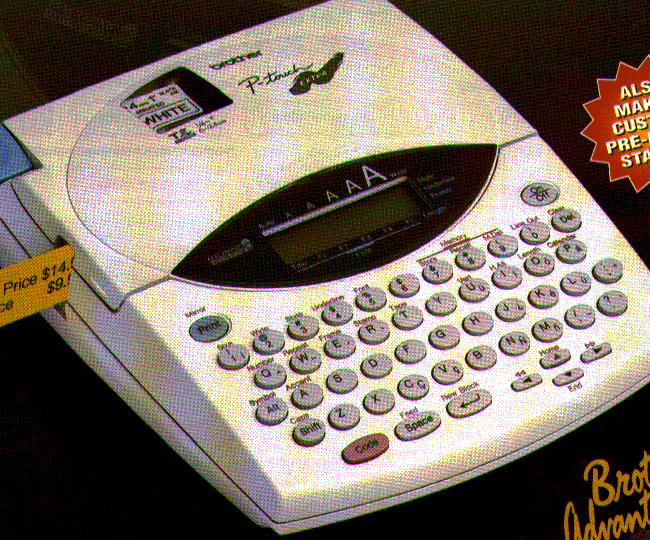
The PT-350 is an earlier, discontinued P-touch built around a full QWERTY keyboard and a display, so it belongs in the conversation for someone who wants to compose at the machine rather than reach for a phone. Its unusual point is the tape history: Brother's current U.S. specification lists TZe cassettes through 12 mm, while its model-specific brochure documents original TZ tape as wide as 24 mm. Those are separate, source-backed routes—not one interchangeable range. That distinction matters more than a generic “up to one inch” description if you are checking a second-hand machine or trying to use a particular cassette.
Keep the two tape paths separate
Brother's PT-350 product page describes five widths—6, 9, 12, 18 and 24 mm—without attaching that list to a cassette family. Its separate specification table says the compatible family is TZe and lists 3.5, 6, 9 and 12 mm. The linked brochure identifies the model as PT-350 and specifically says it uses TZ tape at 6, 9, 12, 18 and 24 mm. I treat those as an original-TZ plan and a current-page TZe plan, not as proof that the PT-350 prints 18 or 24 mm TZe. Brother's TZe-621CS supply page names PT-350 in its compatible-model list for that 9 mm cassette, which supports the narrower TZe route directly. If your job needs a wide strip, check the cassette marking and exact model instructions rather than buying on width alone.
That is a useful example of why this older machine is not just a smaller version of a current model. A 24 mm original-TZ label is supported by the PT-350 brochure, but a 24 mm TZe requirement is not supported by the current specification table. Brother's replacement-model guide points PT-350 owners toward the PT-D610BT; that is a replacement suggestion, not a promise that the newer machine has the same cassette compatibility or workflow. The replacement's own limits should be checked separately.
A local keyboard routine, with a modest display
The exact product page identifies a QWERTY layout and a maximum of two print lines. The brochure shows the keyboard machine and a two-row, 12-character display. This makes the PT-350 a plausible fit for entering short names, shelf notes or folder text directly on the unit. It does not require a separate phone or computer for basic composition, and there is no documented mobile-app route in the sources reviewed. That can be a benefit when a shared machine should remain usable without pairing or installing anything; it is a drawback if you expect long text, a large on-screen layout preview, or the faster editing habits of a modern app.
The listing and brochure also describe different character sizes, styles and frame choices, and the brochure includes barcode and repeated-label functions. Those are useful clues about a flexible standalone tool, but the current online page does not enumerate every built-in option. Treat old promotional feature language as a starting point, not a complete menu or a performance test. In particular, the page specifies two print lines while the brochure claims up to four. Two-line output is supported by both; the exact maximum beyond that is conflicting, so this review does not rely on a four-line job.
Power and stamp supplies are separate buying questions
The PT-350 brochure lists six AA alkaline batteries and an optional Brother AD-60 adapter. It also says the original package included a 12 mm black-on-clear sample tape and a tape trimmer. The adapter is a separate option in that brochure package, not an included item. For an older used unit, ask the seller to show the battery compartment, the adapter label if one is supplied, and the cassette in the machine; do not assume a listing's box contents match the original brochure. The sources here do not confirm an automatic cutter, dimensions, wireless connection, or computer software path, so none should be treated as a fit requirement this model satisfies.
Stamp-making is the PT-350's distinctive extra: Brother describes stamp creation for reusable pre-inked holders, and the brochure identifies SK-MB and SK-LB stamp kits as separate accessories. A label tape cassette does not by itself make a stamp; if stamps are the reason you are considering this unit, verify the holder and matching kit are present and compatible. The extra capability may be useful for repeat office marks, but it also makes package completeness more important than with a simple tape-only labeler.
Who should consider it
This model suits an owner who already has a working PT-350, likes on-device QWERTY entry, and can confirm the exact tape family and power pieces before relying on it. It is a less comfortable default for someone shopping for a current machine: Brother marks it discontinued, its support page does not surface a user-manual section in the saved U.S. response, and the current product page's broad width description is easy to confuse with its narrower TZe table. A modern model may be easier to support, but it will not automatically preserve the PT-350's original-TZ or stamp workflow.
In the finder, the PT-350 is an earlier-reference option, not a current buying recommendation. A need for a QWERTY keyboard, two-line labels, original TZ up to 24 mm, or the separate AD-60 power route can match the evidence-backed plans. A requirement for 24 mm TZe, an included adapter, a phone app, automatic cutting, a specific print height, or a particular body-size limit cannot. Before paying for a used PT-350, identify the model on its underside, confirm the cassette code, and ask for a sample print using the tape you intend to keep buying. If those details cannot be checked, a currently supported machine with the exact media and power route documented is the safer choice.
Primary references: Brother PT-350 product page, its linked PT-350 brochure, the Brother TZe-621CS compatibility page, and Brother's 2024–25 replacement-model guide.
Key details at a glance
| Full-color output | No |
|---|---|
| Print process | thermal transfer |
| Maximum tape width | 12 mm |
| Compatible cassette | Keep Brother's exact PT-350 original-TZ brochure path (6–24 mm) separate from its current exact-page TZe specification (3.5–12 mm), corroborated by an exact compatible 9 mm TZe supply. The general product description's five-width list does not identify cassette family. |
| On-device preview characters | 12 |
| Display type | LCD |
| Maximum lines per label | 2 |
| Letter-key arrangement | qwerty |
| Original TZ maximum width | 24 mm |
Use the exact model’s instructions for operating limits, supplied equipment and version differences.
Sources for this assessment
- Brother U.S. Office & Home directory row PT350, offset 90/index 104
- Exact Brother U.S. PT350 product page
- Exact Brother U.S. PT350 support page
- Brother PT-350 product brochure linked from the exact U.S. page
- Brother U.S. TZe621CS compatible-model listing
- Brother U.S. 2024–25 replacement-model guide (reused existing archive)
Put the device and its tape system together.
Match the exact model, cassette family, computer or network route and any optional power or touch-panel hardware before buying.