
Your needs, this model
Does it fit your priorities?
Would you rather enter short label text on a built-in QWERTY keyboard, or is a phone app essential?
The PT-3600 has a 58-key QWERTY panel and is documented for standalone entry. The archived exact-model pages and manual do not establish a mobile-app route, so do not choose it for phone-first label design.
Explore this need in the finder →Do you need an original TZ cassette as wide as 36 mm, rather than relying on a narrow TZe table alone?
The exact U.S. manual and detailed specification list original TZ through 36 mm. The product page's structured TZe widths end at 12 mm, while Brother's exact 24 mm and 36 mm TZe supply pages also list PT-3600; keep the cassette families and source conflict visible.
Explore this need in the finder →Do you need computer-made output over USB, and will you check the software for your present operating system?
Brother documents a PC/Mac connection and the original package includes a USB cable and software disc. The current exact-model OS page lists several systems, but the older included disc should not be assumed to be the current installer.
Explore this need in the finder →Would pre-sized Avery address or file-folder labels from a cassette solve a different job than continuous tape?
The separate AV plan lists AV2067 address, AV1957 return-address and AV1789 file-folder cassettes. They are individual die-cut labels, not a 36 mm TZ strip or ordinary sheet labels.
Explore this need in the finder →Must the original bundle include an AC adapter, or do you need a battery-powered portable?
Brother's exact U.S. product description includes the AD-9000 adapter in the original PT-3600 package; the model-family guide documents AC-only operation for PT-3600, reserving the rechargeable battery for PT-9600.
Explore this need in the finder →Brother P-touch PT-3600 review
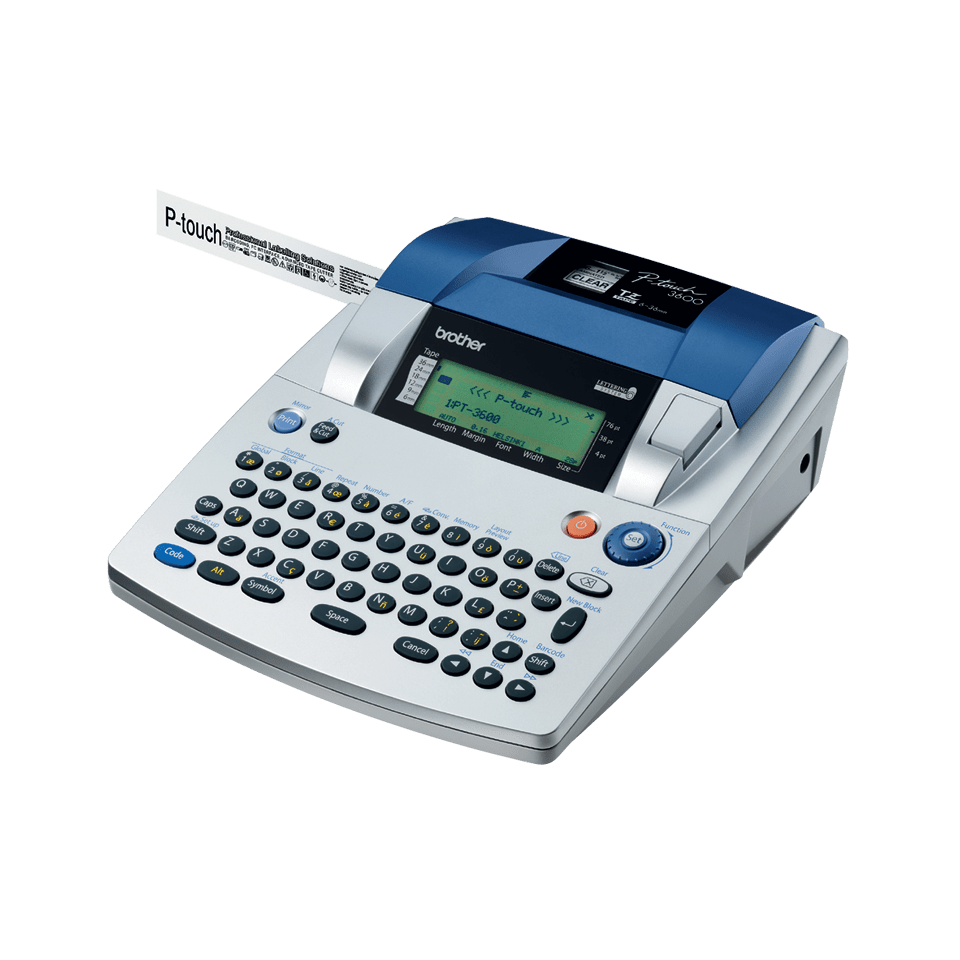
The PT-3600 is an earlier desktop label system for someone who wants more than short handwritten-looking strips: it combines a full-size QWERTY keyboard, a large-format laminated-tape path, automatic cutting, and a USB connection for computer-designed labels. Brother marks the model discontinued, so this is an ownership and careful secondhand assessment, not a current-stock recommendation. It is a substantial counter machine, not the sort of labeler to tuck into a drawer between jobs: Brother lists a 9⅓ × 11 15/16 × 4-inch body and 4.41-pound weight.
Wide tape is the headline, but check the cassette code
The clearest documented route is original Brother TZ laminated tape, in 6, 9, 12, 18, 24, and 36 mm widths. That makes the PT-3600 a fit to consider for broad equipment, shelf, file, or facility labels where a narrow handheld cartridge is limiting. Its shared U.S. user guide gives width-specific line limits—up to 16 lines on 36 mm, 13 on 24 mm, 10 on 18 mm, and fewer on narrower tape—so the maximum is not a promise that every width can carry the same block of text. The manual also lists 360 dpi printing, a 4-foot maximum line of text, roughly 10,000 characters of memory, and automatic full and half cutting.
There is a meaningful source conflict around the newer TZe family. Brother's exact PT-3600 FAQ says TZe tapes can be used, and Brother's own 24 mm TZe-M851 and 36 mm TZe-461CS supply pages each name PT-3600 in their compatible-model list. The current PT-3600 product table, however, lists TZe only at 3.5, 6, 9, and 12 mm and gives a two-line maximum, while its descriptive copy and U.S. specifications/manual describe wider TZ and many more lines. I treat 24 and 36 mm TZe as directly listed compatible supplies, but I would still check the cassette-family mark and exact code on an older unit before building a routine around them; do not take every TZ width as proof of every TZe width. Brother's 3.5 mm guidance also calls for setting the margins carefully, because text can otherwise extend past that narrow strip.
A keyboard on the machine, plus an old computer route
The PT-3600 has a 58-key rubber QWERTY keyboard and a 24 × 119-dot LCD. Brother describes the screen as a three-line display, but it is not a modern color preview; the U.S. specification says it is not backlit. This favors deliberate local entry over composing on a phone. The manual gives ten built-in fonts, character styling, barcodes, and 31 templates for TZ tape, so short repeated labels can be laid out without opening a computer.
It also has a genuine USB computer-design path. The original package description names a USB interface cable and a CD-ROM with label-design software, templates, and drivers; the U.S. manual explains the PT-3600's computer connection separately from the PT-9600 sibling's extra functions. Brother's exact support page currently lists Windows 11 and several older Windows and macOS versions for the model, but the supplied CD is historical software. If computer output is important, check Brother's current download for the operating system you actually use, then confirm the driver and editor are still available before buying a used machine. The available records do not establish a phone-app, Wi-Fi, or Bluetooth route.
Not just tape: Avery cassettes and cutting
A separate AV cassette path prints one die-cut paper label at a time. The guide identifies AV2067 address labels, AV1957 return-address labels, and AV1789 file-folder labels, with 15 AV templates; these are purpose-shaped cassettes, not ordinary sheets of Avery labels and not another tape width. Brother's original PT-3600 package listing says it included an AV2067 cassette with 65 address labels alongside a 24 mm TZ starter cassette. That makes the box more versatile than a basic tape-only bundle, but it does not mean each replacement cassette or the original contents will be present in a secondhand listing.
For TZ tape, the full cutter and automatic half-cut are useful when a job contains several labels: the half-cut leaves the backing easier to peel while separating each label. The cut feature is a mechanical convenience rather than a reason to overlook cassette availability or a jammed cutter on an old unit. Brother's troubleshooting guide advises cleaning and checking the tape path if labels stop ejecting cleanly. A stamp-making function also appears in the manual, but the compatible stamp media and holder are separate pieces; do not count them as part of the standard bundle.
Power, condition, and the more sensible alternative
The PT-3600 is AC-powered. Brother's U.S. guide identifies the AD-9000 adapter and the original product description lists that adapter in the package; the PT-3600's ability to run from a computer does not turn it into a battery-powered portable. The manual and current U.S. specification disagree on the adapter's current rating, so a used-unit buyer should use the exact adapter specified on the machine and adapter labels rather than substituting a generic supply based on an online figure. Check that the keyboard, LCD, USB port, cassette latch, feed path, and both cut actions work, and print a sample with the exact tape family you plan to keep using.
For someone who wants a supported wide-format machine with a smaller workflow, compare the separate PT-D800W or PT-P900 series assessments; their newer connectivity and cassette limits are not interchangeable with the PT-3600's combined TZ/TZe/AV history. The PT-3600 makes sense when local QWERTY input, an AC-powered station, wide TZ labels, computer design, or the specific AV cassette workflow solve a real job—and when you can verify the used machine and supplies. Skip it if you need a phone-first portable, a current bundled product, or you cannot confirm the adapter and cassette identity.
Primary references: Brother's PT-3600 product page, U.S. specifications, PT-9600/3600 U.S. User's Guide, TZe compatibility FAQ, and Brother's 24 mm TZe-M851 and 36 mm TZe-461CS compatibility listings.
Key details at a glance
| Full-color output | No |
|---|---|
| Print process | Thermal transfer |
| Maximum tape width | 36 mm |
| Compatible cassette | Original TZ is documented through 36 mm in the exact U.S. manual and detailed specification. The exact PT-3600 FAQ says TZe is compatible; the current product table lists TZe widths only through 12 mm, but Brother's exact 24 mm TZe-M851 and 36 mm TZe-461CS pages both name PT-3600 in their compatible-model lists. The 24/36 mm TZe direct supply evidence is retained with the product-page conflict; no 18 mm TZe cassette is listed here. Inspect the cassette mark/code on a used unit. |
| Display type | LCD |
| Maximum lines per label | 16 |
| Computer design route | ['Brother label-design software and driver on included CD-ROM; separate software guide is listed by exact U.S. support'] |
| Letter-key arrangement | qwerty |
| Die-cut Avery AV paper-label cassettes | Yes |
| Original TZ maximum width | 36 mm |
Use the exact model’s instructions for operating limits, supplied equipment and version differences.
Sources for this assessment
- Brother U.S. Office & Home directory row PT3600 at offset 105, index 106
- Exact Brother U.S. PT-3600 product page
- Brother U.S. PT-3600 support specification
- Exact U.S. PT-3600/9600 manual index
- Brother PT-9600/3600 U.S. User's Guide v03
- Brother PT-3600 U.S. Quick Setup Guide v02
- Brother U.S. exact-model TZe compatibility FAQ
- Brother U.S. TZ/TZe logo compatibility guidance displayed in PT-3600 support context
- Brother U.S. PT-3600 3.5 mm tape setup FAQ
- Brother U.S. PT-3600 supplies list
- Brother U.S. TZe-461CS 36 mm tape page, compatible model list
- Brother U.S. TZe-M851 24 mm tape page, compatible model list
- Brother U.S. PT-3600 supported-OS list
- Brother UK exact PT3600 product image
- Brother 2024-25 replacement-model list, verified local primary archive reused
Put the device and its tape system together.
Match the exact model, cassette family, computer or network route and any optional power or touch-panel hardware before buying.