
Your needs, this model
Does it fit your priorities?
Would a local-keypad M-tape routine fit your labels?
The PT-55 guide describes local character keys and Brother M tape; exact U.S. page data conflicts on cassette family and keyboard layout, so this is only a fit when those details are confirmed on the specific unit. Brother’s named M231, MK233 and MK631 supply pages each document a 12 mm M route.
Explore this need in the finder →Do you need a confirmed keyboard layout or computer/app composition?
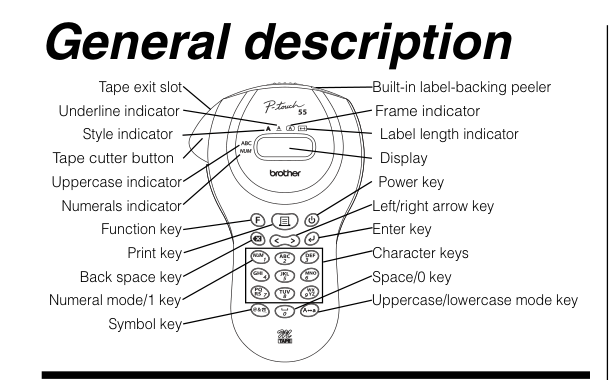
The PT-55 diagram shows multi-press letter keys, but the exact U.S. feature table calls the layout QWERTY. The machine is not documented for app or computer composition; do not rely on it for a required QWERTY, phone or USB workflow.
Explore this need in the finder →Can you cut labels manually after printing?
The PT-55 guide describes a physical cutter button and warns against pressing it during printing. This model is suitable only when manual cutting is acceptable; automatic cutting is not confirmed.
Explore this need in the finder →The PT55BM is an earlier handheld, not a current-buy recommendation
Brother marks the PT55BM discontinued on its U.S. product page. It is therefore most useful to an owner identifying an older machine, or to someone deliberately evaluating a used unit, rather than a shopper who needs a current warranty or a predictable supply route. Brother’s replacement list names the PT-D220 as a suggested successor, but that is a place to start a separate comparison—not proof of identical keyboard, media, features or package contents.
The PT55BM’s appeal is its self-contained labeling routine: enter text on the machine, print, then operate the physical cutter. The Brother PT-55 instructions describe two-line output, variable label-length settings, several text styles and frames, and an integrated backing peeler. The little device drawing in the guide shows a compact key cluster rather than a desktop keyboard. The exact U.S. product page calls its layout QWERTY, however, so the sources disagree on a basic input detail. If key arrangement matters, do not decide from the model name; ask to see the actual unit or its manual before choosing it.
Use the M-tape evidence narrowly
The strongest practical distinction is the cassette family. The PT-55 guide says to use Brother M TAPE cassettes. Brother’s U.S. product page currently lists TZe and 3.5, 6, 9 and 12 mm widths, while its M-231 supply page names PT55BM and describes a 12 mm non-laminated cassette. The separate M-K233 and M-K631 product pages also name PT55BM and specify 12 mm tapes. These specific supplies give an owner concrete options, but they do not make M and TZe interchangeable. For a conservative fit decision, count only the directly documented M route and the named 12 mm supplies; a TZe-dependent job is not established by the cassette pages.
There is another reason not to buy a random old cartridge by width alone. The PT-55 instructions list several M models that cannot be used, including M-721, even though Brother’s current M-721 web page includes PT55BM in its compatibility list. That is a real conflict, not something a buyer should resolve by guesswork. A used PT55BM should be tested with a cassette whose exact part number is supported by the machine’s own documentation, rather than with a tape selected only because it is 9 or 12 mm wide. The printed guide also says supplies can differ by country, so the specific U.S. cassette record matters.
Simple output, with limits that shape the choice
For short household labels, the PT-55 instructions’ two-line limit and adjustable label length can be enough: think names, drawer markers or brief file identifiers, not dense instructions. The manual’s two-line mode uses its smallest text setting, so adding a second line does not preserve the largest type size. Brother’s U.S. page gives a maximum of two lines too, but its print-height field is not enough to establish a guaranteed character height for a particular label. If a label must be legible from a distance or needs a specific text height, the PT55BM is not a safe choice without a demonstration or better exact-model documentation.
This is a standalone keypad machine, not a documented computer or phone-design printer. The checked U.S. product and supply pages do not establish an app workflow, Bluetooth, Wi-Fi or USB design route. Nor should buyers infer automatic cutting: the manual describes pressing a cutter button after printing. If any of those capabilities is essential, choose a product whose exact instructions describe it rather than treating an empty specification field as a yes.
Brother’s guide instructs users to install four AAA batteries and warns against touching the cutter blade or pressing its button while printing. It also describes a five-minute automatic shutoff. These details suit an occasional grab-and-label task but not necessarily a fast workstation workflow. The U.S. page does not confirm package contents or exact body dimensions, so a used machine should be checked for its cassette cover, working display, cutter action and any adapter or cassette being offered. Do not assume a historical box included an accessory simply because a listing photo shows one.
Which needs change the recommendation?
The PT55BM is a reasonable earlier reference only if on-device entry, a small number of text lines and the confirmed 12 mm M cassette route fit your task—and you are comfortable verifying the particular unit. Selecting “include earlier models” and M tape can surface that route in the comparison. A current-reference-only preference should remove it. An essential TZe requirement, a wider cassette, phone composition, USB computer design, a confirmed QWERTY layout, or automatic cutting should rule it out because the available records do not support those conditions.
That distinction is more useful than saying the machine is simply “basic.” Its compact, self-contained approach avoids an app or desktop design step, but it also leaves the owner with an older and less certain media record. A current M-tape model such as Brother’s PT-M95 is a better comparison for someone who wants on-device entry with clearer current U.S. documentation; the PT-D220 is Brother’s named replacement, but its own attributes should be checked separately. Neither alternative should be treated as an upgrade in every respect without comparing the exact task and supplies.
Bottom line
Keep the PT55BM in a used-unit or earlier-model comparison, not a current shopping shortlist. Its manual describes a compact standalone printer for short, two-line labels and a manually operated cutter. Exact Brother M-tape pages provide a narrow 12 mm route, while the product specification’s TZe/QWERTY fields conflict with the PT-55 documentation and a current M-721 compatibility entry conflicts with the manual’s warning. Confirm the unit’s identity and an exact supported cassette before paying; if the job depends on an app, computer, wider tape or a particular keyboard, select a better-documented model instead.
Key details at a glance
| Print process | Thermal transfer (U.S. product table); PT-55 guide describes a thermal print head. |
|---|---|
| Maximum tape width | 12 mm |
| Compatible cassette | Conservative strict route: Brother’s M231, MK233 and MK631 U.S. supply pages name PT-55BM and each specifies 12 mm non-laminated M tape. The PT-55 guide says M tape, but the exact U.S. product page lists TZe; its current M721 supply listing also conflicts with the guide’s warning against M-721. TZe and 9 mm compatibility are not enabled until those conflicts are reconciled. |
| Maximum lines per label | 2 |
| On-device frames | 9 |
| Power choices | Brother’s PT-55 family guide says to use four AAA alkaline batteries; exact U.S. package contents and local guide remain unverified. |
| Body dimensions | No exact U.S. physical dimensions were confirmed; measure the specific used unit if shelf fit matters. |
| Tape cutting | PT-55 family guide instructs the user to press the cutter button after printing; automatic cutting is not supported by that described mechanism. |
| Built-in type styles | 9 |
Use the exact model’s instructions for operating limits, supplied equipment and version differences.
Sources for this assessment
- Brother U.S. Office & Home catalogue row at offset45/index59
- Brother U.S. PT55BM product page
- Brother U.S. PT55BM product-support page
- Brother PT-55 family user guide, AU English download
- Brother U.S. exact-model manual-index response
- Brother U.S. M231 tape page
- Brother U.S. M-K233 tape page
- Brother U.S. M-K631 tape page
- Brother U.S. M-K232 tape page
- Brother U.S. M721 tape page
- Brother U.S. replacement-model list (reused prior archive)
Put the device and its tape system together.
Match the exact model, cassette family, computer or network route and any optional power or touch-panel hardware before buying.