
Your needs, this model
Does it fit your priorities?
Do you prefer familiar QWERTY typing and want one of the specifically listed 9 or 12 mm Brother TC tapes?
Brother lists PT-6 compatibility with the named TC20Z1 9 mm and TC10 12 mm tape products. The machine is discontinued, so verify the exact cassette code and working condition.
Explore this need in the finder →Are two printed lines and a maximum 12 mm width enough for the job?
Brother lists up to two PT-6 print lines and a 12 mm TZe ceiling. The page does not give a millimeter print-height limit, and 18 mm is outside its documented width range.
Explore this need in the finder →Would a discontinued PT-6 be acceptable if you can confirm the exact refill and unit condition?
Brother marks PT-6 discontinued. It is shown only when earlier models are included; do not infer its adapter, cutter or included supplies from another label maker.
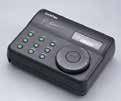
Explore this need in the finder →The Brother P-touch PT-6 is a discontinued, keyboard-led label maker that is most sensible for an owner who can verify the exact cassette and working condition before buying. Brother’s U.S. product page lists a QWERTY layout, laminated thermal-transfer tape, a two-line maximum and a label-length setting. The unusual buying detail is that Brother also lists the PT-6 as compatible with specific TC tape products. Treat cassette codes as part of the model decision: width alone does not establish that two tapes use the same system.
Read the cassette family before shopping for width
Brother’s exact PT-6 page lists TZe tape at 3.5, 6, 9 and 12 mm. Separately, Brother’s U.S. pages for TC10 and TC20Z1 name PT-6 among the compatible machines; those two exact products are 12 mm and 9 mm respectively. Those are distinct manufacturer-listed routes. The practical consequence is simple: if you already have this machine, match the label on the refill to the specific code and PT-6 compatibility record. Do not assume that a different cassette is interchangeable just because it is the same width, or that every specialty cassette in one family fits.
Both paths top out at 12 mm in the records above. That can be enough for short identifiers on folders, containers or equipment, but it is not the choice for a bold 18 or 24 mm label. The PT-6’s exact product listing describes laminated thermal-transfer output, which is useful when you want that kind of tape construction; it does not establish that every listed or specialty tape is suited to every surface or environment. Check the tape’s own instructions for the job you plan to label.
A physical keyboard and short text are the clearest fit
Brother identifies the PT-6’s key arrangement as QWERTY and caps printed output at two lines. There is also a label-length setting. Together, those facts point to direct entry of straightforward names and short identifiers rather than importing a spreadsheet or arranging a large batch of designed labels. If you prefer familiar letter keys and your label can fit within two lines on a narrow cassette, the documented workflow is easy to understand.
Brother’s “Standard Memory 15” entry has no unit or explanation, so it should not be read as fifteen stored labels, fifteen characters or a particular number of saved files. The product information also does not establish a numeric print height, screen size, cutter type, computer port, wireless route or phone-app workflow. If any of those is essential, treat it as unconfirmed rather than assuming it comes with an older label maker. A two-line maximum is not a promise of a particular text height or legibility on every tape width.
Who should keep the PT-6 on the list?
It is best considered by someone who already owns a PT-6, can inspect the actual unit, and wants an on-device QWERTY route for small, narrow labels. A buyer who can identify the cassette and has a known supply plan may value the ability to use the documented TC or TZe route without replacing a working machine. That does not make it a low-risk new purchase: Brother marks the PT-6 discontinued, and remaining supply, condition and package contents depend on the particular offer.
For a purchase intended to stay in regular household use, compare the PT-6 with a current-reference option such as the Brother PT-D220. The PT-D220 is also a QWERTY machine for TZe tape up to 12 mm, but its assessment documents a 15-character display, six AA battery power and an optional adapter route. Those details are confirmed for the PT-D220, not transferable to the PT-6. Choose the newer model if knowing the power and display arrangement matters more than using the older unit you already have.
Questions to settle before buying used
Ask the seller to show the cassette code and the label maker’s model marking together; a tape listing that names PT-6 is more useful than a generic “P-touch compatible” claim. Confirm that the unit powers on, accepts keys, feeds and prints a test label, and has the parts needed for the operating route you intend to use. The U.S. listing and the exact TC supply pages establish useful media and text limits, but they do not answer what adapter, batteries, cutter or accessories are included in a secondhand bundle.
Skip the PT-6 when you need a source-confirmed phone or computer design workflow, wireless printing, a specific adapter, automatic cutting, a known screen size, a measurable print-height minimum or tape wider than 12 mm. Those capabilities are not established in the PT-6 information used here. For a narrow label and familiar keypad, it can remain worth comparing if the exact machine and cassette match; for any essential feature outside that short profile, choose a model whose own documentation confirms it.
Key details at a glance
| Print process | thermal transfer |
|---|---|
| Maximum tape width | 12 mm |
| Compatible cassette | Brother’s exact PT-6 page lists TZe at 3.5/6/9/12 mm; Brother’s separate TC10 and TC20Z1 tape pages list PT-6 as compatible with those named 12 mm and 9 mm products. Keep the cassette families and their specific widths separate; do not infer that every TC or TZe product works. |
| Maximum lines per label | 2 |
| Line-count note | Brother’s exact U.S. PT-6 product page lists a maximum of two print lines. Width-specific text-height limits were not found. |
| Power choices | The exact U.S. PT-6 product/support pages captured here do not establish a battery or adapter route or bundle contents. |
| Body dimensions | No exact U.S. axis-assigned PT-6 device dimensions were established. |
| Tape cutting | The exact product page does not identify a cutter type. Verify the exact unit’s feed/cut behavior rather than assuming manual or automatic cutting. |
| Letter-key arrangement | qwerty |
Use the exact model’s instructions for operating limits, supplied equipment and version differences.
Sources for this assessment
Put the device and its tape system together.
Match the exact model, cassette family, computer or network route and any optional power or touch-panel hardware before buying.