
Your needs, this model
Does it fit your priorities?
Do you need a small standalone QWERTY machine for short labels on Brother M tape?
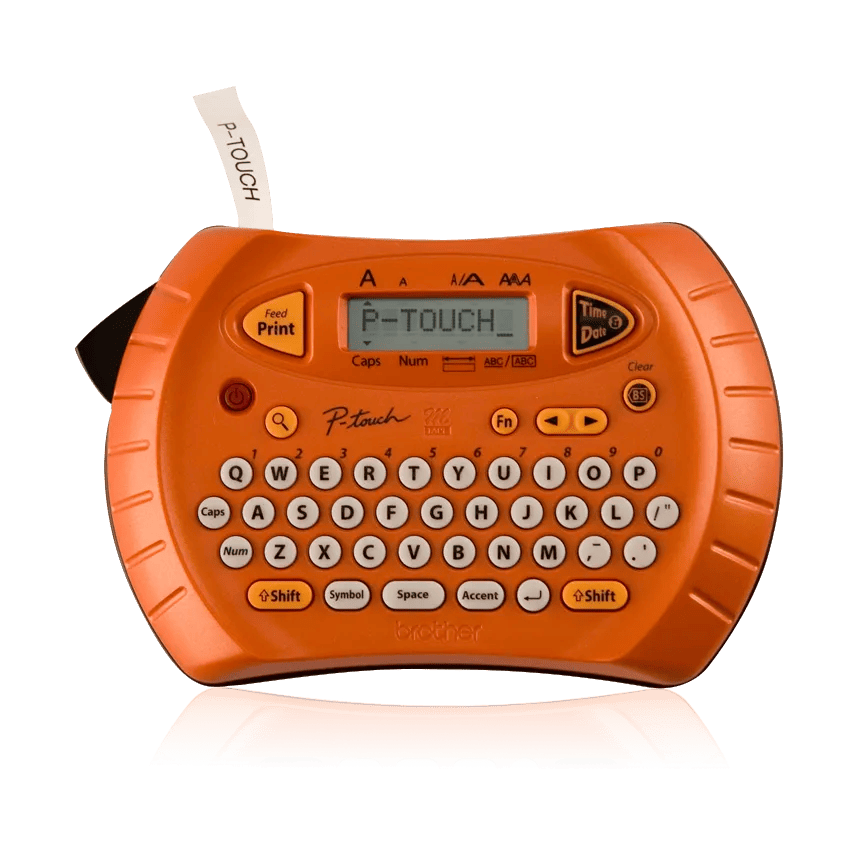
The PT-70 has on-device QWERTY keys and Brother documents M cassettes at 9 and 12 mm; its guide says M only. It is discontinued and should not be treated as a TZe machine.
Explore this need in the finder →Would a handheld body no wider than 6.7 inches fit the place where you store it?
Brother lists the PT-70 body as 6.7 inches wide, before allowing extra hand room or space for a label to exit. The exact width is a fit boundary, not a storage guarantee.
Explore this need in the finder →Can you finish labels with a hand cutter and replace alkaline batteries when needed?
The guide shows a manual cutter and four AAA alkaline batteries. Brother also notes that its date/time function draws battery power to keep the clock updated. Automatic cutting and an adapter route are not established.
Explore this need in the finder →The Brother P-touch PT-70 is a discontinued handheld label maker for someone who prefers to type directly on the machine and can work within a narrow, older cassette system. Its appeal is not an app or a computer workflow: it is the combination of a familiar QWERTY keypad, a small screen, a time-and-date key, and several simple formatting choices. The key purchasing distinction is media. The exact US PT-70 documentation specifies Brother M tape, not the laminated TZe cassettes used by many newer P-touch machines.
A pocket editor, not a design workstation
The PT-70’s raised typewriter-style keys give it a recognizable QWERTY layout, while the LCD shows eight characters on one line. Longer text scrolls across that display; the manual permits up to 80 characters in an entry and up to two printed lines. That is enough for short shelf names, file labels, or a small identifier with a second line, but it is not a large proofing screen. Before printing a long name, move through the text and use the preview function rather than assuming the small window shows the whole result at once.
Brother lists two character sizes, nine type styles and one font. The page also lists five automatic formats, five frame choices and 71 symbols. Those controls offer more variety than a bare “type and print” tool, but they do not make this a graphic-design device. A title may be decorated or paired with a symbol; there is no documented mobile layout editor, broad template library, or computer design connection. If many labels must be created from a spreadsheet or a polished set of layouts, the PT-70 is the wrong route.
Check the cassette logo before thinking about width
Brother’s exact US PT-70 page, support specification and model-specific user guide identify Brother M tape in 9 mm and 12 mm widths. The standard page says a 12 mm black-on-white M starter cassette was included when new. The guide says to use only M tape. This is a non-laminated, direct-thermal system; width alone does not make a TZe cassette compatible. Do not buy a newer TZe cassette just because its width happens to be 9 or 12 mm. If an old machine is missing its tape door or the cassette-family marking is unreadable, identify the exact label on the unit before loading anything.
Nine and twelve millimeters are useful for short indoor identification, but this is not a wide-label machine. The PT-70 cannot meet a requirement for the wider TZe formats or the physical construction of laminated TZe stock. Brother’s specifications do not establish a numeric maximum printed height for the PT-70, so its two-line capability should not be converted into an assumed 9 mm print-height rating. Choose a newer model with model-specific tape and print-height documentation if the size of the finished lettering is an essential constraint.
Date and time are useful, but draw on the batteries
The dedicated Time/Date control can put a date or time onto a label, with eight formats described on the product page. That can help make a quick dated note without moving to a computer. There is a practical catch: Brother’s support FAQ says the clock function continues to use battery power to keep the date and time current, even when the maker is used infrequently. If time stamps are not needed, Brother suggests removing the batteries during longer gaps. The user guide also warns that disconnecting power for more than two minutes clears text and formatting, as well as the language, unit and clock settings. Treat this as a temporary editing pad, not dependable long-term file storage.
The machine takes four AAA alkaline cells. Its manual describes a manual cutter lever, so finishing a label means a separate hand action after printing. Neither a power adapter nor automatic cutting is established for the exact PT-70 configuration. A few one-off labels are manageable; a long run of short labels will involve repeated typing, feeding and cutting. The specification gives a body size of 6.7 × 4.4 × 2.3 inches and a weight of half a pound before batteries and tape. It is handheld, but it still occupies a useful amount of drawer space and is not a tiny key-fob device.
Where it fits—and where it does not
The best case for a PT-70 is an owner who already has a working unit, wants a physical QWERTY keyboard, occasionally uses the date/time feature, and can source the correct M cassette. Its simple two-line labels can suit folders, drawers and other dry indoor surfaces. Brother’s manual warns against exposing the machine to rain, direct sunlight, high temperatures and high humidity; neither the non-laminated media nor the old device should be treated as a universal outdoor marking system. Test a label on the intended surface before making a full batch.
Its status matters: Brother marks the PT-70 discontinued. A used listing is not the same as a new retail package, and old batteries, a missing cover, worn keys, a dull cutter or an uncertain cassette can change whether a particular unit is usable. The product page’s original-package note is not evidence of what accompanies a second-hand sale. If the existing machine is sound and M tape is already part of the routine, it remains a practical opt-in reference. If you are choosing fresh hardware, a current TZe handheld such as the PT-H110 uses a different laminated cassette system and is the more relevant comparison for standard TZe stock; it is not a substitute cassette route for the PT-70.
In short, choose the PT-70 only when the exact earlier machine and Brother M media match the job. Its tiny one-line display, battery-powered clock, manual cut, narrow media and discontinued status are the tradeoffs behind the straightforward keyboard. A need for TZe, wider formats, a computer/app workflow, documented larger print height, or automatic cutting points to another model rather than a workaround.
Key details at a glance
| Print process | Direct thermal |
|---|---|
| Maximum tape width | 12 mm |
| Compatible cassette | Brother’s exact PT-70 US product page, US support specification and PT-70 User’s Guide v02 specify M tape in 9 mm and 12 mm widths; the guide says to use M only. It is non-laminated direct-thermal media, not TZe. |
| Built-in templates | 5 |
| On-device preview characters | 8 |
| Display type | Monochrome LCD |
| Maximum lines per label | 2 |
| Line-count note | The exact Brother US product page and PT-70 User’s Guide state a maximum of two printable lines. |
| On-device frames | 5 |
| On-device symbols | 71 |
| Power choices | The US specification and user guide specify four AAA-size alkaline batteries. No exact PT-70 external adapter route is documented; compatibility is unknown. |
| Body dimensions | Brother US specification: 6.7 × 4.4 × 2.3 inches, W × D × H. |
| Tape cutting | The PT-70 User’s Guide depicts and instructs a manual tape-cutter lever; automatic cutting is not documented. |
| Letter-key arrangement | qwerty |
| Built-in type styles | 9 |
Use the exact model’s instructions for operating limits, supplied equipment and version differences.
Sources for this assessment
Put the device and its tape system together.
Match the exact model, cassette family, computer or network route and any optional power or touch-panel hardware before buying.