
Your needs, this model
Does it fit your priorities?
Would alphabetically grouped keys suit the people entering your labels?
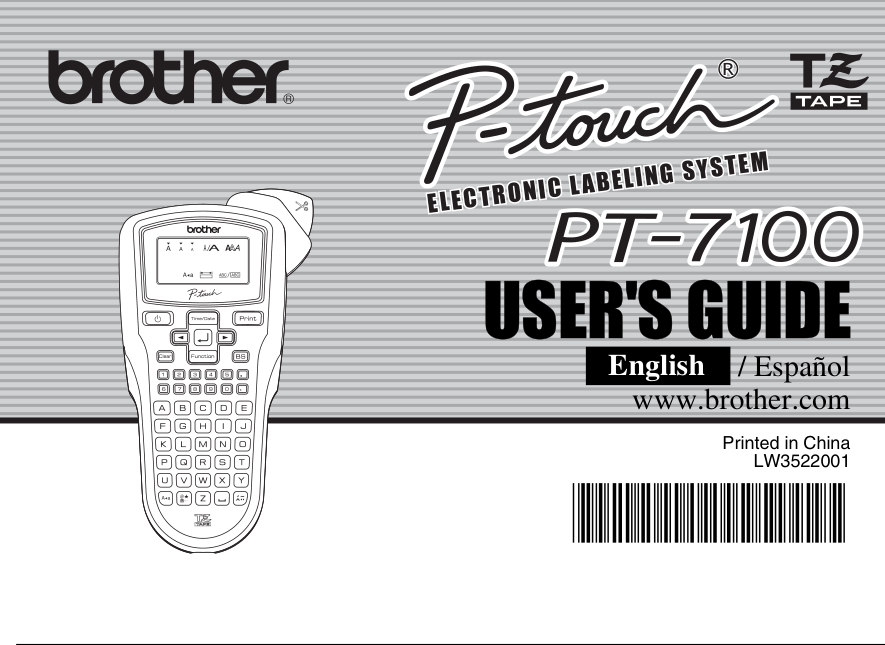
The exact PT-7100 guide illustration shows alphabetic rows, but Brother’s product specification table says QWERTY. Treat the layout as a hands-on check if this is decisive.
Explore this need in the finder →Can you work with Brother’s legacy TZ guide route and widths no wider than 12 mm?
The older U.S. guide says use only TZ at 3.5, 6, 9 or 12 mm; the U.S. product page separately says TZe at those widths. Confirm the cartridge code in the actual machine before stocking supplies.
Explore this need in the finder →Would on-device fixed formats and optional AC power help more than automatic cutting or computer design?
The PT-7100 offers six Auto Format lengths and the optional AD-24 power route, but its manual shows a hand cutter and no computer-design workflow.
Explore this need in the finder →The Brother P-touch PT-7100 is a discontinued handheld label maker that Brother positioned for panels, outlet covers, cables and shop organization. It combines on-device typing with date-and-time insertion, saved labels and fixed-length formats. The useful detail is also the main caution: its exact U.S. product page and the model-specific guide tell different stories about cassette family and keypad arrangement. Treat those conflicts as buying checks, not as interchangeable specifications.
Check the cassette and keyboard before buying
Brother’s U.S. PT7100 product page lists laminated TZe tape at 3.5, 6, 9 and 12 mm. The English/Spanish user guide says to use only Brother TZ tape and lists those same four widths. The model-specific support page marks the PT-7100 discontinued. These are two different manufacturer statements about the same machine; neither proves that every old TZ and later TZe cassette fits or behaves the same. If buying a used unit, inspect the cassette bay, existing cartridge code and exact regional support information before stocking media. Don’t rely on width alone.
There is a second discrepancy. The Brother specification table calls the keyboard QWERTY, while the PT-7100 manual cover and its labeled keyboard diagram show alphabetically grouped letters: A–E, F–J and onward. The alphabetical arrangement is visible in the official model illustration, but a practiced QWERTY typist should inspect the actual machine before purchase rather than assuming the table or picture represents every regional version.
Compact, local entry with useful repeat-label tools
The PT-7100 is composed directly on its own keypad; the guide documents no phone-app or computer-design route. Its LCD shows one line of 12 characters even though an entry can be up to 80 characters long. The guide documents up to nine saved labels, so short repeated identifiers can be recalled instead of retyped. It also offers six Auto Format lengths for common media spines, file tabs and dividers, plus eight date/time formats. Those are concrete conveniences for service records and repeat office jobs, not a substitute for importing a spreadsheet or designing a large label set on a computer.
Brother describes the machine for cable, panel and outlet labeling and says the package comes with a 26.2-foot black-on-white Flexible ID tape. The manual does not document a dedicated Cable Wrap, Cable Flag or faceplate template, so read that as ordinary text output on flexible media—not as the specialized cable-format workflow of newer devices. It also gives no ingress-protection or weatherproof rating. “Industrial” in Brother’s product title is not evidence that the printer or an applied label is suitable for rain, heat, chemicals or every cable jacket. Follow the cassette’s use instructions and test adhesion on the actual surface.
Two lines need wider tape; finishing is manual
Brother’s product description says the PT-7100 can print up to two lines and up to 24-point-equivalent text and symbols on 12 mm tape, automatically selecting a smaller text size for narrower tape. The guide is more useful for planning: it allows two lines on 9 mm or 12 mm tape, and treats 3.5 mm and 6 mm tape as one-line widths. It doesn’t give a measured maximum print height in millimeters, so a buyer who needs a specific physical text-height threshold should not infer one by converting the marketing point-size wording.
Printing is followed by a hand-operated cutter lever. The manual’s Chain Print setting can reduce the margin between successive labels, but still requires feeding the strip and finishing the cut; Brother warns to feed before using the cutter so the end of the text is not clipped. This is reasonable for a small batch. A busy workflow that produces many short labels will involve more manual handling than an automatic-cutter model.
Power, size and ownership tradeoffs
The guide specifies six AAA alkaline cells or Brother’s optional AD-24 adapter. It does not document rechargeable batteries or charging in the unit. Dimensions are about 4.3 by 8.1 by 2.3 inches and weight about 0.8 lb before batteries and tape, so it is hand-portable but not pocket-small. The manual warns that removing power for more than two minutes clears text and formats along with language, unit and clock settings. That matters if labels are being drafted before work begins: keep power available until you have printed or saved the text.
This makes the PT-7100 a fit for someone who values a compact local keypad, saved short labels, date/time insertion and flexible-ID use—and who is comfortable checking legacy cassette identity and hand-cutting. It is a poor match for buyers who require a current model, a guaranteed TZe-only supply story, a QWERTY keyboard, phone or computer composition, automatic cutting, a confirmed adapter in the box or an environmental protection rating.
Current alternative and final checks
The PT-H110 is a more straightforward current-reference alternative when familiar QWERTY entry and standard TZe supply are priorities. It also tops out at 12 mm and uses an on-device keyboard, but its media and software story is less ambiguous in the current U.S. sources. The older PT-7100 instead brings its date/time function, saved-label workflow and manual-described TZ route; those gains are only useful if the exact used unit, cassette and power condition check out. For regular office work that benefits from wider tape or computer composition, a desktop model may be easier to live with.
Before choosing a PT-7100, check the model marking, cassette code, cutter action, display and included power equipment in the actual listing. Brother’s U.S. PT7100 product page, its U.S. manual listing and the English/Spanish user guide are the primary checks for the particular version and supplies.
Key details at a glance
| Full-color output | No |
|---|---|
| Maximum tape width | 12 mm |
| Compatible cassette | Two exact Brother sources conflict: the U.S. product page specifies TZe widths 3.5/6/9/12 mm; the older model-specific U.S. guide says use only TZ and lists the same widths. Keep the statements in separate operating profiles and verify the actual cassette marking; width does not establish cassette-family interchangeability. |
| Built-in templates | 6 |
| On-device preview characters | 12 |
| Display type | LCD, one line of 12 characters; backlighting not specified |
| Maximum lines per label | 2 |
| Line-count note | Brother’s exact U.S. guide permits two-line text on 9 or 12 mm tape and only one line on 3.5 or 6 mm tape; the product page independently lists a two-line maximum. |
| On-device frames | 6 |
| Saved label files | 9 |
| Power choices | Brother’s PT-7100 guide specifies six AAA alkaline batteries (LR03) or the optional Brother AD-24 adapter. It does not establish that the adapter or batteries are included in every observed package. |
| Body dimensions | Brother’s U.S. PT-7100 User’s Guide lists approximate dimensions 4.3 × 8.1 × 2.3 in (W × D × H) and weight 0.80 lb without batteries or cassette. |
| Tape cutting | The guide labels a hand-operated tape-cutter lever and describes Full/Half/Narrow margins and Chain Print. Chain Print reduces between-label margins but still requires feeding and manually finishing the strip. |
| What the base package supplies | The exact U.S. product page says the PT7100 comes with 26.2 ft of black-on-white Flexible ID tape. The user guide warns that supplies may differ by distribution; confirm contents in the specific used or retailer listing. |
| Letter-key arrangement | alphabetical |
| Built-in type styles | 9 |
Use the exact model’s instructions for operating limits, supplied equipment and version differences.
Sources for this assessment
- Brother U.S. PT7100 exact product page
- Brother U.S. PT-7100 discontinued support/downloads page
- Brother U.S. PT-7100 specification page
- Brother U.S. PT-7100 manuals listing; User’s Guide v01 released 2009-02-13
- Brother PT-7100 English/Spanish User’s Guide v01
- U.S. CPSC recall listing snapshot used for exact-model recall search
Put the device and its tape system together.
Match the exact model, cassette family, computer or network route and any optional power or touch-panel hardware before buying.