
Your needs, this model
Does it fit your priorities?
Would direct QWERTY typing on the machine and Brother M tape be a comfortable fit?
The exact PT-80 U.S. manual identifies a QWERTY keyboard and says to use only Brother M tape at 9 or 12 mm; the model is discontinued, so opt into earlier machines.
Explore this need in the finder →Are short two-line labels with a small composing display enough?
Brother lists two-line output, a 12-character single-line LCD and a maximum 7 mm print height. The display scrolls longer text and does not provide a full-size layout preview.
Explore this need in the finder →Do you prefer a handheld machine that cuts by hand after battery-powered printing?
The guide specifies four AAA alkaline batteries and a manual cutter lever. It does not establish U.S. adapter, mobile-app or wireless operation.
Explore this need in the finder →A discontinued keypad labeler for people who already have one
The Brother P-touch PT-80 is a handheld machine that lets you type and format labels on the device itself. Its exact U.S. product page marks it discontinued. That makes this a useful assessment for an existing owner or someone identifying a specific secondhand unit, not a current default purchase suggestion. If you are shopping for a new label maker, start with a current model and confirm its tape system and support path; the P-touch name alone does not make old and new cassettes interchangeable.
Typing and checking a label on the machine
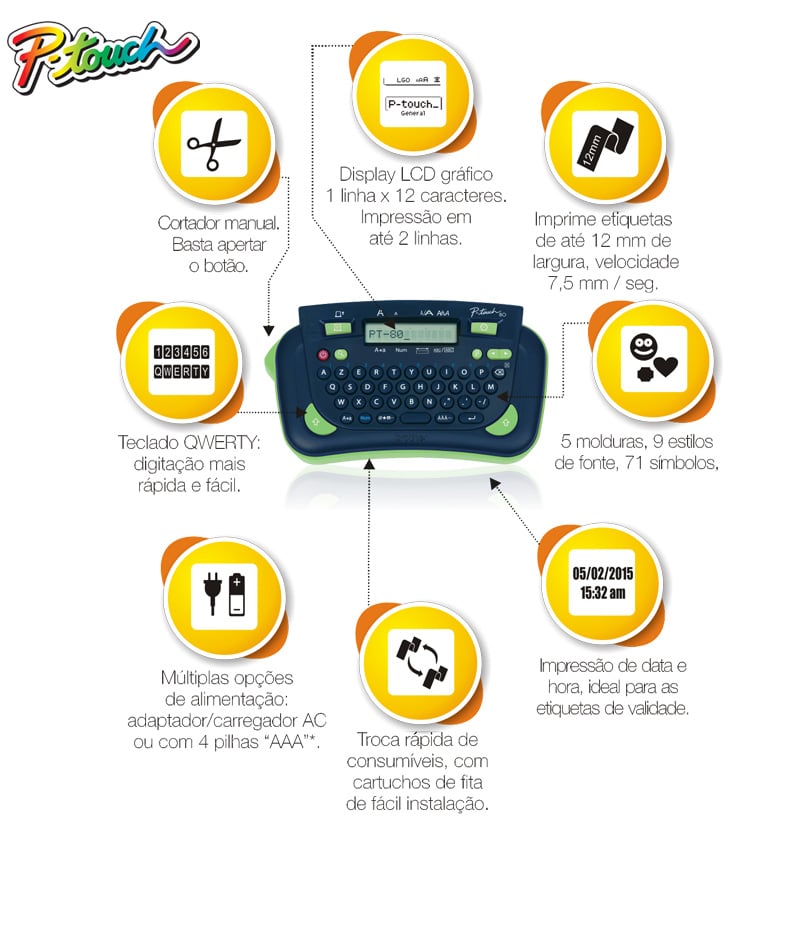
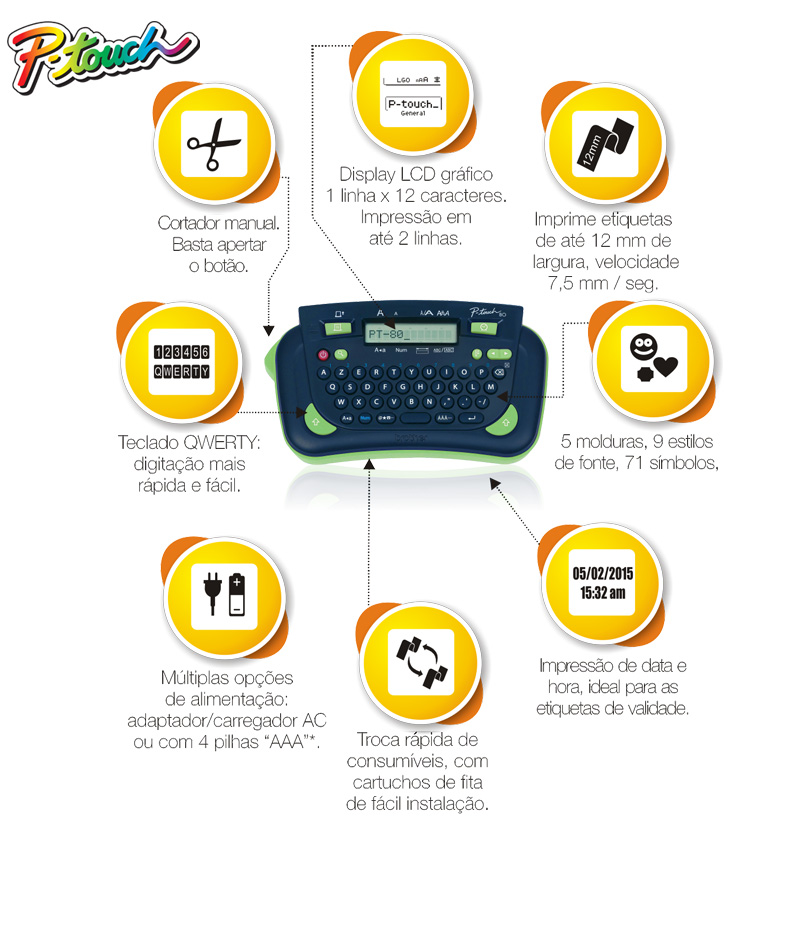
The PT-80 has a built-in QWERTY keyboard and a one-line LCD. The display shows 12 characters at a time, while Brother’s user guide says an entered line can be up to 80 characters and scroll across the screen. That is enough to compose a longer string without attaching a computer, but it is not a large visual preview: you move through the text in a narrow window and check the formatting before printing. The guide shows an actual text preview, and documents up to two printed lines. Brother’s U.S. specification limits the maximum print height to 7 mm, so two lines should not be mistaken for a tall, large-type label. If your minimum is 9 mm of print height, this model does not meet it.
Its controls suit short, repeatable jobs more than elaborate layout work. Brother lists one Helsinki font, nine type styles, size and width adjustments, 71 symbols, and date-and-time insertion in eight formats. The guide also describes five automatic formats for items such as file tabs and cassette spines, plus framing and underlining choices. There is useful variety without a phone app or desktop design step, but an old handheld screen and keyboard take more patience than editing a long batch on a computer. Brother’s exact U.S. specification says there is no PC connection; the checked material does not establish a current phone-app or wireless workflow.
Use the M cassette family, not just a familiar width
PT-80 compatibility is the decisive practical constraint. The model-specific U.S. guide says to use only Brother M tape and lists 9 mm and 12 mm cassettes. The exact U.S. product description says the output is non-laminated; the specification identifies direct-thermal printing. A 12 mm cassette from another P-touch family is not automatically a substitute for a 12 mm M cassette. In particular, do not choose TZe simply because a newer Brother cartridge also measures 12 mm.
Because this is not laminated tape, do not assume it has the same surface or environmental performance as a laminated cartridge. For labels likely to be scrubbed, repeatedly wiped, exposed outdoors, or placed near heat or chemicals, a current model with an exact media recommendation for that use is a safer comparison. Even with the PT-80, a small test label on the actual surface is more useful than inferring adhesion or durability from the product family name. Brother’s exact U.S. support record has a Compatible Supplies section, but that listing does not guarantee future stock, any seller’s condition, or the contents of a used unit.
Hand cutting and battery upkeep
The PT-80 is portable in the sense that it is handheld and runs on four AAA alkaline batteries. The manual describes feeding the tape and pressing a cutter lever; the U.S. specification calls its blade a manual cut, not an automatic cutter. That keeps the label-making path self-contained, but it adds a hand step after each print. The device switches off after about five minutes without a key press. The guide also warns that if power is disconnected for more than two minutes, text and formatting settings are cleared, as are language, measurement-unit and clock settings. Anyone relying on date stamps should remember that the clock needs attention after a long battery change.
The exact U.S. specification gives a 6.8 × 4.0 × 2.3 inch body and a 0.5 lb weight without batteries or cassette. The original guide’s package diagram names the machine, an M tape cassette, a user guide, an accessories guide and a warranty card, while warning that included items can vary by distribution. That is historical packaging information, not proof that a used PT-80 listing includes a cassette, paperwork, working batteries or a warranty. Before buying one used, ask for a clear photo of the exact PT-80 model label and cassette bay; check for battery leakage, a readable LCD, responsive keys, tape feed and a clean cutter.
Who it fits—and where to look instead
Keep the PT-80 in consideration if you already own the machine, can obtain Brother M cassettes in 9 or 12 mm, prefer direct QWERTY entry, and mainly make short personal, school, file or household labels. Its local controls, text preview, date/time option and straightforward battery operation are the appeal. It is a poor fit when TZe compatibility, laminated output, a 9 mm print-height minimum, an automatic cut, phone/computer design, or a dependable current warranty is essential. Unknown support is not a reason to count it as a match.
For a new keyboard labeler, compare the current PT-D220 review and its TZe-focused workflow with your actual requirements rather than treating PT-80 M tape as a direct substitute. The broader M-versus-TZe guide explains why cassette family should be checked before width. This PT-80 assessment is deliberately retained as an earlier-model reference; it does not imply that a particular used unit is in stock or in working order.
Primary references: Brother’s PT-80 U.S. product page, U.S. specification, and U.S. User’s Guide v02. The exact-model image is a Brother Brazil feature graphic, not evidence of U.S. package contents: Brother’s PT-80 page.
Key details at a glance
| Full-color output | No |
|---|---|
| Print process | Direct thermal (exact PT-80 U.S. product-page specification) |
| Maximum tape width | 12 mm |
| Compatible cassette | Brother’s exact U.S. User’s Guide says to use only Brother M tapes and its U.S. specification lists 9 mm and 12 mm M tape. These widths do not imply TZe compatibility. |
| Built-in templates | 5 |
| On-device preview characters | 12 |
| Display type | LCD |
| Maximum combined print height | 7 mm |
| Maximum lines per label | 2 |
| Line-count note | The exact U.S. PT-80 User’s Guide states two lines; the exact specification sets maximum print height at 7 mm. Two lines do not imply a 9 mm print-height capability. |
| On-device symbols | 71 |
| Power choices | The U.S. manual specifies four AAA-size alkaline batteries. Brother Brazil’s feature image also mentions an adapter option for that market, but that does not establish a U.S. PT-80 adapter, so the U.S. plan leaves AC support unknown. |
| Body dimensions | The exact U.S. PT-80 specification gives 6.8 in (W) × 4.0 in (D) × 2.3 in (H), also 172 × 100 × 58 mm. |
| What the base package supplies | The exact U.S. User’s Guide names the PT-80, M cassette, User’s Guide, Accessories Guide and warranty card in its unpacking list, then says included items may differ by distribution. Do not assume a used listing contains the original tape, paperwork, warranty or batteries. |
| Letter-key arrangement | qwerty |
| Built-in type styles | 9 |
Use the exact model’s instructions for operating limits, supplied equipment and version differences.
Sources for this assessment
- Brother Office & Home directory PT80 row at offset90/index95
- Exact Brother U.S. PT80 product page
- Brother exact U.S. PT80 specification
- Brother exact U.S. PT-80 support home
- Brother exact U.S. PT-80 manual index
- Brother PT-80 U.S. User’s Guide v02
- Brother exact PT-80 U.S. product-support page
- Brother Brazil exact-model PT-80 product page, image link
- Brother Brazil original exact PT-80 feature graphic
- U.S. CPSC complete recall listing through 2026-10-15, searched for PT80/PT-80 and P-touch label maker terms
Put the device and its tape system together.
Match the exact model, cassette family, computer or network route and any optional power or touch-panel hardware before buying.