
Your needs, this model
Does it fit your priorities?
Would a computer-designed workflow over USB work for your labels if you can verify a compatible legacy host?
The exact guide documents USB 1.1 and P-touch Editor 3.1, but its USB procedure names Windows 98/Me/2000/XP. Current host support is not established; do not assume USB alone guarantees a modern driver.
Explore this need in the finder →Do you have a serial port and want the wide original TZ cassette route instead of a local keyboard?
Brother lists serial communication up to 115.2 kbps and original TZ cassettes through 36 mm. The machine has no key panel; the manual warns not to connect serial and USB at once.
Explore this need in the finder →Is a 27 mm text height plus an automatic cut useful for computer-composed labels?
The exact support table gives 27.1 mm maximum print height and automatic full and half cutting. The maximum line count is not confirmed, so a two-line essential need should not rely on it.
Explore this need in the finder →Can you work from a computer over original TZ tape instead of requiring a phone app or assuming TZe will fit?
Yes, if you opt into an earlier desktop and confirm the needed legacy host/cable: the model documents USB 1.1 or serial computer design with original TZ widths through 36 mm. It has no phone app. Brother’s exact guide says TZ only while a later exact FAQ and supply pages mention TZe, so inspect the family logo on the actual unit before counting on TZe.
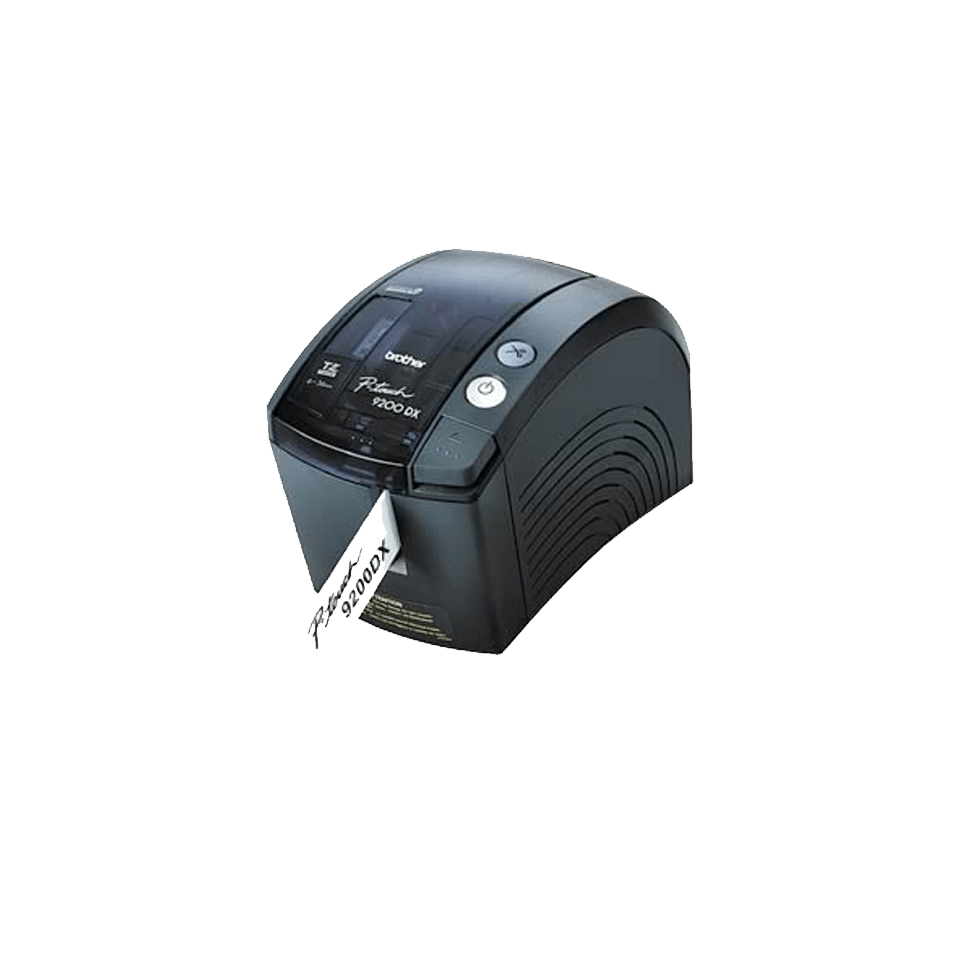
Explore this need in the finder →The Brother P-touch PT-9200DX is a discontinued desktop printer for people who still want to compose labels on a computer and have a working legacy connection and software setup. It is not a small stand-alone keyboard labeler. Brother’s current page has a QWERTY entry in its specification table, but the exact U.S. support specification says there are no keys and no LCD: the machine has status LEDs, power and feed/cut controls. The computer is the editor; the printer is the output device.
Its strongest case is wide original TZ tape
For the documented original Brother TZ system, Brother lists six cassette widths: 6, 9, 12, 18, 24 and 36 mm. That puts the PT-9200DX in a different class from the small handhelds built around narrow tape. Brother’s specification gives a 27.1 mm maximum print height, 360-dpi head and 20 mm-per-second print speed. It also lists automatic full cutting and automatic half cutting. Those are useful capabilities for signs, asset labels, barcode work and other computer-composed layouts where extra width matters, but they do not make it a modern network printer.
The manufacturer’s original guide describes a software-first process: design in P-touch Editor, connect the printer, and print. The old guide includes a 36 mm white TZ sample cassette, a power cord, both serial and USB interface cables, and a CD-ROM with PC/Mac software and manuals. The printer itself is AC-powered; Brother’s U.S. specification gives 120 V, 60 Hz, and does not document battery operation. A used listing may omit one or more of those accessories; verify the actual unit, cable and supply before planning a workflow around them.
Choose one computer connection—and verify the host first
Brother documents USB 1.1 and a serial port rated up to 115.2 kbps. Those are alternative connections, not a reason to plug in both: the guide explicitly warns against connecting USB and serial at the same time. The serial path requires an available serial port and correctly configured port settings; USB setup requires installing the software before connecting the printer. The guide’s USB instructions name Windows 98, Me, 2000 and XP. Brother’s discontinued support page still lists older Windows and Mac releases, then says it is no longer updated. None of that establishes a current Windows or macOS driver.
This compatibility question should decide whether the PT-9200DX is useful before its resolution or width does. An owner with a tested older computer, the correct cable and working P-touch Editor setup may value a USB option in addition to serial. Someone buying it to plug into an ordinary current laptop should not assume that USB 1.1 guarantees present-day software support. If current-phone or current-computer convenience is essential, compare a newer model such as the PT-P910BT or a current computer-connected P-touch instead; those are different media and software ecosystems, not a promise that an old PT-9200DX will interoperate with them.
Do not transfer cassette claims by width alone
The original TZ path is clear in the exact U.S. support table and user guide. TZe is less straightforward. Brother’s present product-page table lists TZe at 3.5, 6, 9 and 12 mm, yet that same table makes other claims—such as a keyboard—that conflict with the detailed model specification. Brother’s U.S. TZe-465 36 mm and TZe-M261 36 mm supply pages also name PT-9200DX as compatible, and a 9 mm TZe supply page names it too. But the exact machine guide says to use TZ tape only; Brother’s model-specific tape-logo FAQ says the cassette mark on the individual printer determines whether both TZ and TZe can be used, and tells owners to check the supported width beside that mark.
For that reason, do not infer blanket TZe compatibility from “36 mm” or a generic product table. If considering a used PT-9200DX, inspect its own tape-family marking and match the exact cassette code before relying on TZe. The finder does not count the conditional TZe path as a confirmed essential match. A printer with an unknown or unreadable marking should not pass a strict TZe requirement.
Who should keep looking?
The PT-9200DX fits an earlier-equipment owner who needs the original TZ range, values up to 27.1 mm of print height, and can verify the computer setup before depending on it. It is a poor choice for phone-first work, on-device typing, a preview screen, battery portability or a current, plug-and-play computer workflow. Its 4.7 × 5.9 × 9.8 inch body and 3.3-pound weight are also countertop dimensions, not a pocketable handheld form.
In the questionnaire, mark “include earlier models” before considering this one. Choose computer-over-USB only if a working compatible host is part of the plan; select the serial option only if that port is actually available. For the well-documented media route, choose original TZ and set the required TZ width separately. A phone-app, local-keyboard, two-line or TZe-specific need should exclude it when that capability is unconfirmed. If you cannot check the computer and cassette together, a newer device with the workflow you need is a more dependable shortlist starting point.
Brother marks this exact model discontinued. The model page’s feature copy and the detailed support data do not agree on every field, so buy only when the exact machine, cable, software environment and cassette can be checked—not because the old model name alone sounds familiar.
Manufacturer references: Brother PT-9200DX U.S. specifications, the PT-9200DX Quick Reference, and Brother’s cassette-logo guidance.
Key details at a glance
| Full-color output | No |
|---|---|
| Print process | Thermal transfer using Brother laminated cassette media |
| Compatible cassette | The exact U.S. specification and Quick Reference document original TZ at 6/9/12/18/24/36 mm. Brother’s exact-model FAQ and U.S. TZe supply pages indicate TZe compatibility in at least some configurations, but the manual says TZ only and another Brother FAQ says to verify the physical unit’s cassette logo and width. TZe is recorded as a conditional bridge, not a confirmed general matching plan; unknown unit markings do not satisfy an essential TZe request. |
| Display type | No LCD; green/red status LEDs |
| Maximum combined print height | 27.1 mm |
| Line-count note | Brother’s current product-page table claims two lines, but the exact detailed specification gives 27.1 mm print height without a line ceiling; the old P-touch Editor computer route does not support treating the generic two-line entry as confirmed. Keep line count unknown. |
| Computer design route | Brother P-touch Editor 3.1 per the U.S. Quick Reference; current downloadable version and present-day host support are unknown. |
| Power choices | Brother’s exact specification gives AC 120V/60Hz. The guide’s original package list includes a power cord. Battery operation is not documented; do not assume a used device includes a power cable. |
| Body dimensions | Brother’s exact U.S. support specification: 4.7 in wide × 5.9 in high × 9.8 in deep; 3.3 lb. |
| Tape cutting | The exact Brother U.S. support table lists automatic full and half cutters. This is a desktop cassette printer, not a hand-cutter workflow. |
| Wired Ethernet | No |
| Original TZ maximum width | 36 mm |
Use the exact model’s instructions for operating limits, supplied equipment and version differences.
Sources for this assessment
- Brother U.S. Office & Home listing row, offset 105/index 107
- Brother U.S. PT-9200DX product page
- Brother U.S. PT-9200DX detailed specification
- Brother U.S. exact-model manual index
- Brother PT-9200DX Quick Reference v03
- Brother U.S. PT-9200DX supported OS page
- Brother U.S. model FAQ list
- Brother U.S. cassette logo FAQ for PT-9200DX
- Brother U.S. TZe FAQ for PT-9200DX
- Brother U.S. 36-mm TZe-465 supply page
- Brother U.S. 36-mm TZe-M261 supply page
- Brother U.S. 9-mm TZe-621CS supply page
Put the device and its tape system together.
Match the exact model, cassette family, computer or network route and any optional power or touch-panel hardware before buying.