
Your needs, this model
Does it fit your priorities?
Would you rather type on the label maker and use its built-in decorative formats than compose on a phone?
The PT-D200 is a stand-alone QWERTY device with on-unit Deco Mode and Name Label formats; its documented text route is the built-in keyboard, not a phone app.
Explore this need in the finder →Would TZe tape up to 12 mm cover your labels, including two-line work only at 9 or 12 mm?
Brother documents TZe widths from 3.5 to 12 mm. The manual restricts two lines to 9 and 12 mm, and its built-in template modes to 12 mm.
Explore this need in the finder →Is compatible AC power enough, or must the adapter itself be included in the offer?
The machine accepts an optional AD-24ES-series adapter, but Brother says the adapter and AAA batteries are sold separately for this SKU.
Explore this need in the finder →The Brother PT-D200 is worth identifying as its own U.S. label-maker model, but it is no longer a current new-product choice: Brother’s exact PTD200 product page marks it discontinued. This review is most useful if you own one, are considering a specific used offer, or want to check cassette and power compatibility. Do not mistake the standard PT-D200 listing for the separate PT-D200G package, whose Brother page explicitly lists two sample tapes.
What the standard PT-D200 does
The exact Brother U.S. product page and the PT-D200 User’s Guide describe a stand-alone, QWERTY label maker. You compose on its built-in keypad and preview on a one-row LCD; the guide says the display shows 15 characters at a time, while ordinary text can be as long as 80 characters. It supports two-line labels, automatic numbering and mirror printing, as well as the on-device Deco Mode and Name Label formats. This is a direct-entry tool, not a phone-first label printer. Brother documents no app or computer design route in the product page or guide.
The narrow screen makes a preview worthwhile: long text scrolls, and the printed result can differ slightly from the preview. Ordinary text can use up to two lines only with 9 mm or 12 mm tape; the guide explicitly warns against trying two lines on the 3.5 mm and 6 mm sizes. Deco Mode and Name Label are narrower still in one important way: the guide says those formats require 12 mm tape. So the full TZe cassette range does not mean every layout works on every width. If your everyday labels require two lines at 6 mm, the PT-D200 is a poor fit; if you need a built-in decorative template, plan on the 12 mm cassette.
TZe tape, and a real 12 mm ceiling
Brother identifies the PT-D200’s tape as laminated TZe thermal-transfer stock in 3.5, 6, 9 and 12 mm widths. That is a useful selection for small naming and household organization jobs, but the model cannot take the 18 mm and wider cassettes that serve larger shelf or equipment labels. A 9 or 12 mm cassette is the documented route for two-line text; only 12 mm supports the two built-in template formats. Check the cassette family printed on the tape itself before buying supplies. Similar-looking Brother label tapes are not interchangeable merely because they share a brand.
Laminated tape may suit many indoor labels, but adhesive and legibility still depend on the surface, curvature, exposure and removal needs. Clean and dry the surface, try one short label first, and be cautious with soft plastics, fabrics or finishes where residue matters. “Laminated” describes the cassette construction; it does not guarantee that every adhesive will behave the same way on every container.
Power and package checks matter on an older unit
The PT-D200 takes six AAA alkaline batteries or six fully charged AAA Ni-MH batteries, neither included, or an optional Brother AD-24ES-series adapter. That gives you a battery route for moving around the house and a compatible mains route for a stationary desk, but not a rechargeable pack built into the machine. Brother says batteries and adapter are sold separately. Its plain PTD200 page does not give the same tape-carton detail as the PT-D200G page, so confirm the cassette, power supply and condition with the exact seller rather than assuming a sample tape or adapter is in a used box.
The manual shows a user-operated cutter lever after printing. For batches of different labels, its Chain Print setting can reduce the gap between labels, but the guide still asks you to feed and cut the run at the end. The body is roughly 6.5 by 6.1 by 2.7 inches and about 1.1 lb without batteries or tape: compact enough to keep near a work area, but not shaped like a slim pocket tool.
Do not choose it for a particular memory count
Brother’s sources disagree about stored-label capacity: the product-page description says 30, a specification field says 15, and the PT-D200 guide describes saving up to 20 label files. The safe conclusion is that the machine has numbered save/open functions, not that one of those totals is a dependable promise. If a fixed number of reusable layouts is essential, verify it against the actual unit and its guide before relying on it.
Who this review helps—and when to choose a different route
The PT-D200 makes sense as a known, earlier model for someone who values a physical keyboard, TZe stock and simple on-device formatting, and who has verified the condition of the cutter, LCD, cassette bay and battery compartment. It is less suitable for a buyer starting from scratch who needs fresh stock and a clearly specified package, a phone-composed layout, larger type, or wider than 12 mm tape. The PT-D200G is a separate, later package review: Brother lists two 12 mm sample cassettes for that exact SKU, a detail not established for a plain PTD200 offer. For a current-reference option, compare the PT-D220 for simpler keyboard operation, the PT-D410 if width and computer connectivity matter, or a documented Bluetooth P-touch if phone composition is essential.
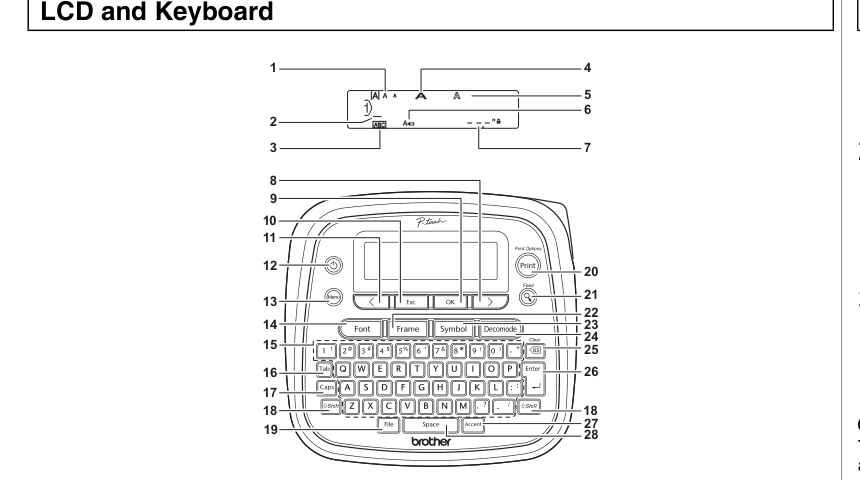
The image accompanying this review is a crop of Brother’s own PT-D200 User’s Guide line illustration, not a product photograph or a picture of a tested unit. Use it to identify the keypad and controls; use Brother’s current support information and the exact seller’s item description to check compatibility and included equipment.
Primary references: Brother PT-D200 U.S. product page and Brother PT-D200 User’s Guide.
Key details at a glance
| Maximum tape width | 12 mm |
|---|---|
| Compatible cassette | The exact U.S. PTD200 page and the PT-D200 guide identify laminated TZe tape. Brother lists 3.5, 6, 9 and 12 mm; no wider cassette family is confirmed for this SKU. |
| Built-in templates | 1 |
| On-device preview characters | 15 |
| Maximum combined print height | 9 mm |
| Maximum lines per label | 2 |
| Line-count note | The guide permits two-line printing with 9 or 12 mm tape, and flags 3.5 and 6 mm as too narrow for two lines. |
| Power choices | The exact PT-D200 product page says six AAA batteries or an AC adapter are sold separately; the guide permits six alkaline or fully charged Ni-MH AAA cells and lists compatible AD-24ES-series adapters. The machine does not charge Ni-MH cells. |
| Tape cutting | The PT-D200 guide documents a hand-operated Tape Cutter Lever. Chain Print can narrow margins across a batch but still requires a final feed and manual cut. |
| What the base package supplies | The plain PTD200 product page does not enumerate a starter cassette. Do not transfer the two sample tapes listed on the separate PT-D200G SKU. Confirm cassette and power equipment in any used offer. |
| Letter-key arrangement | qwerty |
Use the exact model’s instructions for operating limits, supplied equipment and version differences.
Sources for this assessment
- Brother U.S. Office & Home directory row for SKU PTD200
- Exact Brother U.S. PTD200/PT-D200 product page; discontinued state, core specifications and power source statement
- Brother U.S. PT-D200 support specification for d200eus
- Brother U.S. d200eus manual index; User’s Guide v05 listing checked through exact support identity
- Brother PT-D200 User’s Guide D02SAJ001; reused archived exact-family guide
Put the device and its tape system together.
Match the exact model, cassette family, computer or network route and any optional power or touch-panel hardware before buying.