
Your needs, this model
Does it fit your priorities?
Would you rather type at a QWERTY keypad and choose the label maker’s own decorative formats than use a phone?
PT-D200G is a stand-alone PT-D200-family device: the manual shows keypad, Deco Mode and Name Label controls, while no mobile app route is documented.
Explore this need in the finder →Can the PT-D200G’s 12 mm maximum TZe width cover your labels, or is a wider cassette essential?
It is a TZe model that tops out at 12 mm; the general TZe choice fits, while an 18 mm essential need should point elsewhere.
Explore this need in the finder →Do you need a compatible AC-adapter power route, even though the PT-D200G package does not include the adapter?
The labeler supports six AAA cells or an optional AD-24ES-series adapter, but Brother lists no power source in this two-tape package.
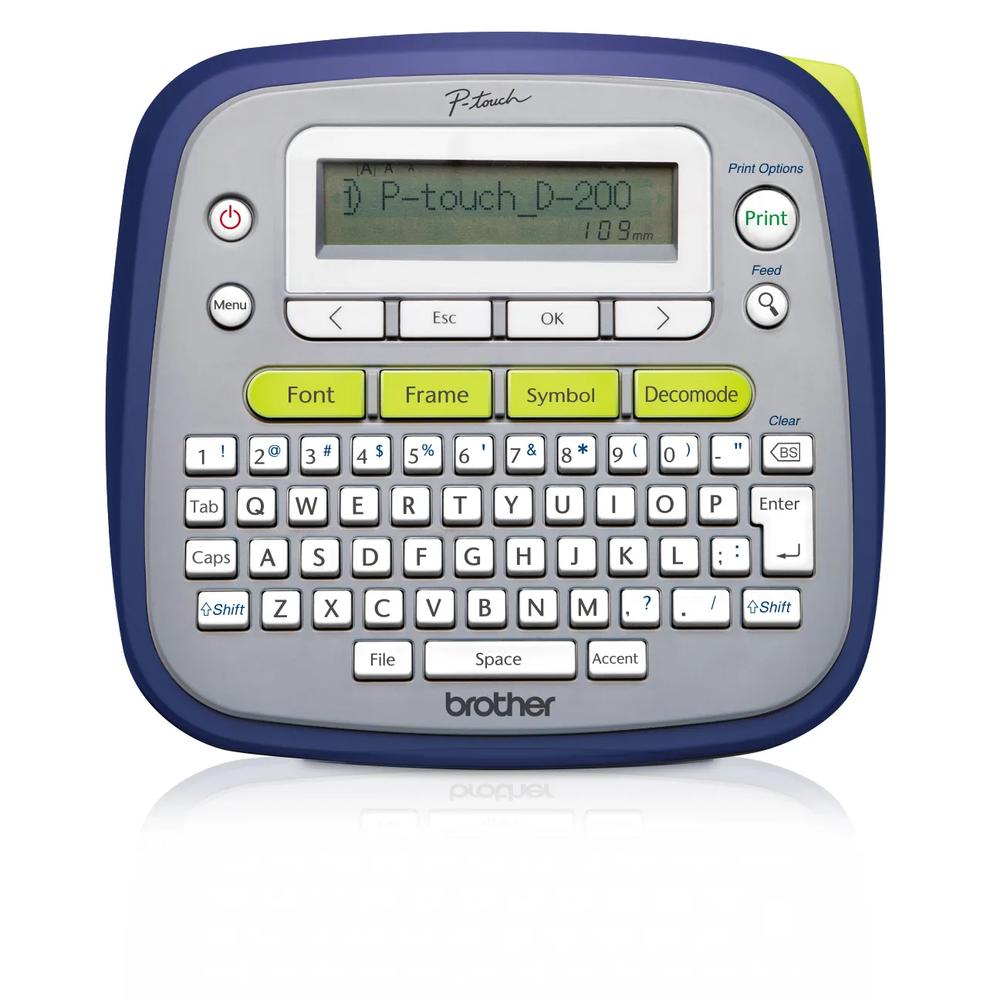
Explore this need in the finder →The Brother PT-D200G is a small, self-contained P-touch with a physical QWERTY keyboard, a one-line preview display and standard laminated TZe cassette tape up to 12 mm wide. Its most concrete distinction is the exact U.S. package: Brother lists both a black-on-white and a black-on-clear 12 mm sample tape, each 4 m long. That is useful if you want to compare two label backgrounds without first shopping for a second cassette. It is not a wireless or computer-connected printer; choose it for the way it works on its own, not for a connection the documentation does not show.
The package is more than the printer, but not a complete power kit
Brother’s product page names this SKU PT-D200G and explicitly calls out the bonus tapes. The carton list contains one 12 mm black-on-white laminated TZe sample, one 12 mm black-on-clear laminated TZe sample and the manual. Brother’s U.S. support record maps it to the PT-D200 support identity, and the linked User’s Guide is titled PT-D200. Preserve the exact “G” package name when checking a retailer box: a plain PT-D200 listing may not include this pair of tapes, and the product image shows the machine rather than its carton contents.
The tape bonus does not mean the label maker is ready to print straight out of the box. The product page says six AAA batteries or an AC adapter are sold separately; the User’s Guide gives compatible AD-24ES-series adapter models and permits six AAA alkaline or fully charged AAA Ni-MH cells. It does not charge rechargeable batteries. If you prefer a permanent desk setup, compare the adapter cost and compatibility before choosing; if you use batteries, plan on supplying them yourself. This is a clear difference from some packages that list batteries in the carton.
On-device formats, with a narrow tape ceiling
All label composition takes place at the machine: type on the QWERTY keys, preview on the graphical display, use the one-touch Font, Frame and Symbol keys, then print. Brother documents Deco Mode and Name Label layouts alongside ordinary text, automatic numbering, mirror printing and vertical printing. Those prepared styles can help with small craft tags or name labels, but they are not an editable phone-app or desktop workflow. The manual’s templates are intended for 12 mm tape; if your routine begins with a spreadsheet or requires screen-based layout work, a connected model is a better match.
Standard TZe tape is the documented cassette family, in widths of 3.5, 6, 9 and 12 mm. Brother lists two lines as the overall maximum, but the manual’s error guidance says a two-line label cannot be printed on the two narrowest widths. Treat 9 and 12 mm as the practical two-line choices, and do not assume that the boldest font, frame and longest wording will fit together attractively. The specified print height reaches 9 mm. There is no route here to the 18 mm cassettes of a larger desk labeler.
The product page’s own counts disagree: its feature text says up to 30 saved labels and 95 frames, while specification fields say 20 labels and 97 frames; the linked foldout manual also shows a 20-file save limit and 99 frame designs. I would not buy the PT-D200G for a particular storage count or exact frame total. The disagreement does not change the more useful decision—this is a compact on-device format library rather than a design-software printer.
Footprint and cutting are part of the routine
Brother describes the body as roughly 6.5 by 6.1 by 2.7 inches and 1.1 lb. It is compact beside a full-size desktop model, but its shape is more convenient on a work surface than in a pocket, and there is no built-in handle. After a print, you operate the cutter lever yourself. Margin settings include a chain-print option that can reduce the blank gap when printing a sequence; the manual still calls for feeding the tape and making the final cut, so this is not a hands-off batch system.
Laminated TZe stock is a more versatile starting point than an unprotected paper strip, but adhesive performance still depends on the surface and conditions. Clean and dry the target, and test a short label in an unobtrusive place where residue, removal or exposure matters. Brother’s general durability language is not a promise that one adhesive suits every container, fabric or outdoor surface.
Who should choose it—and when to step up
The PT-D200G makes sense for home, school or craft users who like typing at the unit, want decorative on-device modes and will use both included tape colors. The PT-D202 is a close alternative when its fixed home-organization layouts and the exact current package’s included AAA batteries are more valuable than the D200G’s second 4 m starter tape. The PT-D220 is a plainer keyboard option for ordinary TZe labels. If you need 18 mm output, choose a wider model such as the PT-D410; if phone composition is essential, look instead at a model whose app workflow is explicitly documented.
Before ordering, match the offer to PT-D200G rather than assuming every PT-D200 box is the same. Verify that both 12 mm sample cassettes are listed, budget for a power source, and decide whether a one-line display and manual cutting fit your actual label volume. Those checks tell you more than an advertised count of decorative elements.
Key details at a glance
| Full-color output | No |
|---|---|
| Print process | Thermal transfer; monochrome text and formats on selected TZe cassette. |
| Maximum tape width | 12 mm |
| Compatible cassette | The exact U.S. product page, d200eus support specification and PT-D200 guide document standard laminated TZe tape at 3.5, 6, 9 and 12 mm. One generic product-page compatibility field mentions HGe and TZe together, but the named TZe series, width list and manual support only TZe; HGe compatibility is left unconfirmed and is not a match. |
| Built-in templates | 18 |
| On-device preview characters | 15 |
| Display type | Unlit graphical LCD, 15 characters by one line; exact U.S. support specification. |
| Maximum combined print height | 9 mm |
| Maximum lines per label | 2 |
| Line-count note | The exact model page lists two lines. The PT-D200 manual's error guidance says 3.5 and 6 mm tape cannot print a two-line label; use 9 or 12 mm for the two-line plan. |
| On-device symbols | 617 |
| Power choices | Six AAA alkaline or fully charged AAA Ni-MH batteries, or one of the optional AD-24ES-series AC adapters. The exact PT-D200G product page says both batteries and adapter are sold separately; the machine does not charge Ni-MH cells. |
| Body dimensions | Approx. 6.49 x 6.10 x 2.67 in and 1.08 lb before batteries and cassette, per the d200eus specification and linked PT-D200 U.S. guide; the exact product page rounds to 6.5 x 6.1 x 2.7 in and 1.1 lb. |
| Tape cutting | PT-D200 guide shows a manual Tape Cutter Lever and full, half, narrow and Chain Print margin settings. Chain Print requires a later feed and manual cut; it is not an automatic cutter. |
| What the base package supplies | Brother's exact U.S. PT-D200G page lists PT-D200G with one 12 mm x 4 m black-on-white laminated TZe sample, one 12 mm x 4 m black-on-clear laminated TZe sample and the User's Manual. Batteries and adapter are sold separately. This is a package difference; support maps the unit to the PT-D200 d200eus identity. |
| Letter-key arrangement | qwerty |
| Built-in type styles | 10 |
Use the exact model’s instructions for operating limits, supplied equipment and version differences.
Sources for this assessment
- Brother U.S. Office & Home catalogue offset 30; exact PTD200G tile
- Brother U.S. PT-D200G product page and exact two-cassette package contents
- Brother U.S. support page for PT-D200G / d200eus family
- Brother U.S. PT-D200 support specification / d200eus
- Brother U.S. PT-D200 manual index; lists User’s Guide v05, 2023-03-23
- Brother-linked U.S. PT-D200 User’s Guide foldout; linked from d200eus support index
- Brother PT-D200G product-page image; exact model-family rendering visually inspected
- Brother U.S. PT-D200 barcode support answer, model coverage includes PTD200G
- Brother U.S. recall index previously archived and checked for PT-D200G identifier
Put the device and its tape system together.
Match the exact model, cassette family, computer or network route and any optional power or touch-panel hardware before buying.