
Your needs, this model
Does it fit your priorities?
Would local QWERTY typing and standard TZe through 12 mm fit your routine?
The PT-D201CS uses an on-device QWERTY keyboard and standard TZe up to 12 mm; 18 mm tape and connected composing are not documented.
Explore this need in the finder →Can a roughly 6.5-inch-wide handheld body fit where you plan to store it?
Brother’s US support specification and User’s Guide give a body width of about 6.49 inches; exact product-page dimensions conflict, so measure the actual printer if the fit is tight.
Explore this need in the finder →Is optional AC power useful, or must the cutter finish labels automatically?
The PT-D201 supports an optional AD-24ESA adapter and also takes six AAA cells, but its documented cutter is manual.
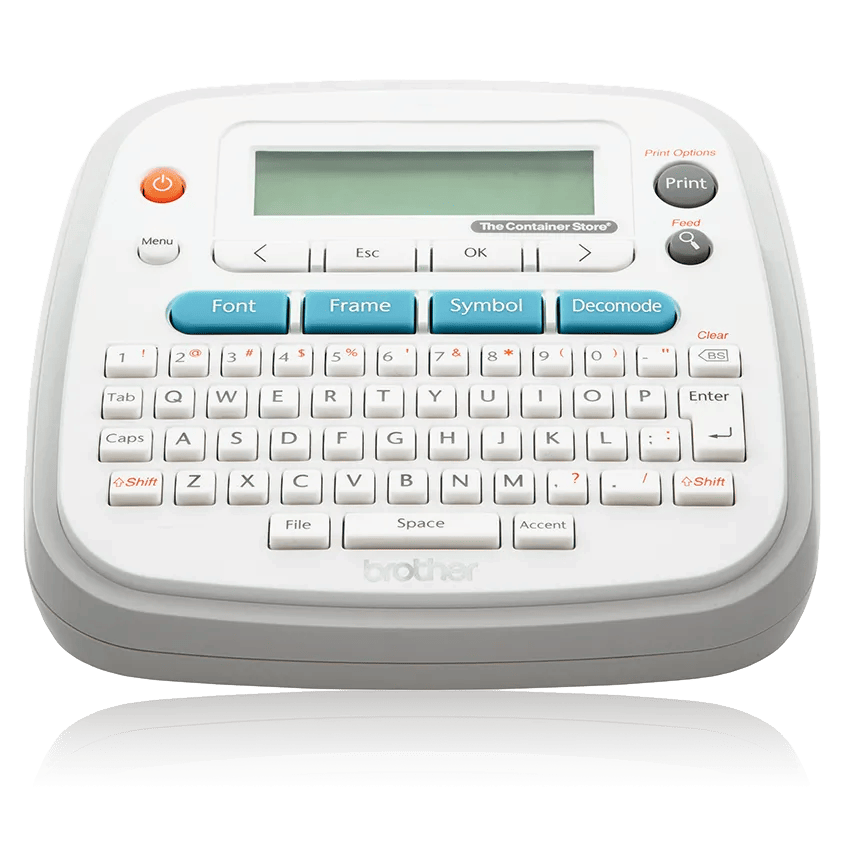
Explore this need in the finder →The Brother PT-D201CS is a self-contained QWERTY label maker for someone who wants to type on the machine, keep the supplies together in a hard-sided case and print ordinary household or office labels on standard TZe cassettes. Its ceiling is 12 mm, not the 18 or 24 mm available from some larger P-touch models. The practical appeal is the ready-to-carry package: the product listing includes six AAA batteries, a case and two 12 mm tapes. It is a more decorated standalone labeler than a bare entry model, but it is still a one-line-screen, manual-cut machine—not a phone-connected printer or a small parcel-label printer.
What the QWERTY workflow includes
Brother gives the PT-D201CS a physical QWERTY-style keyboard and a 15-character-by-one-line graphical LCD. A label can contain up to 80 characters, with a 30-character-and-space limit when using built-in templates, even though the display shows only a short window at once; the manual describes moving through off-screen text and checking a generated preview before printing. That preview helps catch a typo or approximate label length, but Brother cautions that it may differ from the final printed result. It is not a full desktop-style proof of how every font, frame and spacing choice will look on the tape.
On-device controls provide a good number of choices for a keyboard machine: Brother lists eight fonts, ten styles, 97 frames, 617 symbols and twelve Decomode text-layout options. Brother’s feature copy says the machine can store up to 30 labels, although the same product page’s technical table lists “Standard Memory 15” without explaining the discrepancy. Treat the actual storage ceiling as unclear rather than paying extra for a specific file count. The many formatting tools still suit someone making recurring pantry, cable, folder, gift, craft-bin or classroom labels who would rather operate the keys than open an app each time. The menus and keys remain part of the work; if you expect to compose long lists in a computer, print from a phone, or arrange text on a large screen, the PT-D201CS does not offer those connected routes.
Decide whether 12 mm is enough
The cassette family is Brother TZe. Brother’s US support specification and User’s Guide list 3.5, 6, 9 and 12 mm cassettes. The 12 mm maximum works for short names and ordinary container or folder labels, but it is a real ceiling: the machine is not a fit if an 18 mm or 24 mm cassette is essential. The official multiple-line guidance for the PT-D201 says 3.5 and 6 mm tapes are limited to one line; two lines are supported on 9 and 12 mm tape. A two-line option is useful for a short identifier plus a second descriptor, but it does not establish a particular print height in millimeters. Brother does not publish a verified maximum printable-height value for this model, so a strict 9 mm height requirement remains unknown rather than guaranteed.
Brother describes laminated TZe tape for indoor and outdoor use and names specialty variants for jobs such as flexible ID, extra-strength adhesion or iron-on fabric. Those are cassette choices, not a promise that one adhesive works on every surface. Pick the exact tape material for the item, follow its application guidance and test a small area first if removal, heat, moisture or fabric care matters. The PT-D201CS uses monochrome thermal-transfer tape; full-color output and Brother’s separate CZ/ZINK roll system are not part of this operating plan.
Portable package, optional wall power, manual cutting
The PT-D201CS box lists a hard-sided storage case, six AAA batteries, a 12 mm by 4 m black-on-white laminated starter cassette and a 12 mm by 8 m black-on-clear cassette. Brother’s support specification and guide say the unit can also use an optional AD-24ESA AC adapter, which is not among the listed contents. The body itself is approximately 6.49 inches wide by 6.10 inches deep by 2.67 inches high, and weighs about 1.08 pounds without the batteries or tape cassette. The manual and support specification agree on those body dimensions; the exact product page’s separate technical-dimensions row shows a conflicting set of numbers, so measure the actual printer if a very tight storage slot is the deciding factor.
The tape does not cut itself. The guide shows a hand-operated cutter lever, so each printed label or set still needs a person at the machine to finish the cut. Margin and chain-print options can help manage tape between labels, but they do not convert this into unattended batch production. If you care about wasting short pieces, plan the label sequence and inspect the selected margin before printing a long run.
When another model is the better match
Choose the PT-D201CS when the local keyboard, case, included batteries, storage for repeated labels and TZe widths through 12 mm line up with your routine. The smaller PT-H110 is worth comparing if a narrower handheld body matters more than the included case; it also uses TZe through 12 mm but offers a simpler feature set. The PT-2040SC is a more suitable comparison if you want to stay with standalone keys but require 18 mm tape and an included AC adapter; its one-line screen and manual cutter remain limitations too. If app-based design is essential, look at a connected alternative such as the PT-P300BT, and check its separate input and cassette limits rather than assuming that all P-touch machines share one workflow.
In a recommendation form, selecting QWERTY entry, standard TZe and optional AC operation can keep the PT-D201CS in the set. Requiring a phone app, USB computer design, automatic cutting, 18 mm tape, full color or a verified 9 mm printable height should remove it. Unknown print height is not a hidden advantage, and the generous symbol count cannot compensate if the width, cut method or operating route is wrong.
Key details at a glance
| Full-color output | No |
|---|---|
| Print process | Thermal transfer |
| Maximum tape width | 12 mm |
| Compatible cassette | Brother’s exact PT-D201CS US page, PT-D201 support specification and User’s Guide identify standard TZe cassettes in 3.5, 6, 9 and 12 mm widths only. Cassette width does not make TZe interchangeable with Btag, M or color-roll systems. |
| Built-in templates | 12 |
| On-device preview characters | 15 |
| Display type | Graphical LCD, 15 characters × 1 line; Brother does not specify a backlight. The guide says text preview may differ from printed output. |
| Maximum lines per label | 2 |
| Line-count note | Brother’s PT-D201 two-line support FAQ identifies PT-D201 as a related model and limits 3.5/6 mm tape to one line; 9/12 mm tape permits two lines. |
| On-device frames | 97 |
| On-device symbols | 617 |
| Power choices | The PT-D201 support specification and guide list six AAA alkaline or Ni-MH cells and optional AD-24ESA AC adapter. The PTD201CS product page lists six AAA batteries in the box but no adapter; the included cell chemistry is not specified in the box summary. |
| Body dimensions | Brother’s PT-D201 US support specification and the PT-D201CS User’s Guide independently agree on approximate W × D × H of 6.49 × 6.10 × 2.67 inches and 1.08 lb without batteries or cassette. The exact product page’s technical table lists conflicting dimensions; use the matched support/manual values cautiously and measure the physical unit where fit is critical. |
| Tape cutting | Brother’s guide depicts a manual cutter lever. Chain print can reduce repeated margins but requires a final feed and manual cut; it is not an automatic cutter. |
| What the base package supplies | The exact US PTD201CS page lists a hard-sided carrying case, six AAA cells, one 12 mm × 4 m black-on-white starter TZe cassette, one 12 mm × 8 m black-on-clear TZe cassette and documentation. No AC adapter is listed in the package; confirm contents for the exact offer. |
| Letter-key arrangement | qwerty |
| Built-in type styles | 10 |
Use the exact model’s instructions for operating limits, supplied equipment and version differences.
Sources for this assessment
- Brother US PT-D201CS exact label-maker product page
- Brother US PT-D201 specification page (support identifier d201eus)
- Brother US PT-D201 manual index; User’s Guide v03
- Brother PT-D201CS US English User’s Guide v03 (16 pages; release date 2018-03-30)
- Brother PT-D201 US support FAQ for two-line limits (PT-D201 related model entry)
- Brother US PTD201CS Office & Home directory tile
- Brother PT-D201CS exact US product image bytes (manufacturer render)
- Brother US product recalls index searched for PT-D201/PTD201CS identifiers
Put the device and its tape system together.
Match the exact model, cassette family, computer or network route and any optional power or touch-panel hardware before buying.