
Your needs, this model
Does it fit your priorities?
Do you want to compose on a familiar QWERTY keyboard and start from built-in home label layouts?
PT-D202 offers local QWERTY entry and Brother documents six Home Label layouts plus 12 Deco Mode formats; the fixed layouts are useful only if you can work within their limits.
Explore this need in the finder →Will standard TZe cassettes up to 12 mm cover the labels you plan to make?
The PT-D202 accepts Brother TZe widths through 12 mm. It does not meet an essential 18 mm or wider tape requirement.
Explore this need in the finder →Can six AAA cells or a separately purchased AC adapter work if you still cut labels by hand?
The base package lists six AAA batteries, and Brother documents an optional AD-24 adapter; the cutter is a manual lever rather than an automatic cutter.
Explore this need in the finder →Where the PT-D202 fits
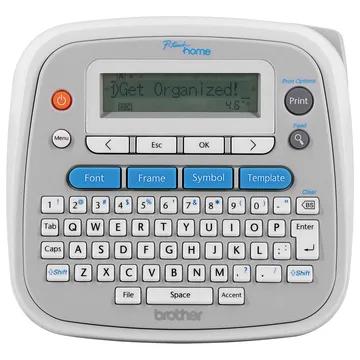
Brother identifies the PT-D202 as its P-touch Home Personal Label Maker. The U.S. Office & Home listing and the product’s own U.S. support record both identify the PT-D202, so this is not the similarly numbered PT-D201CS, PT-D210 or PT-D220. Think of it as a compact table-top keyboard rather than a pocket labeler: it is about 6.49 inches wide, 6.10 deep and 2.67 high, and Brother gives a weight of about 1.08 pounds without the tape cassette or batteries. Its small footprint still leaves room for a one-line LCD, QWERTY keyboard and dedicated format keys.
The core workflow is deliberately local. You enter text on the machine, see a scrolling 15-character line, preview the label and print. Brother specifies up to 80 characters in a text label and storage for up to 30 saved labels, with up to 2,400 characters across memory. That is useful for recurring pantry, storage-bin or family-name labels without reconnecting a phone. It is not a substitute for computer-based batch design: Brother lists no mobile app, USB connection or Bluetooth print path for this model.
The home layouts are the main reason to choose it
The PT-D202 adds six Home Label layouts and a separate Deco Mode with 12 decorative formats. Those options can speed up common household jobs such as a dated food container, linen storage or a small identification label. They are not a data-automation feature: the guide’s date example is typed as text, and Brother says the layouts cannot be edited. The Home Label and Deco Mode formats require a 12 mm cassette, limit input to 50 characters, and cap template output at about 200 mm. If the standard 3.5, 6 or 9 mm TZe tapes are already loaded, those special layouts cannot be used; ordinary text printing still works on the supported tape widths.
For ordinary text, Brother documents TZe tape in 3.5, 6, 9 and 12 mm widths. The 9 and 12 mm widths support two-line printing; the narrower two widths are single-line. The top printable height is listed as 9 mm. This puts the PT-D202 on the narrow-label side of the category: it suits jars, folders, boxes and many small household surfaces, but it will not satisfy a need for 18, 24 or 36 mm tape. Its 14 named built-in fonts, three sizes, ten styles, symbols and frames give reasonable direct-device variety. However, Brother’s own product page and support specification disagree on exact symbol and frame totals, so those totals are not a sound reason to buy it; the manual does show extensive on-device symbol and frame tables.
Plan around tape, power and the cutter
The current U.S. base package lists one 12 mm black-on-clear laminated TZe cassette, six AAA batteries, documentation and a one-year limited warranty. It does not list the optional AC adapter or a storage case. The guide identifies an optional AD-24 adapter and also describes six alkaline AAA or six Ni-MH cells; it warns that the printer itself does not charge rechargeable batteries. The package listing says the cells are included, while the general guide says batteries are not included, so check the exact box description when shopping for a new or used example. Treat the adapter as a separate purchase, not as a standard inclusion.
Cutting is manual. After printing, you press the integrated lever yourself; there is no automatic cutter to finish a run of labels hands-free. The margin settings include full, half and narrow, plus a chain-print workflow for making several different labels with less waste between them. Chain printing requires a final feed before you use the cutter, so it saves tape by asking for an extra step rather than doing the job unattended. For occasional home labeling, that is a reasonable compromise. For batches where a clean cut after every label matters, consider an auto-cutter model instead.
Who should compare alternatives
Choose the PT-D202 if you want a self-contained keyboard and expect to use its home-specific layouts, accept 12 mm as the widest tape, and are comfortable pressing the cutter. The PT-D220 is a close alternative if its larger documented set of preset templates better matches your jobs; compare the exact templates and the fact that both remain narrow TZe machines. The PT-D201CS is another small stand-alone TZe option, but its listed package includes a carry case and its product-page technical fields disagree with its support documents on dimensions and memory, so verify that bundle rather than assuming it is the same package as the PT-D202. If you want to compose on a phone or computer, compare connected P-touch models; if a powered cutter or wider tape is essential, move to a more capable desktop unit.
Brother describes laminated TZe labels as resistant to water, temperature and fading, but a tape’s adhesive still has to suit the surface and conditions. The PT-D202 does not turn a label maker into a surface-testing device; clean, dry, compatible surfaces matter. In short, this is an appealingly direct home tool when its prepared layouts, local keyboard and narrow tape system line up with your routine. Its fixed templates, one-line screen, manual cutter, replaceable-cell power and lack of connected input are meaningful limits, not details that a decorative format count can erase.
Key details at a glance
| Full-color output | No |
|---|---|
| Print process | Thermal transfer; monochrome output using selected TZe tape |
| Maximum tape width | 12 mm |
| Compatible cassette | The exact PT-D202 U.S. guide and support specification identify genuine Brother TZe cassettes in 3.5, 6, 9 and 12 mm widths; templates require 12 mm. Do not infer compatibility with Brother Btag, CZ/ZINK color rolls or other cassette families. |
| Built-in templates | 18 |
| On-device preview characters | 15 |
| Display type | Unlit, one-line graphical LCD; Brother lists 15 characters visible at once. |
| Maximum combined print height | 9 mm |
| Maximum lines per label | 2 |
| Line-count note | The PT-D202 guide says use 9 or 12 mm TZe tape for two-line printing; 3.5 and 6 mm are single-line. |
| Saved label files | 30 |
| Power choices | Six AAA alkaline or Ni-MH cells, or optional AD-24 AC adapter. The current exact U.S. base-package page lists six AAA batteries as included; the generic user guide says batteries are not included. The printer does not charge Ni-MH cells. |
| Body dimensions | Approx. 6.49 W × 6.10 D × 2.67 H in and 1.08 lb without batteries or tape cassette in the PT-D202 U.S. guide; the product page rounds these to 6.5 × 6.1 × 2.7 in and 1.1 lb. |
| Tape cutting | Cutter is a manual lever. Chain Print can reduce the tape between successive labels but requires a final feed before the user pushes the cutter. |
| What the base package supplies | Current exact Brother U.S. PTD202 base listing: PT-D202 maker, one black-on-clear laminated 12 mm TZe tape (8 m / 26.2 ft), documentation, six AAA batteries and one-year limited warranty; no AC adapter, USB cable or case is listed. |
| Letter-key arrangement | qwerty |
| Built-in type styles | 10 |
Use the exact model’s instructions for operating limits, supplied equipment and version differences.
Sources for this assessment
- Brother US Office & Home directory offset 45, exact PTD202 tile
- Brother US exact PT-D202 model product page
- Brother US exact PTD202 route linked by observed Office & Home tile
- Brother US support specification for PT-D202 / d202eus
- Brother US manual index for PT-D202 / d202eus
- Brother US PT-D202 User Guide D01EL0001 v01
- Brother product-page primary PT-D202 product image endpoint
- Brother US PT-D202 formatting FAQ for fonts, style, frame and underline
- Brother US product recalls index checked for PT-D202 identifier
Put the device and its tape system together.
Match the exact model, cassette family, computer or network route and any optional power or touch-panel hardware before buying.