
Your needs, this model
Does it fit your priorities?
Would you rather type on the machine than compose from a phone?
The PT-D210 is a stand-alone QWERTY model with no documented phone-app or computer input. Include earlier machines if you want this discontinued keypad option considered; a required phone app rules it out.
Explore this need in the finder →Are 12 mm TZe cassettes and up to 9 mm of print height enough?
It accepts Brother TZe at 3.5, 6, 9 and 12 mm and the maker lists up to 9 mm print height; two lines require 9 or 12 mm tape. It cannot meet an 18 mm TZe minimum.
Explore this need in the finder →Would an optional AC adapter or the included-adapter SV bundle suit a fixed station?
The base PT-D210 supports a compatible separately purchased adapter as well as six AAA cells. The exact PTD210SV bundle listing includes an adapter and case, while the PTD210BP package is a tape bundle; inspect the exact package and adapter label.
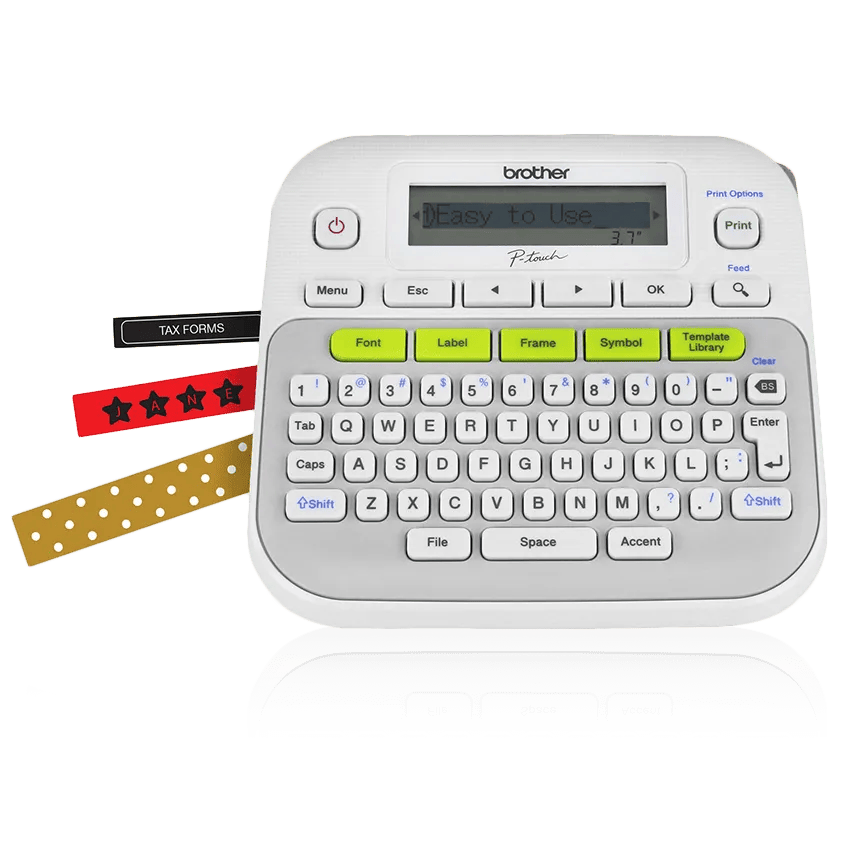
Explore this need in the finder →The Brother P-touch PT-D210 is an earlier, stand-alone keypad label maker, not a phone printer in disguise. Its one-touch formatting keys, preview button and physical QWERTY keyboard handle label creation on the machine. It uses standard Brother TZe cassettes, not Btag. Brother's US product page marks the base PT-D210 discontinued, so this assessment is most useful if you already own one or are comparing an exact earlier bundle. Do not treat a product-page bundle as proof that the base model remains a current machine.
A self-contained keypad, with a genuinely small preview
The D210 puts typing, fonts, frames, symbols and its template library on the device. Brother specifies 14 fonts, 10 font styles, 98 frames and 27 predesigned label templates. It can store up to 30 label files for later printing. That is a useful set of direct controls for file folders, pantry containers, gift labels and simple cable identification when you want to avoid opening another device. The US guide says a text label can contain up to 80 characters and that saved files share 2,400 characters of total memory.
The screen, however, is a single row of 15 characters and is not backlit. Its preview key generates an image, but Brother warns that the preview and actual print may differ. Long entries scroll through that narrow display rather than being laid out on a phone or computer. The text and pattern templates are also less flexible than a full design editor: Brother says they are only available on 12 mm tape, cannot be edited or saved as files, and pattern templates do not support preview. Those limits matter if you expect a stored reusable design or careful visual proofing.
Standard TZe supply, with a 12 mm ceiling
The US manual identifies four compatible tape widths: 3.5, 6, 9 and 12 mm. It permits two printed lines only with 9 or 12 mm tape; the narrower 3.5 and 6 mm options are single-line. Brother lists a maximum print height of 9 mm, so this is a small-label tool rather than a way to create the larger text area available on an 18 mm TZe desktop model. TZe's assortment of colors and specialty adhesive or fabric tapes can help with particular materials, but a cassette's marketing claim is not a guarantee that it will adhere to every surface. Test a small sample on the actual clean, dry material before covering a set of containers or equipment.
Keeping the D210 in an existing TZe routine is straightforward; confusing it with Brother's similarly named Btag machines is not. The tape cassette is part of the operating system, and the PT-D210 guide says to use Brother TZe tape. Before buying extra cassettes for an old machine, confirm the width and tape family printed on the exact cassette and check whether the adhesive suits the target surface.
Power and finishing still take hands-on work
The base model uses six AAA alkaline or Ni-MH cells, or a separately purchased compatible Brother AC adapter. The base product page says neither power option is included. The manual lists AD-24ES, AD-24ESA, AD-24ESAW and related variants as compatible, so do not assume an adapter that merely looks similar is correct. The product's manual cutter lever also means every label needs a finishing action. Chain printing reduces the margin between successive labels, but the guide calls for a final feed and manual cut; it is not an automatic cutter for unattended batches.
Package codes make a real difference to setup. The basic PT-D210 box includes a 12 mm by 4 m black-on-white laminated TZe sample. Brother's PTD210SV bundle page lists a protective case, an AC adapter and black-on-white plus black-on-clear 12 mm by 4 m sample tapes. Its bundle table calls the included adapter AD-24, while the base model's guide names the compatible AD-24ES series; check the adapter label and current exact package before use. PTD210BP is instead a supply-heavy package: one sample tape plus three full-length black-on-white TZe tapes. Brother's page does not state the full cassette length there, so do not assume a specific yield from the bundle name alone. Neither code changes the D210's screen, tape-width ceiling or cutter.
Who should consider it—and what to compare
For an owner, the D210 remains understandable: load a TZe cassette, type at the keyboard, preview, print and cut. Its saved labels and direct controls can make occasional household labeling convenient without a computer. For a prospective buyer, the discontinued designation changes the decision. Check the exact unit's condition, included power supply and tape, and whether replacement cassettes are available before committing; no bundle suffix or old product description proves the contents of a particular seller's offer.
If you want a current-reference TZe keyboard machine, compare the PT-D220 review: the D220 keeps the stand-alone keyboard approach and 12 mm TZe limit. The PT-D410 is the more meaningful alternative when an 18 mm cassette or a USB computer-design route would matter, though it occupies more desk space and still uses a manual cutter. A phone-first routine points to a connected model, but Brother's PT-N25BT uses Btag tape rather than TZe. The PT-H111 is a smaller handheld alternative with dedicated cable and faceplate formats, not a wider desktop printer.
In the finder, the D210 appears only when you opt to include earlier models. Requiring a phone app, an 18 mm cassette or automatic cutting removes it for substantive reasons; asking for standard TZe or an optional adapter can fit its documented setup. That distinction is especially important here: the PTD210SV package may include an adapter, but the base PT-D210 does not. The assessment is based on Brother's US product and specifications pages and its US English User's Guide v02—not a print-quality or long-term adhesive test.
Key details at a glance
| Maximum tape width | 12 mm |
|---|---|
| Compatible cassette | Brother's US manual limits the PT-D210 to genuine TZe cassettes in 3.5, 6, 9 or 12 mm widths; this is not the separate Btag system. |
| Built-in templates | 27 |
| On-device preview characters | 15 |
| Display type | One-line monochrome graphical LCD; Brother lists no backlight. |
| Maximum combined print height | 9 mm |
| Maximum lines per label | 2 |
| Line-count note | The US guide allows two lines only on 9 mm or 12 mm cassette widths; 3.5 mm and 6 mm are single-line. |
| On-device frames | 98 |
| Saved label files | 30 |
| Power choices | The base PT-D210 takes six AAA alkaline or Ni-MH cells or a compatible optional Brother AD-24ES-series adapter. Batteries and the adapter are not included in the base box. The PTD210SV bundle page lists an AC adapter; verify its label against the exact manual before use. |
| Body dimensions | Approximate W x D x H is 6.2 x 5.9 x 2.7 in; about 1.1 lb without batteries or tape cassette. |
| Tape cutting | A manual cutter lever finishes labels. Chain printing can reduce repeated margins but still calls for a final tape feed and manual cut; Brother says not to pull tape during feeding. |
| What the base package supplies | Base PT-D210 includes a 12 mm x 4 m black-on-white laminated TZe sample. Exact PTD210SV adds a protective case, an AC adapter and 12 mm x 4 m black-on-white and black-on-clear sample TZe tapes. PTD210BP adds one sample and three full-length black-on-white TZe tapes; its page does not specify their length. These are bundle contents, not different printer capability. |
| Letter-key arrangement | qwerty |
| Built-in type styles | 10 |
Use the exact model’s instructions for operating limits, supplied equipment and version differences.
Sources for this assessment
Put the device and its tape system together.
Match the exact model, cassette family, computer or network route and any optional power or touch-panel hardware before buying.