
Your needs, this model
Does it fit your priorities?
Would you rather compose labels directly on a familiar QWERTY keyboard than use a phone or computer?
The PT-D400 is operated from its built-in QWERTY keyboard. Its matching U.S. manual documents no USB computer-design route; the graphical display supports a local preview.
Explore this need in the finder →Can you use batteries or source an adapter separately instead of requiring one in this exact package?
The PTD400 box lists a 12 mm starter tape and User’s Guide, not an adapter. The manual supports six AA cells or an optional AD-E001 adapter; PTD400AD is the separate adapter-included offer.
Explore this need in the finder →Is standard TZe up to 18 mm enough, without needing the wider 24 mm cassette?
The PT-D400 manual lists five TZe widths through 18 mm, with fewer lines on narrow tape and a five-line maximum at 18 mm. It does not meet a 24 mm requirement.
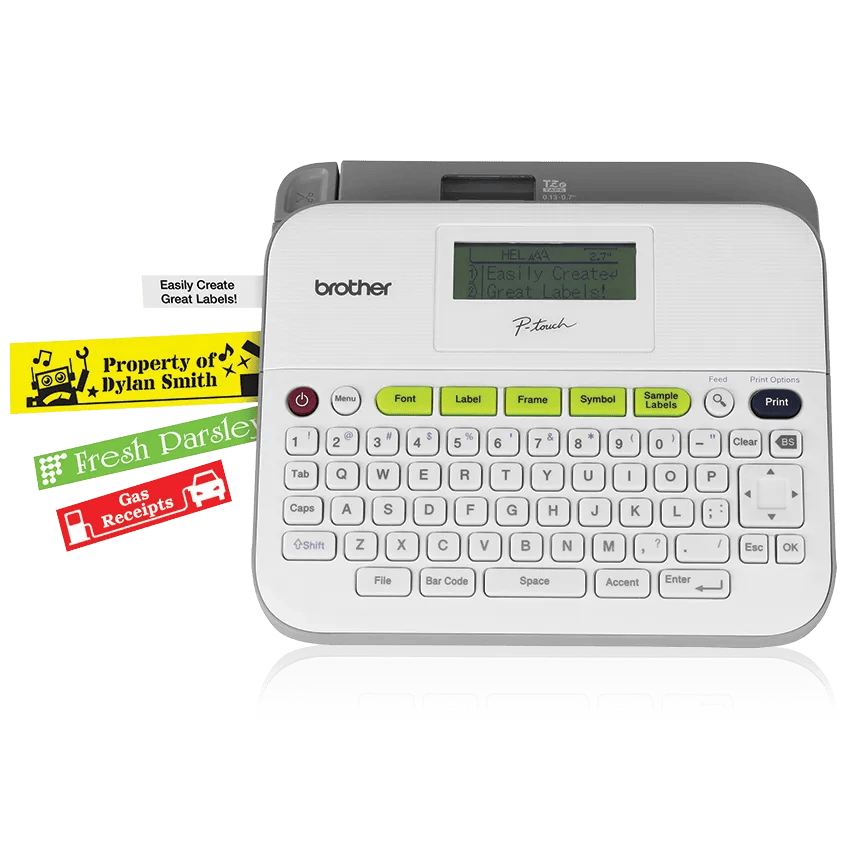
Explore this need in the finder →The Brother P-touch PT-D400 is an earlier desktop label maker built around a physical QWERTY keyboard and standard TZe cassette tape. It is for someone who would rather type on the labeler than compose every label on a phone or computer. The key decision is not just whether the PT-D400 can print 18 mm tape; it is which exact package is being considered. The base PTD400 listing includes a 12 mm starter cassette and guide, while the PTD400AD package adds an AC adapter and an 18 mm starter cassette. Brother lists the PT-D400 as discontinued, so treat this as an older model to compare or maintain, not a default current purchase.
The PTD400 package is not the PTD400AD bundle
Brother’s exact PTD400 box list names a black-on-white laminated 12 mm TZe starter tape and the User’s Guide. It does not list an AC adapter. The matching PT-D400 manual calls the compatible adapter optional and identifies AD-E001; it also documents six AA alkaline or six AA Ni-MH cells as power options. The package therefore suits a desk where batteries are acceptable or the owner already has a compatible adapter. Do not assume an adapter is present just because a seller writes “PT-D400” in a title: for a used unit, confirm what is physically included.
The PTD400AD is the distinct adapter-included package, not proof of a different print engine. Brother’s PTD400AD page lists an AC adapter, an 18 mm black-on-white TZe starter tape and a two-year limited warranty; the base PTD400 page lists the 12 mm sample and a one-year limited warranty. Both support pages map to the same d400eus product support identity and the same PT-D400 User’s Guide. If the adapter in the box matters, that package distinction should change the choice. If the adapter does not matter, consider whether the 12 mm starter cassette is useful for the first jobs.
Typing, previewing and saved files
The wide QWERTY keyboard is the central convenience: type directly, choose a layout or frame, preview the text and print without pairing or launching an app. This is a straightforward routine for labeling pantry containers, storage drawers, household folders, craft supplies or cables when you prefer physical keys. The graphical screen shows multiple lines, but it is not a backlit display. It is helpful for checking wording and line breaks; it is not a substitute for seeing a full-size mock-up, especially on a narrow cassette.
The manual documents up to 50 stored label files, barcode printing, mirrored text, vertical printing, numbering and built-in formatting. Those are useful tools for repeating inventory or file labels, but do not turn the PT-D400 into a barcode scanner or computer-managed database printer. The model’s documented design route is the onboard keyboard. If you want to design from a laptop, import data or create labels with a phone, this is the wrong kind of convenience; compare a model with an explicit USB or mobile route instead.
Choose tape width for the label, not just the device
The PT-D400 uses Brother TZe tape at 3.5, 6, 9, 12 and 18 mm. The manual allows as many as five lines on 18 mm tape, three on 12 mm, two on 6 or 9 mm, and one on 3.5 mm; maximum print height is 15.8 mm on the widest cassette. That makes 18 mm the better choice for a longer cabinet title or a multi-line identifier, while 12 mm is a practical starter for short names. If a job needs 24 mm tape, another label family, or very large type, this machine does not meet that requirement. Tape choice also affects how comfortably text fits: a five-line maximum is not a promise that every long label will remain easy to read.
Brother’s laminated TZe system offers more than one adhesive or finish, but a tape width alone cannot guarantee it will stick well to every surface. Consider the material, texture, temperature and cleaning routine, and test the chosen tape on the actual item before labeling a large set. The cassette is replaceable, so the included 12 mm sample does not limit the PT-D400 to that width over its life.
Power and cutting are hands-on
Six AA batteries make the PT-D400 movable around a home or shared workroom, but they are not listed in the base box. A compatible AD-E001 adapter can instead keep it at a station; it is optional for the base package. This choice affects both setup and recurring battery replacement, so decide whether an adapter you already own is verified compatible or whether it needs to be sourced separately. The body is about 7.44 by 6.99 by 2.78 inches and around 1.6 pounds without batteries or tape. It can be moved, but it is a desktop machine rather than a pocket-size labeler.
The cutter is a manual lever. Full, half, narrow and chain margins help manage how much tape is used between jobs; chain printing still requires a final feed and a hand cut. If automatic cutting is essential for a batch workflow, choose another model. The PT-D400 is more attractive for occasional, deliberate labeling than for a production line that should print and cut continuously.
Who should consider this older model?
Consider the base PT-D400 when a local QWERTY keyboard, standard TZe cassettes through 18 mm, AA power or an already-owned compatible adapter meet the job, and the exact 12 mm starter package is acceptable. It is a poor fit if computer design, phone editing, Wi-Fi, automatic cutting, a bundled adapter or tape wider than 18 mm is essential. The PT-D400AD is the closer comparison if adapter-in-box convenience is valuable. The PT-D410 is the more relevant current-reference alternative if you want to keep the same keyboard habit but add a documented USB computer-design route. For all earlier listings, verify the exact package and actual included parts rather than inferring them from the shared PT-D400 name.
Key details at a glance
| Print process | Thermal transfer |
|---|---|
| Maximum tape width | 18 mm |
| Compatible cassette | The PT-D400 U.S. User’s Guide limits this model to Brother TZe cassettes and lists widths 3.5, 6, 9, 12 and 18 mm. Do not infer other Brother media families from the shared cassette shape. |
| On-device preview characters | 16 |
| Maximum combined print height | 15.8 mm |
| Maximum lines per label | 5 |
| On-device frames | 99 |
| On-device symbols | 617 |
| Saved label files | 50 |
| Body dimensions | Approx. 7.44 × 6.99 × 2.78 inches W × D × H per the exact PT-D400 U.S. User’s Guide. |
| Tape cutting | The manual directs the user to operate the physical cutter lever. Chain mode still requires tape feed and a final hand cut. |
| What the base package supplies | The exact PTD400 U.S. box list names a 12 mm x 4 m black-on-white laminated TZe starter cassette and User’s Guide; no AC adapter is listed. PTD400AD is a distinct adapter-in-box package that lists an 18 mm starter cassette and has a separate two-year warranty listing. |
| Letter-key arrangement | qwerty |
Use the exact model’s instructions for operating limits, supplied equipment and version differences.
Sources for this assessment
- Brother U.S. Office & Home directory tile at offset 30, PTD400
- Brother U.S. PTD400 exact product package page
- Brother U.S. PTD400 support page; support identifier d400eus
- Brother PT-D400 U.S. manual index; v02 dated 2014-12-16
- Brother PT-D400 U.S. English User’s Guide v02 (reused exact underlying manual; cover identifies PT-D400)
- Brother PTD400 product-page illustration
- Brother U.S. PTD400AD package comparison page; same d400eus device, different exact box contents
Put the device and its tape system together.
Match the exact model, cassette family, computer or network route and any optional power or touch-panel hardware before buying.