
Your needs, this model
Does it fit your priorities?
Would you rather type with the machine’s own QWERTY keys than compose on a phone?
The D400 is a self-contained keyboard labeler. Its U.S. guide documents on-device entry and formatting, not a mobile-app or computer design connection.
Explore this need in the finder →Do you need the widest standard TZe cassette and room for several lines?
The PT-D400 guide lists TZe widths through 18 mm and up to five lines on that width. Narrower cassette widths support fewer lines.
Explore this need in the finder →Must the exact package include an AC adapter rather than merely support one?
Brother lists an adapter in the discontinued PT-D400AD package. The PT-D400 manual describes AC adapter operation as optional for the base PT-D400 offer, so package contents matter.
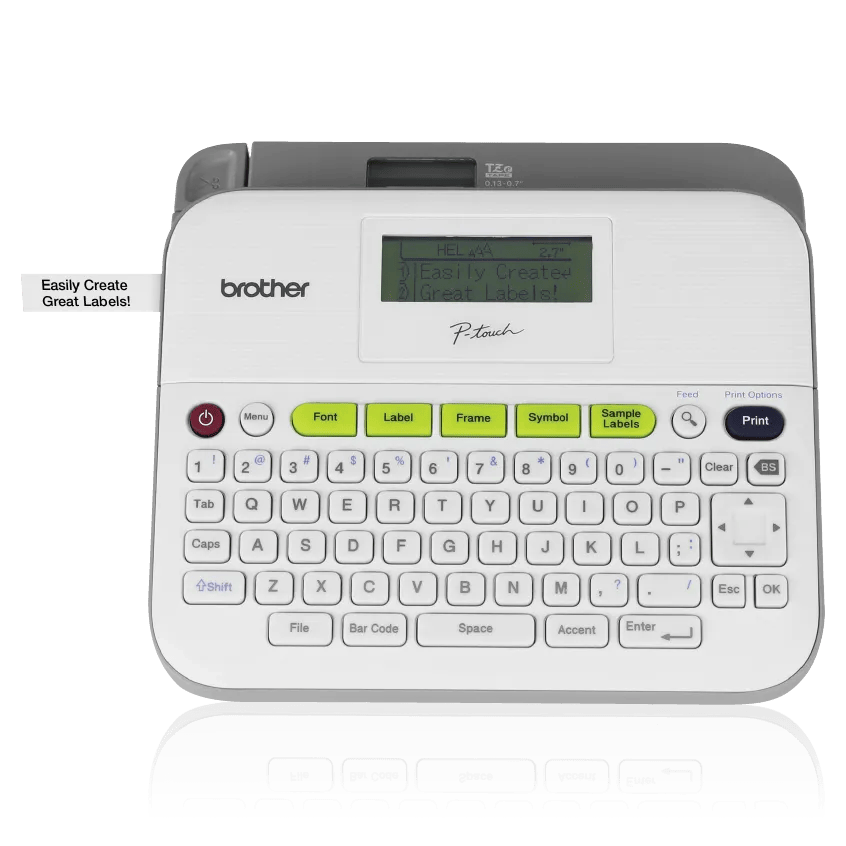
Explore this need in the finder →The PT-D400AD is a desktop Brother P-touch label maker for someone who wants to compose labels on the machine itself and values an AC adapter in the exact package. Its wide QWERTY keyboard, 18 mm maximum TZe tape and room for up to five text lines on the widest cassette suit a home office, craft table or shared labeling station. Brother now lists this product as discontinued, so this assessment is most useful when comparing an existing machine or evaluating an earlier-package listing rather than as a current default recommendation.
The “AD” package is the important distinction
The product page calls the item PT-D400AD and lists an AC adapter and an 18 mm black-on-white TZe starter cassette in the box. The linked U.S. support record and User’s Guide identify the underlying labeler as PT-D400; the guide says an AC adapter is optional for the PT-D400. That makes the included power supply the package difference to verify, not evidence of a different print engine. A used machine, reseller bundle or replacement package may not contain the same accessories, so do not infer what is in a particular box from the “D400” name alone.
With the adapter connected, the D400AD is ready for a fixed desk without buying batteries. The PT-D400 can also run from six AA alkaline cells or six AA Ni-MH cells, but those batteries are not listed in the D400AD product box. The manual recommends the AD-E001 adapter for the D400 platform; Brother’s D400AD page says an adapter is included but does not name the included adapter model. If you are buying a replacement power supply, use the exact model and electrical rating Brother specifies rather than treating any plug that fits as compatible.
A self-contained keyboard workflow
The large QWERTY panel and built-in display let you enter, format, preview and print without a phone or computer. The U.S. guide describes a display with 16 characters per row, one guidance row and two text rows. It documents basic editing, saved label files, number sequencing, barcodes, cable-flag layouts, mirror printing and sample-label templates. The PT-D400AD product page lists 14 fonts, 99 text frames and 617 symbols, plus barcode printing; font-style counts are inconsistent between sections of that page, so they are not a sound reason to choose it over another model.
This is not the connected route offered by more recent desk models. The PT-D400 guide focuses on on-device entry and documents no USB computer-design workflow; the exact model page likewise identifies a keyboard label maker rather than a mobile printer. If phone composition, computer artwork or Wi-Fi printing is essential, look at a different model and confirm that its own operating plan supports the connection you need. The D400AD’s self-contained approach is straightforward for short text, but it is less convenient for importing a long list or laying out many designs on a large screen.
Width, line count and cutting affect the real routine
Brother’s PT-D400 documentation confirms standard TZe cassettes at 3.5, 6, 9, 12 and 18 mm. At 18 mm the machine allows up to five lines, while narrower cassettes support fewer: up to three lines at 12 mm, two at 6 or 9 mm, and one at 3.5 mm. Maximum print height is 15.8 mm on 18 mm tape; actual characters can be smaller. That flexibility is useful for storage bins, folders, craft supplies and other labels that need more than one line, but it does not mean every font, frame and line count will fit comfortably on every width.
It uses a manual cutter lever, not an automatic cutter. The guide offers full, half, narrow and chain margin settings. Chain printing can reduce the repeated gap between consecutive labels, but the manual still requires tape feed and a final cut, so it is not a zero-waste automated batch system. The device is also a stationary desktop unit: the PT-D400 specifications list a body around 7.44 by 6.99 by 2.78 inches and about 1.6 pounds before batteries and cassette. Measure the shelf or drawer rather than assuming it will pack like a handheld labeler.
Who should choose it—and what to compare
Keep or consider the PT-D400AD if you specifically want an on-device QWERTY TZe labeler, need 18 mm tape, and value the adapter included with this named package. The laminated TZe family gives you more than plain paper labels, but Brother cautions that adhesion and removability depend on the material and environment. Clean, dry surfaces are a better starting point; test an inconspicuous spot when the substrate matters. Tape compatibility is not a guarantee for every surface or every exposure.
The PT-D410 is a closer current-reference comparison if you want the same broad TZe desk format with the option to design from a computer over USB as well as type on the keyboard. The smaller PT-D220 is more sensible when 12 mm is enough and reducing the footprint matters more than wide, multi-line output. Neither comparison makes the discontinued D400AD a poor machine for an existing owner; it clarifies that the D400AD’s practical appeal is the bundled adapter and stand-alone operation, not a modern wireless feature set. Check the exact package contents and condition before spending money on an earlier unit.
Key details at a glance
| Print process | Thermal transfer |
|---|---|
| Maximum tape width | 18 mm |
| Compatible cassette | The U.S. manual says to use Brother TZe cassettes and lists 3.5, 6, 9, 12 and 18 mm. Its listed specialty types are cassette variations within that media family; no other Brother tape family is confirmed. |
| On-device preview characters | 16 |
| Maximum combined print height | 15.8 mm |
| Maximum lines per label | 5 |
| On-device frames | 99 |
| On-device symbols | 617 |
| Saved label files | 50 |
| Body dimensions | Approx. 7.44 x 6.99 x 2.78 in (W x D x H), per the PT-D400 U.S. manual. |
| Tape cutting | Manual lever cutter, not automatic. Chain mode reduces the interval between labels but manual feed and a final cut remain necessary. |
| What the base package supplies | Exact Brother PT-D400AD page lists an 18 mm x 4 m black-on-white TZe starter cassette, an AC adapter and User’s Guide. The PT-D400 guide says adapter optional for the base PT-D400. Brother does not name the adapter model in the D400AD box list. |
| Letter-key arrangement | qwerty |
Use the exact model’s instructions for operating limits, supplied equipment and version differences.
Sources for this assessment
- Brother U.S. PT-D400AD product page
- Brother U.S. PTD400AD support page; maps to PT-D400 support identity
- Brother U.S. PT-D400 manuals listing; User’s Guide v02, 2014-12-16
- Brother PT-D400 User’s Guide (U.S. English; exact PT-D400AD support maps to d400eus)
- Brother U.S. PT-D400AD product image; manufacturer rendering visually inspected
- Brother U.S. PT-D400 specifications (direct page returned HTTP 403 to local archive request; also inspected via official web result)
Put the device and its tape system together.
Match the exact model, cassette family, computer or network route and any optional power or touch-panel hardware before buying.