
Your needs, this model
Does it fit your priorities?
Would it help to design intricate labels on a computer as well as type on the machine?
The PT-D410 supports both its built-in QWERTY keyboard and USB-connected Brother P-touch Editor on Windows or Mac. It has no mobile printing app or wireless connection.
Explore this need in the finder →Do you need the wider 18 mm TZe tape for larger text or multi-line layouts?
Brother documents the PT-D410 with TZe tape up to 18 mm and five lines at that width; the PT-D220 and Btag machines top out at 12 mm.
Explore this need in the finder →Would a power adapter that is already in the base box simplify a fixed desk setup?
The PT-D410 package includes an AD-E001A adapter and a USB cable. Its six AA alkaline battery option is separate, so the included AC route is the practical ready-to-use stationary option.
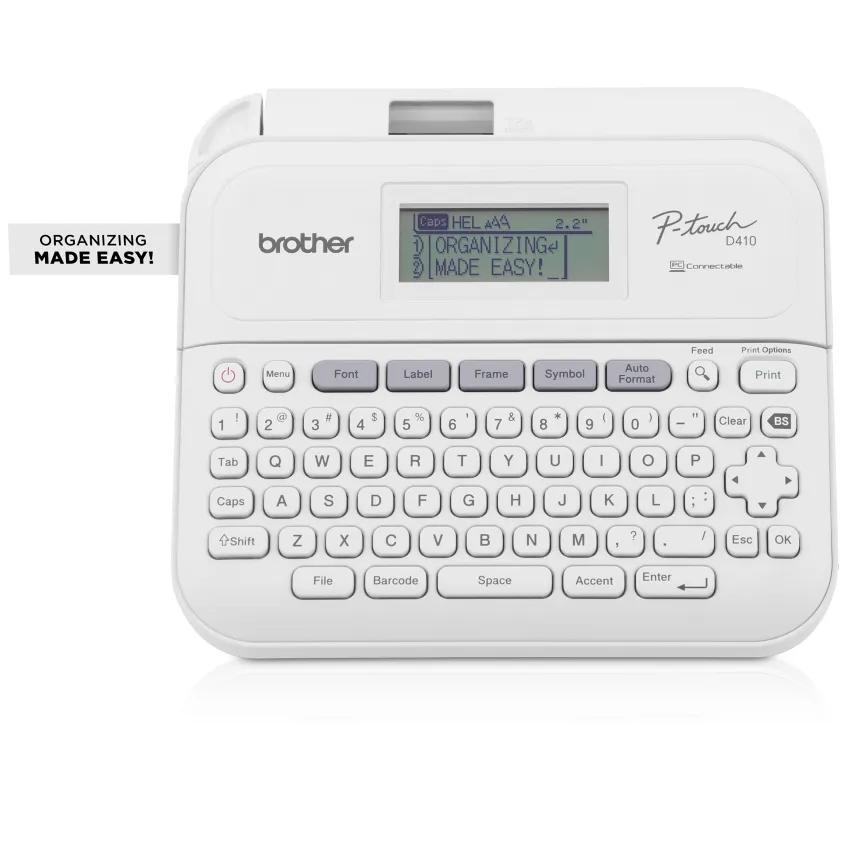
Explore this need in the finder →The PT-D410 is a desktop keyboard label maker for people who may outgrow narrow tape or want computer editing without moving to a roll-fed shipping printer. It keeps a full QWERTY keyboard on the machine, but also connects by USB to Brother P-touch Editor on a Windows PC or Mac. Standard TZe tape runs up to 18 mm, and the manual gives up to five lines on that widest cassette. Those are practical differences from the PT-D220, which tops out at 12 mm and edits only on its own keypad.
Two creation routes, not a wireless workflow
At the machine, the 15-character two-line display is more forgiving than a single line when adjusting a longer label. The PT-D410 also has quick formatting keys, 30 preset templates, storage for 50 labels, 15 fonts, 13 styles, 120 frames and 700 symbols. Its barcode function can be used from the unit; P-touch Editor adds computer-based layout work and the ability to include images and barcodes. The software is a download, so expect to install it and check current operating-system support rather than assuming the printer is ready to pair with any device.
This model has no mobile printing app, Bluetooth or Wi-Fi. The connection is USB 2.0 through a Micro-B port. If you only want a phone-based workflow, the PT-N25BT is a more direct fit, though it uses Btag tape and not TZe. If you want to make labels without any computer, the PT-D410’s built-in keyboard still works; buying it does not force you to use the software.
The extra width is useful but comes with a larger footprint
Brother lists standard TZe tape widths of 3.5, 6, 9, 12 and 18 mm, with one line on the narrowest size, up to three at 12 mm and up to five at 18 mm. Maximum print height is 15.8 mm on 18 mm tape, and Brother notes actual character size can be smaller. That gives room for more legible multi-line organization labels than the PT-D220’s 12 mm ceiling, but a tape-width maximum is not a promise that every font, frame and number of lines fits the same way.
The manufacturer’s product page has one generic media field that lists both HGe and TZe, while its compatible-tape-family field and the model-specific user guide identify standard TZe cassettes. The US support specifications also detail TZe widths only. For a reliable buying decision, treat the documented TZe sizes as confirmed and do not assume an unlisted HGe cassette will work without an exact-model confirmation from Brother.
The PT-D410 body is about 7.3 by 7.0 by 2.8 inches and roughly 1.67 pounds without batteries or cassette. Against the PT-D220’s 6.2 by 5.9 by 2.7 inch body, this is a noticeably larger desk tool, not a pocket labeler. It makes sense on a work surface where the keys, larger display and wider tape matter more than packing space.
What the package does—and does not—solve
The base package includes one 18 mm by 4 m black-on-white TZe sample, the AD-E001A AC adapter, a USB cable and documentation. It can also run on six AA alkaline batteries, which are not included. The adapter is the convenient included route for a fixed desk; USB is the data connection, not a wireless power or mobile-print feature. Brother’s PTD410CCBUND adds a carry case, while PTD410VP adds the case and a second 12 mm by 4 m black-on-clear sample cassette. The printer mechanism and label capabilities remain the same across these package codes.
Like the D220, the PT-D410 has a manual tape-cutter lever, not an automatic cutter. Its guide includes small-margin, large-margin, chain, no-cut and special-tape options; some options require you to feed the tape and operate the cutter after printing. Chain printing can reduce the repeated gap between short labels, but Brother’s instructions still include a feed and final cut. Do not plan on an automatic, zero-waste label batch. The manual also cautions that the adhesive result depends on surface and environment; clean, dry, smooth surfaces are better starting points, and a hidden-area test is prudent.
Who should choose it?
Choose the PT-D410 if a wider TZe label, a richer desktop layout or the option to design from a computer is essential, and you have room for a small stationary machine. It is less compelling if your labels are short and narrow, you do not want to install software, or you need phone, Wi-Fi or automatic cutting. For a smaller physical-keyboard TZe machine, look at the PT-D220. For phone-made decorative labels, compare the PT-N25BT but first price and source Btag cassettes as a different supply system. The D410 is best understood as a more capable TZe desk workflow, not an all-purpose wireless printer.
Key details at a glance
| Maximum tape width | 18 mm |
|---|---|
| Compatible cassette | Brother support specifications document standard TZe cassettes from 3.5 through 18 mm. The product page also lists HGe in a general media field but its tape-family field and the PT-D410 user guide specify TZe; no HGe size was confirmed for matching. |
| Built-in templates | 30 |
| On-device preview characters | 15 |
| Maximum combined print height | 15.8 mm |
| Maximum lines per label | 5 |
| On-device frames | 120 |
| On-device symbols | 700 |
| Saved label files | 50 |
| Computer design route | Brother P-touch Editor for Windows or Mac; separate software download required |
| Power choices | Six AA alkaline batteries are not included; the base PT-D410 package includes the AD-E001A AC adapter and USB cable. |
| Body dimensions | Approximately 7.3 in wide x 7.0 in deep x 2.8 in high |
| Tape cutting | Manual tape-cutter lever, not an automatic cutter. The manual describes small-margin and chain options; chain printing still needs a final feed/cut and cannot remove the initial feed margin. |
| What the base package supplies | Base PT-D410 includes one 18 mm x 4 m black-on-white TZe sample, AC adapter, USB cable and documentation. PTD410VP adds a carry case and 12 mm x 4 m black-on-clear sample; PTD410CCBUND adds a carry case. The underlying PT-D410 capabilities are unchanged. |
| Letter-key arrangement | qwerty |
| Built-in type styles | 13 |
Use the exact model’s instructions for operating limits, supplied equipment and version differences.
Sources for this assessment
- Brother US PT-D410 product page
- Brother PT-D410 US specifications
- Brother PT-D410 US manuals listing
- Brother PT-D410 User's Guide (US English; shared D410/D460BT manual, D410-specific sections inspected)
- Brother PT-D410 two-page product brochure
- Brother PT-D410VP package page
- Brother PTD410CCBUND package page
Put the device and its tape system together.
Match the exact model, cassette family, computer or network route and any optional power or touch-panel hardware before buying.