
Your needs, this model
Does it fit your priorities?
Do you want to type on the label maker and also design through a computer rather than a phone?
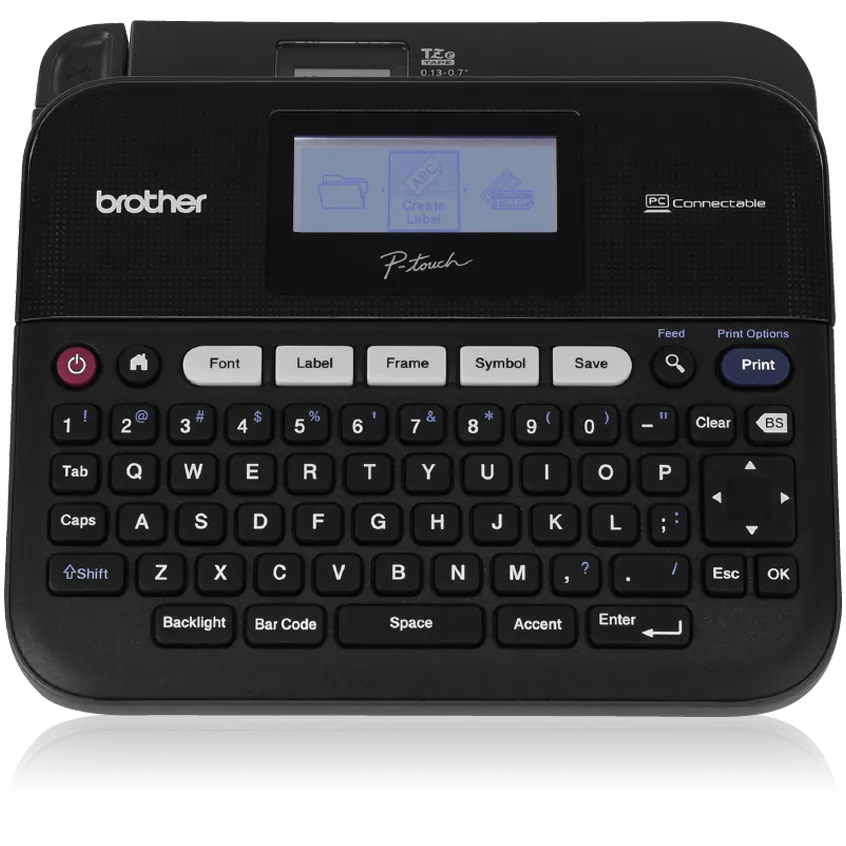
The PT-D450 provides an on-device QWERTY keyboard and a separate wired USB route to Brother P-touch Editor on a PC or Mac. No phone app or Wi-Fi route is documented.
Explore this need in the finder →Is 18 mm standard TZe tape wide enough, with a manual cutter acceptable?
The U.S. guide lists five standard TZe widths through 18 mm and allows up to five lines on 18 mm. It uses a hand-operated tape cutter; narrower cassettes allow fewer lines.
Explore this need in the finder →Do you need the named package to include an AC adapter and can you work with a wired desktop setup?
Brother lists an AC adapter, USB cable and 18 mm starter cassette in the exact PTD450 box. Six AA batteries are an alternative but not listed as included.
Explore this need in the finder →The Brother P-touch PT-D450 is an earlier, discontinued label maker for someone who wants two ways to compose: type on its built-in QWERTY keyboard or connect the machine to a computer over USB. That second route is the meaningful difference from a keyboard-only desktop model such as the PT-D400AD. The exact U.S. PTD450 package included an 18 mm black-on-white TZe starter cassette, USB cable and AC adapter. Brother now marks the product discontinued, so this is a useful assessment for an existing owner or a carefully checked older listing, not a current default recommendation.
Choose it for the keyboard-plus-computer routine
At the machine, the PT-D450 lets you type, format, preview and print without another device. The broad QWERTY keyboard has direct keys for font, label, frame, symbol, save, preview and barcode work. Brother’s U.S. guide describes a graphical screen with a one-line guidance row and three text rows. The product page’s specification table instead calls it a 20-character, two-line display. The manual and support specification agree with each other; because Brother’s page conflicts with its own manual-backed field, read the exact screen on an older unit rather than buying on a display-count claim.
When keyboard entry is not convenient, an included USB cable connects it to a Windows PC or Mac running Brother P-touch Editor. The computer route is wired, not Bluetooth or Wi-Fi, and the model has no documented phone-app path. Brother describes Excel database printing as a Windows-only P-touch Editor function. The 2014 U.S. guide lists operating systems from its own era and tells readers to check Brother for the latest compatible OS; that old list is not proof of support on a current computer. If computer design is essential, verify that the software and drivers are still available for the operating system you will actually use.
Work in the TZe sizes you can use
The PT-D450 accepts standard Brother TZe cassettes from 3.5 through 18 mm. The exact package listing describes one 18 mm by 4 m black-on-white starter tape. With the widest cassette, the manual allows up to five lines and a maximum print height of 15.8 mm; 12 mm permits three lines, 6 and 9 mm allow two, and 3.5 mm allows one. Those are format ceilings, not a promise that five lines will be easy to read in every design. Brother’s online product page says “four different widths” in one paragraph, “five” in another and lists all five widths in its table; the U.S. manual and support spec also list five, so use the documented cassette-width list rather than that stray four-width phrase. The same product page’s technical table says two maximum print lines even though its feature copy and the manual specify up to five at 18 mm; I have kept that internal conflict visible rather than treating the table as dependable for line planning.
This is a TZe-only machine. Brother’s support answer for the PT-D400/PT-D450 family says the machines do not accept TZ or HG cassettes. Pick the cassette for the surface and use: compatibility with a laminated or specialty tape does not guarantee adhesion or easy removal from every material. Brother itself cautions that location, surface and environment can change how a label sticks or comes off.
Budget for hand cutting and memory backup
The cutter is a manual lever. Large-margin, small-margin, chain, no-cut and special-tape options change feeding and spacing, but none turns this into an automatic batch cutter. Chain mode can reduce the gap between labels; it still pauses for feeding and a final hand cut. If you print a run of files, plan for the cut step and the long leading/trailing margins described in the guide rather than assuming every label will emerge trimmed.
The PT-D450 can use AC power or six AA alkaline or Ni-MH cells. Brother lists the AD-E001 in its manual and includes an AC adapter in the named PTD450 package; batteries are not listed in the box. The battery option adds flexibility if the machine moves away from an outlet, but it is not rechargeable. One ownership detail matters if you use stored layouts: Brother says saved text files and formatting can be cleared if power is disconnected for more than two minutes, and recommends batteries for memory backup when the adapter is unplugged. Keep backup cells installed if you rely on those 50 saved files, and inspect a used unit’s power compartment and adapter before counting on it.
Who should look elsewhere?
The PT-D450 fits an older desk setup where QWERTY typing, USB computer layout, an 18 mm TZe ceiling and an adapter in the exact package all matter. Its body is about 7.44 by 6.99 by 2.78 inches and weighs about 1.6 pounds without batteries or tape; measure a drawer or counter before treating it as a portable handheld. It is not the choice for phone-first editing, Wi-Fi, wider-than-18-mm tape or automatic cutting. Its discontinued status and 2014 software guide also make condition, adapter, cassette and computer compatibility more important than a product title or image.
For a current Brother reference with keyboard and USB design, compare the PT-D410; it preserves the basic TZe desktop format but is a newer product. The earlier PT-D400AD is a closer comparison if you only need the stand-alone keyboard and an adapter in its named package, not the D450’s computer connection. If a phone app matters, a Bluetooth model such as the PT-D460BT follows a different workflow. For the PT-D450, check the exact PTD450/PT-D450 code and what is actually included; do not assume a used offer retains the original tape or adapter. This review is based on Brother’s U.S. product record, support specification, official User’s Guide and tape-compatibility answer, not personal testing or print-quality measurements.
Key details at a glance
| Print process | Thermal transfer |
|---|---|
| Maximum tape width | 18 mm |
| Compatible cassette | The PT-D450 U.S. User’s Guide says to use Brother TZe cassettes only and lists 3.5, 6, 9, 12 and 18 mm. Brother’s support answer for PT-D400/PT-D450 says TZ and HG cassettes are not compatible. Do not infer other media families. |
| Built-in templates | 1 |
| On-device preview characters | 21 |
| Maximum combined print height | 15.8 mm |
| Maximum lines per label | 5 |
| Line-count note | The U.S. User’s Guide and support specification list width-specific line limits. Brother product-page feature copy says up to five lines, while a separate technical row says maximum two; manual and support specification agree on five for 18 mm. |
| On-device frames | 99 |
| On-device symbols | 617 |
| Saved label files | 50 |
| Body dimensions | Approximate 7.44 x 6.99 x 2.78 inches W x D x H per the PT-D450 U.S. User’s Guide and support specification. |
| Tape cutting | The cutter is a hand-operated lever. Chain mode pauses for feeding and a final manual cut; it is not automatic cutting. |
| What the base package supplies | Exact U.S. PTD450 product page marks the model discontinued and lists the included 18 mm x 4 m black-on-white TZe starter cassette, AC adapter and USB cable. Six AA cells are supported but not listed as included. |
| Letter-key arrangement | qwerty |
Use the exact model’s instructions for operating limits, supplied equipment and version differences.
Sources for this assessment
- Brother U.S. Office & Home directory offset 30, exact PTD450 tile
- Brother U.S. PTD450 exact product page
- Brother U.S. PTD450 support page, support identifier d450eus
- Brother U.S. PT-D450 specification
- Brother U.S. PT-D450 manual index, User’s Guide version 02 dated 2014-12-19
- Brother PT-D450 U.S. English User’s Guide v02 (LAF394001A)
- Brother U.S. PT-D450 product-page primary image
- Brother U.S. cassette-installation answer naming PT-D400 and PT-D450
- Brother U.S. recall index (reused source; no PTD450 identifier found)
Put the device and its tape system together.
Match the exact model, cassette family, computer or network route and any optional power or touch-panel hardware before buying.