
Your needs, this model
Does it fit your priorities?
Do you want the keyboard and a phone route without giving up TZe?
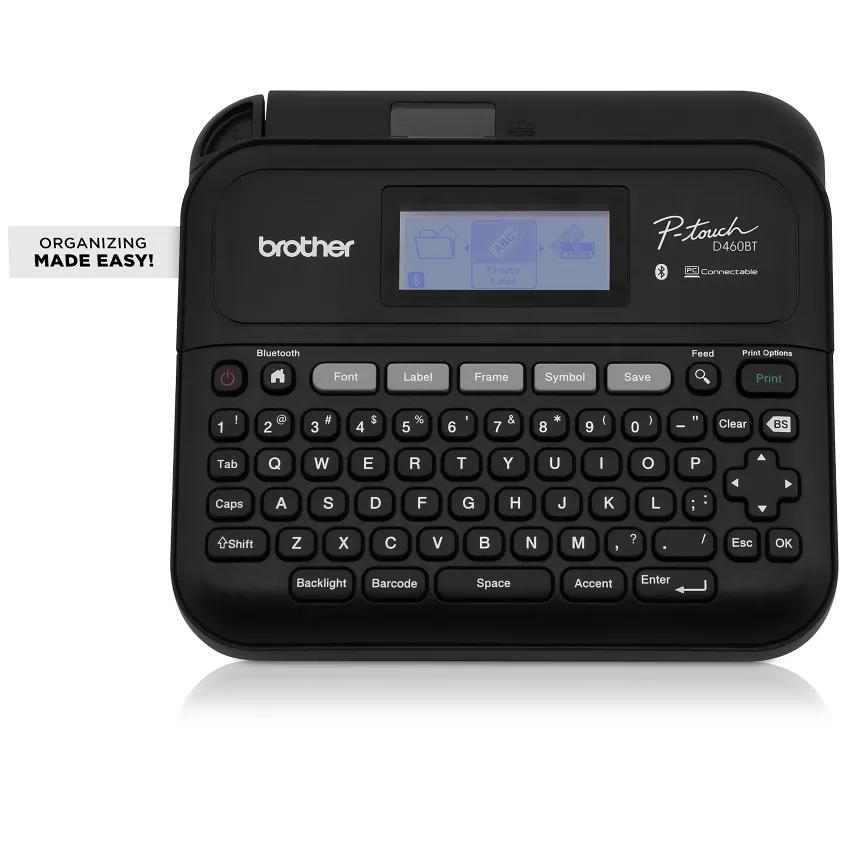
The PT-D460BT has a QWERTY keyboard and Brother iPrint&Label Bluetooth workflow, but uses standard TZe rather than Btag tape.
Explore this need in the finder →Will 18 mm TZe provide enough room for your longer labels?
The documented 18 mm cassette supports up to five lines, while narrower tape has lower line limits; the D460BT cannot accept 24 mm tape.
Explore this need in the finder →Would both computer design and app access be useful?
P-touch Editor connects by USB or Bluetooth, and iPrint&Label connects by Bluetooth; six AA or the included AC adapter power the printer.
Explore this need in the finder →The Brother P-touch PT-D460BT is a connected desktop label maker for someone who still values a physical keyboard but does not want to be limited to typing at the machine. It accepts standard Brother TZe cassettes through 18 mm, can also take label jobs over Bluetooth or USB, and has a larger two-line display than a basic handheld. That combination makes it a flexible small-office or home-workbench tool—not a replacement for a wide-format shipping printer and not the right choice if a fully automatic cutter is essential.
A keyboard that does not lock you into the keypad
The QWERTY keyboard and backlit, 20-character by two-line monochrome screen make the PT-D460BT usable as a stand-alone label maker. You can enter text, set a layout and preview the label without opening a phone or computer. The screen is still only a small proofing window, so carefully check long names and line breaks before printing a batch. Brother says it stores up to 70 label files for repeat use, and lists 40 on-device templates, 140 frames and 800 built-in symbols. That is a broader direct-entry toolkit than the PT-D220, though a template count does not guarantee a particular label layout will fit a narrow cassette.
When the label needs a computer layout, the D460BT connects to P-touch Editor over USB or Bluetooth. Brother also documents the iPrint&Label app over Bluetooth for iOS and Android devices. The physical keyboard remains useful for a quick one-off; the app is an additional input route rather than a requirement. A PC or Mac can handle more deliberate composition, including graphics and codes through the connected software. These are software-dependent routes: download the current application and check its OS support before building a routine around it. There is no Wi-Fi workflow documented for this model.
What the 18 mm ceiling means in practice
Brother's US support specification and the shared PT-D410/PT-D460BT guide list standard TZe widths of 3.5, 6, 9, 12 and 18 mm. At the widest 18 mm cassette, the model can lay out as many as five lines; the supported line count drops as tape narrows. Brother lists a maximum print height of 15.8 mm on 18 mm tape and cautions that actual character size may be smaller. That gives more room for multi-line room, shelf and inventory labels than a 12 mm-only machine, but it is not a promise that any selected font, frame and five-line layout will look readable together. Make a test label with the exact cassette and text size before printing a series.
One source conflict is worth knowing about: Brother's product-page technical table says a maximum of two print lines, while its US support specifications and model guide describe a width-dependent maximum of five, including 18 mm tape. The more detailed model documentation agrees on five, so that is the maximum we use here; it should not be confused with the much narrower two-line display, which is a preview screen rather than the tape's line limit.
Brother's product page also contains a generic media field mentioning HGe and TZe, but its compatible-family field and the US support specification and manual list TZe cassettes. Those sources enumerate TZe sizes; they do not give a D460BT HGe size or operating instruction. For a dependable match, treat TZe as the confirmed supply family, not as permission to use a similarly sized cassette from another Brother line.
Desk setup, power and cutting
The PT-D460BT measures about 7.3 by 7.0 by 2.8 inches, and its weight is about 1.69 pounds before batteries and tape. It is a small desktop machine rather than a pocket tool. The base package includes a black-on-white laminated TZe sample cassette, an AC adapter, a USB cable and documentation. Six AA alkaline batteries are an alternative power route, but they are not included. The USB cable carries the computer connection; it does not make the printer a phone- or network-powered device.
Cutting is manual. Brother's guide offers margin, chain and no-cut options, but the user still operates the cutter lever; the model does not advance to automatic finishing. Short batches and occasional household labels make that simple. Repeated short labels can still use tape on margins and a final manual cut, so a high-volume workflow should include handling and trimming time. For TZe's laminated tapes, Brother lists application-specific options such as flexible ID and extra-strength adhesive, but tape capability alone cannot guarantee adhesion to every surface. Clean and dry the target, follow the cassette's instructions and try a sample on a hidden area.
Bundle codes and alternatives
The PT-D460BTVP value package keeps the same PT-D460BT machine and adds Brother's carry/storage case plus a second black-on-clear 12 mm by 4 m TZe sample; the base PT-D460BT sample is black on white at 18 mm by 4 m. The refurbished RPTD460BT is also a condition/package variant of the same printer, not a different wireless model. Brother says its refurbished unit is tested and includes the same original accessories; minor cosmetic blemishes may be possible under the manufacturer's refurbished guidance. Compare exactly what a particular listing says is in the box rather than assuming a bundle code, condition or available cassette is identical everywhere.
Choose the D460BT if the built-in keyboard, phone/computer options and tape up to 18 mm solve one real routine. It is the most balanced of the connected desktop choice when you want Bluetooth but do not need 24 mm tape or automatic cutting. The PT-D410 is the simpler TZe desktop alternative if USB computer editing is enough and you do not need mobile input. The PT-D610BT is the step up if an automatic cutter, color display, seven-line layouts on 24 mm tape or larger maximum print height matter. If neither wider TZe tape nor connected editing earns a place in your routine, a smaller direct-entry machine may be easier to store and less elaborate to set up.
Key details at a glance
| Maximum tape width | 18 mm |
|---|---|
| Compatible cassette | The exact product page has a generic media field mentioning HGe and TZe, but the compatible-family field, US support specification and PT-D410/PT-D460BT manual list standard TZe cassettes. Their enumerated widths are 3.5, 6, 9, 12 and 18 mm; no exact D460BT HGe size or operating instruction was confirmed. |
| Built-in templates | 40 |
| On-device preview characters | 20 |
| Display type | Backlit graphical monochrome display, 20 characters x 2 lines |
| Maximum combined print height | 15.8 mm |
| Maximum lines per label | 5 |
| Line-count note | Five lines is the ceiling on 18 mm TZe; line capacity is lower on narrower tape. |
| On-device frames | 140 |
| On-device symbols | 800 |
| Saved label files | 70 |
| Computer design route | Brother P-touch Editor for Windows or Mac, connected by USB or Bluetooth; separate software download required |
| Power choices | Six AA alkaline batteries are an alternative and are not included. The base package includes the AD-E001A AC adapter and a USB cable. |
| Body dimensions | The US manual gives approximate body dimensions of 7.3 x 7.0 x 2.8 in; the product page lists 7.4 x 7.0 x 2.8 in. The finder uses the larger 7.4 in width conservatively. |
| Tape cutting | Manual lever cutter. Brother documents margin, chain and no-cut options; chain printing still requires a final feed and manual cut. |
| What the base package supplies | Base PT-D460BT includes one 18 mm x 4 m black-on-white TZe sample, AC adapter, USB cable and documentation. PTD460BTVP adds a carry case and a 12 mm x 4 m black-on-clear TZe sample. Refurbished RPTD460BT is the same printer in refurbished condition and includes the original accessories per Brother. |
| Letter-key arrangement | qwerty |
| Built-in type styles | 15 |
Use the exact model’s instructions for operating limits, supplied equipment and version differences.
Sources for this assessment
- Brother US PT-D460BT product page
- Brother PT-D460BT US support specifications
- Brother PT-D460BT US manual listing
- Brother PT-D410 | PT-D460BT US English User Guide home page
- Brother PT-D410 / PT-D460BT US English User Guide PDF (shared manual; PT-D460BT-specific sections individually inspected)
- Brother PT-D460BTVP connected label maker with carry case package page
- Brother RPTD460BT refurbished product page
Put the device and its tape system together.
Match the exact model, cassette family, computer or network route and any optional power or touch-panel hardware before buying.