
Your needs, this model
Does it fit your priorities?
Do your labels require 24 mm TZe and more than five lines?
The manual allows up to seven lines at 24 mm; the PT-D460BT and PT-D410 stop at 18 mm and five lines.
Explore this need in the finder →Is automatic cutting essential for repeated label jobs?
The D610BT has the documented automatic cutter, unlike the PT-D460BT and PT-D410 manual-lever models.
Explore this need in the finder →Would keyboard, computer and phone creation all be useful on one wider-tape printer?
The D610BT supports its keyboard, Bluetooth phone app, and USB or Bluetooth computer connection, while using TZe cassettes through 24 mm.
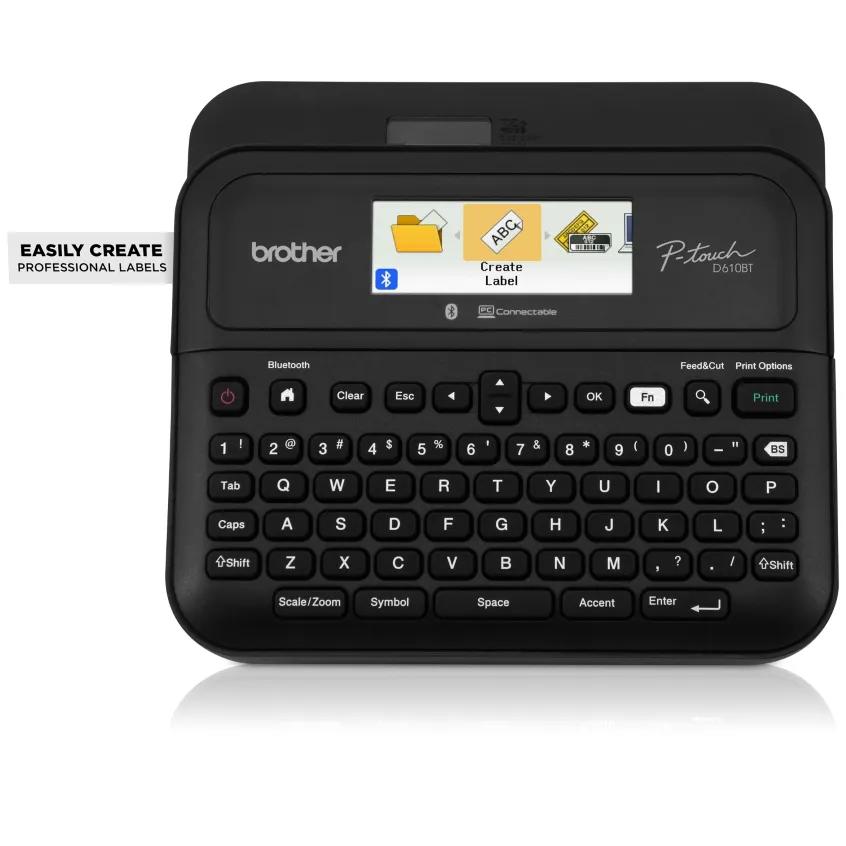
Explore this need in the finder →The Brother P-touch PT-D610BT is a desktop TZe label maker with a physical QWERTY keyboard, Bluetooth and USB connections, a color display and an automatic cutter. Its most consequential advantage over the PT-D460BT is not simply a bigger number on the box: it accepts 24 mm tape, can fit up to seven lines at that width, prints up to 18 mm high and cuts without requiring a hand-operated lever after each label. It is a sensible fit for repeat office, inventory or household batches where those capabilities are actually used, but it is larger and more involved than a narrow-tape keypad machine.
Three ways to create a label
The keyboard handles a one-off without software. P-touch Editor on a computer and iPrint&Label on a supported phone add the other routes; the manual documents Bluetooth 5.0 and USB 2.0 Micro-B, not Wi-Fi. Both apps require downloads, so check current OS support. The 20-character, two-line color display is useful for menus and preview, not a large proof of the finished layout.
Brother lists 17 built-in fonts, 17 styles, 160 frames, 900 symbols, 175 templates and storage for 99 labels. Its product page describes computer-created layouts with images, barcodes and QR codes; that detailed design route belongs to P-touch Editor rather than a large on-device workspace.
Wider TZe tape and the real line limit
The US support specification and PT-D610BT manual list laminated Brother TZe in 3.5, 6, 9, 12, 18 and 24 mm widths. The manual gives the line ceiling by tape size: up to seven on 24 mm, five on 18 mm, three on 12 mm, two on 6 or 9 mm, and one on 3.5 mm. Maximum print height is 18.0 mm on 24 mm tape, though actual characters may be smaller. These are capacity limits, not a guarantee that every typeface remains readable at the maximum line count. Test one label before a batch.
Brother's current product-page specification table lists four as the maximum number of print lines. The separate US support specification and the D610BT manual both provide the width-dependent seven-line maximum, and Brother's model brochure agrees. We use the more detailed, mutually consistent documentation here and preserve the discrepancy rather than silently treating the web page's shorter figure as the machine's whole capacity. The maximum is specific to 24 mm; it does not mean seven lines fit on every cassette.
Brother's general product-page field mentions HGe and TZe, but its compatible-family field, US specification and model manual enumerate standard TZe only. No HGe size or operation is confirmed for this printer, so treat TZe as the supported family. Similar width does not make another cassette system interchangeable.
Automatic cutting helps, but does not eliminate tape planning
Unlike the PT-D460BT and PT-D410 manual-lever models, the D610BT has an automatic cutter, which removes a repetitive hand-cut step in a batch. The guide still exposes cut and margin choices; it cannot erase blank feed margins or promise a zero-waste routine. Set the cut mode for the job and expect to handle the tape leader. It is a convenience, not a shipping or production system.
Brother lists a print speed of about 30 mm per second and up to 180 by 360 dpi when connected to a computer; the resolution claim is not universal to every input route. The stand-alone barcode function is documented, and 24 mm tape leaves room for larger equipment or folder labels. The color display does not change what TZe tape can adhere to.
Power, footprint and package details
The body is about 7.95 inches wide, 7.83 inches deep and 3.42 inches high, with a listed weight of roughly 2.2 pounds before the tape cassette and batteries. Leave extra room to open the cassette cover and collect labels; the dimensions do not include surrounding workspace. The base PT-D610BT package contains an AC adapter, USB cable, documentation and one black-on-white TZe sample cassette, 24 mm wide by 4 m long. Six AA alkaline batteries are an alternative and are not included. The included adapter suits a stationary desk setup, while the batteries offer a way to work away from the outlet.
The PT-D610BTVP package adds a carry case and a second 12 mm by 4 m black-on-clear TZe sample; its core printer is the same D610BT. Brother also lists RPTD610BT as its refurbished-condition version, with the same original accessories as the new machine according to the refurbished product page. A refurbished example may have minor cosmetic marks, and package details or terms should be checked on the exact offer; it does not create a second tape format or change the printer's operating plan.
Who should choose it?
Choose the PT-D610BT if 24 mm TZe, wider multi-line labels, an automatic cutter or a recurring keyboard/computer/phone routine matters. It also accepts narrower listed TZe widths, but its larger body and feature set are overkill for single-line pantry names. For connected input on 18 mm tape with a manual cutter, consider the PT-D460BT; the PT-D410 is simpler for a USB-only desk. Select tape for the surface, clean the target and test a sample before labeling something hard to replace.
Key details at a glance
| Maximum tape width | 24 mm |
|---|---|
| Compatible cassette | The exact product page has a generic media field mentioning HGe and TZe, but its compatible-family field, US support specification and PT-D610BT manual enumerate standard TZe cassettes in 3.5, 6, 9, 12, 18 and 24 mm widths. No exact D610BT HGe cassette size or instruction was confirmed. |
| Built-in templates | 175 |
| On-device preview characters | 20 |
| Display type | Backlit graphical full-color display, 20 characters x 2 lines |
| Maximum combined print height | 18 mm |
| Maximum lines per label | 7 |
| Line-count note | Seven lines is the ceiling on 24 mm TZe; line capacity is lower on narrower tape. |
| On-device frames | 160 |
| On-device symbols | 900 |
| Saved label files | 99 |
| Computer design route | Brother P-touch Editor for Windows or Mac, connected by USB or Bluetooth; separate software download required |
| Power choices | Six AA alkaline batteries are an alternative and are not included. The base package includes the AD-E001A AC adapter and a USB cable. |
| Body dimensions | The US manual lists approximately 7.95 in W x 3.42 in H x 7.83 in D. The product page rounds the body dimensions to 8.0 x 7.7 x 3.4 in; the finder rounds width conservatively to 8.0 in. |
| Tape cutting | Built-in automatic cutter; cut and margin options still affect tape feed, so automatic cutting is not a zero-waste guarantee. |
| What the base package supplies | Base PT-D610BT includes one 24 mm x 4 m black-on-white TZe sample, AC adapter, USB cable and documentation. PTD610BTVP adds a carry case and a 12 mm x 4 m black-on-clear TZe sample. Refurbished RPTD610BT is the same printer in refurbished condition and includes the original accessories per Brother. |
| Letter-key arrangement | qwerty |
| Built-in type styles | 17 |
Use the exact model’s instructions for operating limits, supplied equipment and version differences.
Sources for this assessment
- Brother US PT-D610BT product page
- Brother PT-D610BT US support specifications
- Brother PT-D610BT US manual listing
- Brother PT-D610BT US English User Guide home page
- Brother PT-D610BT US English User Guide v02 PDF
- Brother PT-D610BTVP connected label maker with carry case package page
- Brother RPTD610BT refurbished product page with variant identifier
Put the device and its tape system together.
Match the exact model, cassette family, computer or network route and any optional power or touch-panel hardware before buying.