
Your needs, this model
Does it fit your priorities?
Would you rather type repeated work labels on a built-in QWERTY keyboard than depend on a phone or computer?
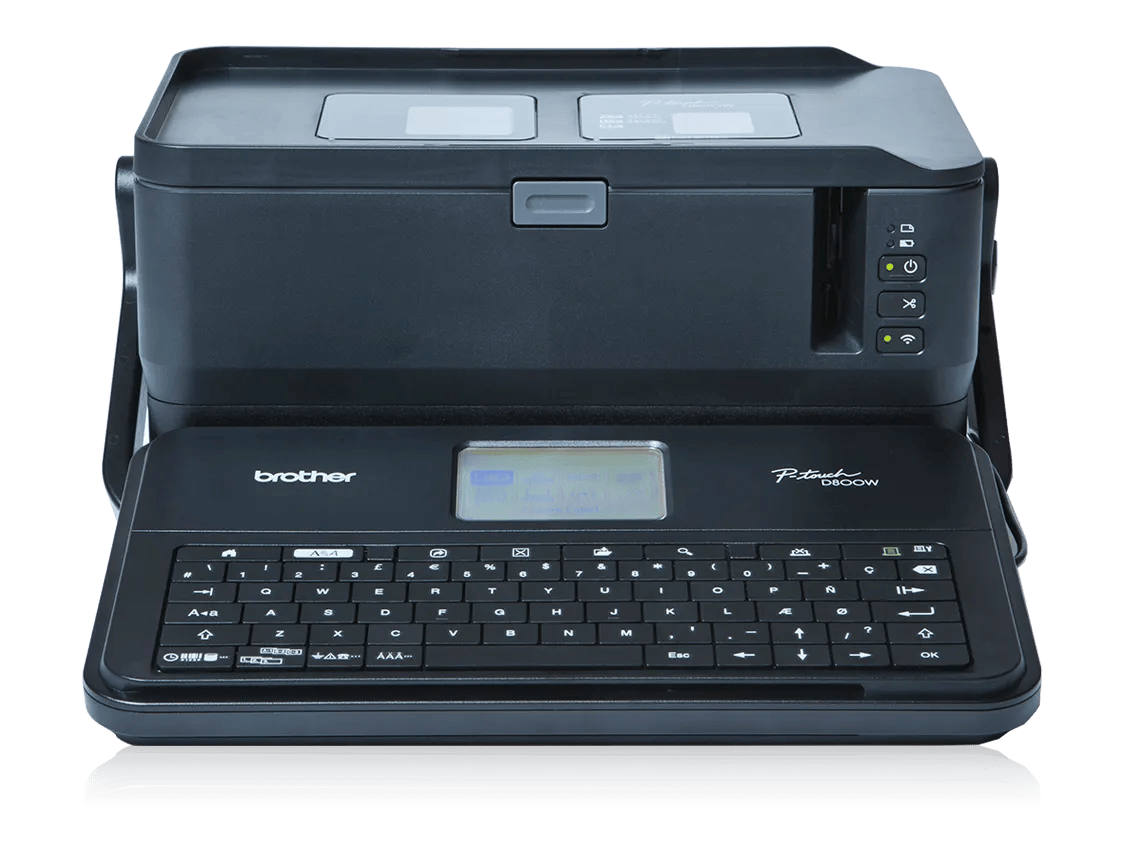
The PT-D800W has a removable, fold-down QWERTY keyboard and four-line display for local creation; its 7.5-pound body is far larger than a pocket labeler.
Explore this need in the finder →Do your equipment, cable or panel labels genuinely need Brother TZe tape through 36 mm?
The PT-D800W accepts TZe through 36 mm and Brother lists up to 32 mm maximum print height on the widest tape; the media is monochrome, not a color roll.
Explore this need in the finder →Can you give this work-oriented printer about 13.3 inches of width, or do you need wired networking or a scanner host?
Its large footprint is worth allowing for when wide labels and a local keyboard matter. It does not have Ethernet or a USB barcode-scanner host; the PT-P950NW is the Brother comparison for those advanced office links.
Explore this need in the finder →The Brother PT-D800W is a large, work-oriented P-touch that makes sense when a small office or workshop needs wide cassette labels and wants the option to type at the machine itself. Its fold-down QWERTY keyboard and LCD can make labels without a phone or computer, while USB and Wi-Fi add computer and mobile workflows. It is not a pocket labeler: the US support specification lists a body about 13.31 inches wide and 7.5 pounds including the keyboard/LCD unit. The built-in handle and removable keyboard help with moving it between work areas, but it still needs a shelf or bench and room for tape to exit.
Local typing is the difference
The hinged keyboard/LCD is not an optional accessory. Brother describes a fold-down QWERTY unit that can be removed for carrying and used to create and print labels directly. That is helpful when staff need repeatable, numbered, cable or panel labels at a work point without borrowing a laptop. The display shows four lines of 15 characters; a screen preview helps with layout, though it cannot show the final adhesive surface or guarantee how a small typeface will read at arm’s length.
Computer and wireless connections add flexibility rather than replace the keyboard. The printer has USB 2.0 and Wi-Fi, including Wireless Direct, so a nearby operator can use the on-unit controls even where the local network is absent. Brother documents software-based design, database and barcode tasks from a computer. The manufacturer’s current US support page notes that Mobile Cable Label Tool was discontinued and recommends Pro Label Tool; because mobile-app support changes separately from printer hardware, check that the app and operating-system combination you use still supports this exact model before treating phone-first printing as essential.
Wide cassettes have real uses—and limits
The PT-D800W accepts Brother TZe and HGe tape through 36 mm, as well as HSe heat-shrink tubing and the fixed-size FLe die-cut label cassette. On 36 mm TZe, Brother lists a maximum print height of 32 mm and up to 17 lines; the maximum character size can be smaller than the full printable dimension. A 36 mm cassette is therefore not a promise of a 36 mm-tall printed block. HSe is a different tubing supply, and FLe is a 21 by 45 mm die-cut format. They are not substitute rolls merely because the printer accepts them. Choose the exact cassette for the wire, panel, equipment or surface and follow its application instructions.
The on-machine Cable Label screen offers preset label types including cable wrap and cable flag, while computer software adds more layout control. The product page also lists nine barcode types, numbering and database printing. Those are useful when a workroom maintains repeat labels, but they do not turn the PT-D800W into a general document printer or color-label device. It prints monochrome thermal-transfer output. Brother specifies a 360 dpi print head and a higher-resolution computer mode up to 720 by 360 dpi under stated power and tape conditions; the latter is not an always-on setting for every media or connection.
Power and cutting deserve a plan
The standard US box includes a 120 V AC adapter, a USB cable and one black-on-white 36 mm TZe cassette; Brother lists a two-year limited warranty on the product page. An optional PA-BT-4000LI rechargeable battery is a separate purchase, not a supplied feature. Battery operation is a way to move the printer away from a power outlet, not a way to make this 7.5-pound body handheld in the everyday sense. If the printer will mostly sit near a computer or network drop, the included AC adapter is the uncomplicated route.
Automatic cut, half-cut and chain-printing settings let an operator choose between individual labels and a connected strip. They cannot eliminate the lead-in, margins or tape consumed while feeding, so very short labels may use more material than their printed text suggests. The keyboard and manual make those cut choices visible rather than hiding them in an app. Do a short test run before a long sequence, especially with specialty media, and do not pull a label while the printer is feeding.
Who should choose it?
Choose the PT-D800W when the combination matters: broad 36 mm TZe output, a real on-printer keyboard, cable-oriented label formats, and the choice of USB or Wi-Fi design. It may suit a small facilities team or workshop that prefers direct entry at the printer and needs occasional computer-created batches. If users need a dedicated USB barcode-scanner host or wired Ethernet, compare the PT-P950NW instead: it has those interfaces but no standard built-in keyboard, and its touch panel is an optional accessory. If the same labels can be made on a smaller printer and 24 mm tape is enough, the PT-D460BT is a more compact handheld alternative; it does not provide the PT-D800W’s 36 mm supply ceiling or the same work-station scale.
For occasional pantry labels, craft projects or a compact drawer organizer, the D800W is more machine than the task requires. Its dimensions and specialist supplies make sense only when its wider output and mixed input routes solve a recurring job. In the finder, the model should pass a QWERTY, TZe 36 mm, automatic-cut or cable-flag requirement when requested, but fail a full-color, compact-width, scanner-host or Ethernet requirement. Unknown software compatibility, optional battery ownership and tape-surface performance should remain questions to check—not assumed advantages.
Key details at a glance
| Full-color output | No |
|---|---|
| Print process | Thermal transfer |
| Maximum tape width | 36 mm |
| Compatible cassette | The Brother US PT-D800W manual and support specification list TZe widths 3.5, 6, 9, 12, 18, 24 and 36 mm; HGe 6, 9, 12, 18, 24 and 36 mm; HSe tubing 5.8, 8.8, 11.7, 17.7 and 23.6 mm; and fixed-size FLe die-cut labels 21 × 45 mm. The manual also describes TZe-R ribbon use. TZeSL support is not confirmed for this exact model. These media are not interchangeable by width alone; match tape, ribbon, tube or die-cut cassette to the intended job and surface. |
| On-device preview characters | 15 |
| Display type | Graphical 15-character × 4-line LCD on a removable, fold-down QWERTY keyboard unit; this is not a touchscreen. |
| Maximum combined print height | 32 mm |
| Maximum lines per label | 17 |
| Line-count note | Brother documents up to 17 lines on 36 mm TZe or HGe tape. Maximum line counts decrease for narrower media; HSe line counts are model-specific and are not collapsed into a single maximum. |
| On-device frames | 99 |
| On-device symbols | 465 |
| Computer design route | Brother P-touch Editor and model-compatible cable-label software; verify current operating-system and mobile-app support before purchase. Brother's PT-D800W support page says Mobile Cable Label Tool was discontinued and recommends Pro Label Tool. |
| Power choices | Brother's US product page lists the AD9100ESA AC adapter and USB cable in the box. Optional rechargeable Li-ion PA-BT-4000LI battery operation is supported but is an additional purchase; the supplied-package description does not include it. |
| Body dimensions | Brother US support specifies approximately 13.31 × 7.40 × 6.81 in and 7.50 lb / 3.4 kg, including the keyboard/LCD unit. The product page separately displays 7.8 without a visible unit; the fact uses the explicit US support-spec measurement. |
| Tape cutting | The manual documents auto-cut, half-cut and chain-printing combinations. Feeding, margins and the leader still consume tape; the manual notes FLe cut options are set through the computer driver. |
| What the base package supplies | The exact US PTD800W product page lists one 36 mm black-on-white TZe cassette, USB cable and AD9100ESA adapter. It lists a two-year limited warranty. The optional PA-BT-4000LI battery is additional; check the exact seller offer for any nonstandard bundle. |
| Letter-key arrangement | qwerty |
| Maximum printable dimension | 32 mm |
| Wired Ethernet | No |
| USB host for barcode scanner | No |
| Optional touch-panel templates | No |
| Optional Bluetooth adapter | No |
| Specialist media limits | HSe is heat-shrink tubing at listed widths through 23.6 mm; FLe is a fixed 21 × 45 mm die-cut label cassette. The manual describes TZe-R ribbon handling and compatible ribbon use. No exact-model TZeSL listing was found in the checked US support spec/manual, so that family remains unconfirmed. |
Use the exact model’s instructions for operating limits, supplied equipment and version differences.
Sources for this assessment
- Brother US PTD800W exact-model product page
- Brother US PT-D800W support specification
- Brother US PT-D800W manuals index; page lists version 05 but links version 04 PDF
- Brother PT-D800W US English User's Guide version 04 (the linked PDF)
- Brother PT-D800W US Quick Setup Guide version 03
- Brother exact PT-D800W open-keyboard product rendering
- Brother US PT-D800W support advisory on current mobile app availability
Put the device and its tape system together.
Match the exact model, cassette family, computer or network route and any optional power or touch-panel hardware before buying.