
Your needs, this model
Does it fit your priorities?
Would an alphabetical keypad make short-name entry easier for your household?
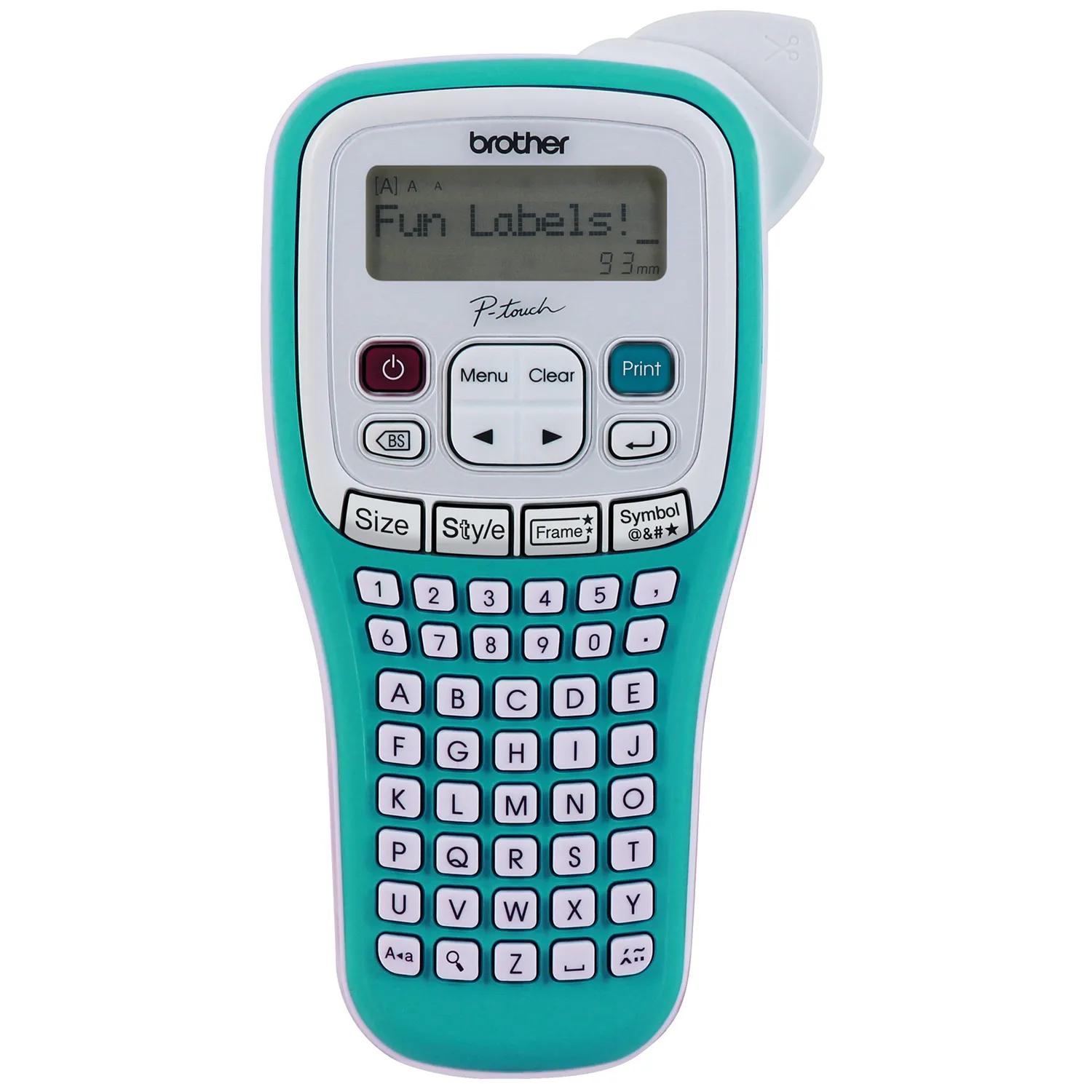
The PT-H103W’s exact-model image and US guide show letter keys grouped in alphabetic order. This differs from the QWERTY arrangement stated in one online specification field, so check the physical layout if it is important.
Explore this need in the finder →Are standard TZe labels up to 12 mm enough, including two-line text on wider cassettes?
The PT-H103W accepts standard TZe widths through 12 mm; the US guide permits two lines on 9 or 12 mm, not 3.5 or 6 mm. It cannot satisfy an 18 mm minimum.
Explore this need in the finder →Do you want to avoid phone setup and accept manual finishing?
The PT-H103W is locally typed, has no documented phone app and uses a manual cutter. Its built-in frames and symbols work on the device, but they do not replace app or computer composition.
Explore this need in the finder →The Brother P-touch PT-H103W is a handheld TZe label maker for personal organization, school supplies and small craft jobs. Its strongest distinction is visible before printing: the letter keys are grouped alphabetically rather than in familiar QWERTY order. A playful set of frames, styles and symbols makes it more expressive than a plain text tool, but its small screen, 12 mm tape ceiling and hand-operated cutter keep it on the short-label side of the category.
Alphabetical keys change the feel of typing
The front panel puts A through E on the first letter row, followed by F through J and so on. That is easy to scan when you are learning the keypad or entering a few words, but it is not the layout a practiced QWERTY typist expects. There is a source discrepancy worth knowing: Brother's online technical table calls the keyboard QWERTY, while the PT-H103W User's Guide illustration and the exact-model front image both show alphabetic letter order. If this distinction matters, inspect the physical layout before you buy rather than relying on that one table field.
Text is composed on the device; Brother lists no phone app for this model, and the guide shows no computer workflow. The one-line, 12-character LCD is a narrow editing window. Brother's manual says its text preview is a generated image and may differ from the final print, so treat it as a check on wording and arrangement, not a color proof or a guarantee of exact output. It accepts up to 80 characters in a text entry and can store up to nine labels for later recall. The manual describes nine saved files, even though the product page's general memory row says “15”; use nine as the documented repeat-label count.
Colorful choices, but within a small tape format
Brother lists one built-in font with nine style choices, 24 frames and 260 symbols and emojis. That is enough to give a name tag or notebook label a more personal look without adding a phone or software step. The frame choices are not available on the narrowest 3.5 mm tape. A quick preview and a test label are worthwhile when combining a frame with a longer name: character size, tape width and the chosen decoration all affect how much room remains.
The PT-H103W uses Brother's TZe cassette family in 3.5, 6, 9 and 12 mm widths, with a maximum combined print height of 9 mm. Two-line printing is restricted to 9 or 12 mm tape; 3.5 and 6 mm are single-line choices. The supplied package has two short 12 mm starter cassettes—black on clear and white on lime green, each 4 m—rather than the single black-on-white sample found in many basic boxes. Those are useful for trying the included color contrast, but they are samples, not long refill rolls.
Brother lists several specialty TZe types, including Flexible ID, extra-strength adhesive and non-laminated iron-on fabric tape. The manual recommends Flexible ID tape when using its Cable Label function, which lays out two lines to wrap around a cable. That is a useful occasional formatting aid; it is not the PT-H111's dedicated Cable Wrap, Cable Flag or Faceplate shortcut system. Tape compatibility also does not prove that any label will adhere well to every surface. Clean and dry the target, follow the cassette instructions and test the intended material before labeling a whole set.
Power and finishing remain manual
The maker runs on six AAA alkaline or rechargeable Ni-MH cells. Brother's exact product listing also mentions an AC adapter as a separate supply, but it does not identify a model in the PT-H103W specification; confirm the correct adapter with Brother rather than assuming one that fits another P-touch will work. The manual advises replacing all six cells together and warns that stored data can be lost if power is interrupted for long enough. Nothing in the included box eliminates those ongoing supply decisions.
After printing, you operate the cutter lever yourself. Chain Print can reduce repeated gaps when making several labels, but it still calls for feeding and cutting the finished strip, with scissors used at the printed marks in that workflow. For a handful of names this is a reasonable trade. If you routinely print many short labels, a manual cutter adds a finishing step that an automatic-cutter model avoids.
Which handheld fits better?
Choose the PT-H103W when the alphabetical keypad, teal-and-white body, included clear and lime-green tapes, and on-device decorative options fit your routine. It makes sense for short runs of labels for notebooks, storage jars, folders or personal gear, especially when an app is not wanted. Its approximate body size is 4.4 by 8.2 by 2.4 inches and about 0.9 lb before batteries and cassette, so “handheld” does not mean pocket-sized; measure a drawer or pouch.
The PT-H110 is the closer alternative if QWERTY input is important. It shares the 12 mm TZe limit and local-keypad approach, but has a different character layout and a different set of household formatting controls. The black PT-H111 is more targeted toward cable and panel work: its dedicated Cable Wrap, Cable Flag and Faceplate functions are useful when those specific shapes are needed, not just a decorative frame. For wider TZe labels, the PT-D410 reaches 18 mm and adds a USB computer design route, at the cost of a larger desktop footprint.
Before choosing, decide whether the alphabetic keypad is a benefit or a delay, whether two-line text on 9 or 12 mm tape is enough, and whether manual cutting suits the volume. Those answers matter more than the bright trim alone. Brother's PT-H103W product page and US User's Guide are useful final checks for package contents, tape choices and operating limits.
Key details at a glance
| Maximum tape width | 12 mm |
|---|---|
| Compatible cassette | Brother’s exact US page and User’s Guide v03 identify standard TZe cassettes at 3.5, 6, 9 and 12 mm. Page lists specialty TZe types including Flexible ID, extra-strength adhesive and non-laminated iron-on fabric; the guide recommends Flexible ID for its two-line Cable Label format. |
| On-device preview characters | 12 |
| Display type | Non-backlit LCD, 12 characters × 1 line |
| Maximum combined print height | 9 mm |
| Maximum lines per label | 2 |
| Line-count note | The PT-H103W User’s Guide permits two-line text on 9 mm or 12 mm tape and treats 3.5 mm or 6 mm as one-line widths. |
| On-device frames | 24 |
| On-device symbols | 260 |
| Saved label files | 9 |
| Power choices | Six AAA alkaline or Ni-MH cells; the exact Brother US product page lists an AC adapter as a separate supply but does not identify its model. Verify exact compatibility with Brother; batteries and adapter are not included. |
| Body dimensions | Brother’s PT-H103W US specification page and User’s Guide give approximate W × D × H as 4.4 × 8.2 × 2.4 in (110 × 208 × 59 mm); about 0.9 lb without batteries or cassette. |
| Tape cutting | The guide shows a hand-operated cutter lever. Chain Print can reduce repeated margins, but users still feed the tape and make a finishing cut; the manual instructs cutting at its printed marks in that workflow. |
| What the base package supplies | The exact PTH103W product page lists the PT-H103W, documentation and two 12 mm × 4 m starter cassettes: black on clear and white on lime green. Check the exact package code and contents at purchase. |
| Letter-key arrangement | alphabetical |
| Built-in type styles | 9 |
Use the exact model’s instructions for operating limits, supplied equipment and version differences.
Sources for this assessment
Put the device and its tape system together.
Match the exact model, cassette family, computer or network route and any optional power or touch-panel hardware before buying.