
Your needs, this model
Does it fit your priorities?
Is the dedicated Cable Flag format essential for cable identification?
The H111’s guide includes a Cable Flag layout with a settable or automatic 10–200 mm flag length; it does not support rotated text in that format.
Explore this need in the finder →Will a 12 mm maximum and a local keypad be enough for the job?
The H111 has no phone or USB design route, but works from its keyboard and accepts TZe cassettes through 12 mm.
Explore this need in the finder →Do you need two-line labels but not 18 mm tape?
The model supports two-line printing on 9 and 12 mm tape, but cannot satisfy a minimum 18 mm cassette requirement.
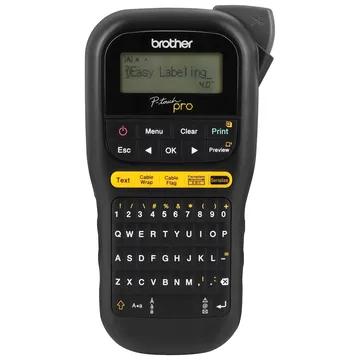
Explore this need in the finder →The Brother P-touch PT-H111 is a handheld TZe label maker whose defining feature is not a larger tape or a phone connection; it is a group of dedicated cable and panel-label keys. Its User's Guide documents Cable Wrap, Cable Flag, Faceplate and Serialize functions, so it is a more purposeful fit for small cable-identification jobs than a general household labeler. It remains a compact 12 mm cassette machine with a manual cutter, not an industrial wire-marking system.
Dedicated formats, not just a cable icon
The H111's QWERTY keyboard and 15-character, one-line display keep basic label creation local to the device. You can enter up to 80 characters, preview the result, and store up to nine label files. Brother's instructions say two-line printing uses 9 mm or 12 mm tape, while the full supported TZe range is 3.5, 6, 9 and 12 mm. The screen is a text preview, not a large layout monitor; inspect the selected format and print a sample when label fit matters.
The dedicated Cable Wrap function lets you choose a cable diameter from about 3 to 90 mm and can repeat text along the strip so it is readable around the cable. Cable Flag uses a specified or automatic flag length from 10 to 200 mm; Brother says it is intended for objects wider than about 3 mm and notes that rotated text is not available in this format. Faceplate spacing lays out separate text blocks evenly on one label, with a settable 30 to 300 mm length. The Serialize key increments a number or letter; the manual describes numeric sequences from 01 through 50 and allows serialization to be combined with the wrap, flag or faceplate formats.
These controls save repeated menu steps, but they do not guarantee every entered string fits. The manual warns that selected formats can trigger a Text Limit message when the text is too long, and the physical label still has to fit the width and geometry of the job. Flexible ID tape is Brother's recommended cable material, not a substitute for checking the cable surface, bend radius, exposure or installation rules. Treat the H111 as a convenient label-layout aid rather than proof that a mark meets a workplace or electrical code.
Standard TZe supplies keep the system flexible, but narrow
The H111 uses standard Brother TZe cassettes in four widths, topping out at 12 mm. Its box includes a black-on-white 12 mm by 8 m Flexible ID laminated sample, plus a wrist strap and documentation. The TZe platform also offers other colors and specialty adhesives, but the cassette must be verified for the specific label task. Similar-looking Brother tapes from another product family are not interchangeable just because the widths are close.
The label maker has three built-in fonts and a broad symbol set; Brother lists more than 300 symbols. These are useful for simple identifying marks, but the one-line display and small tape do not make the H111 a good choice for dense diagrams, wide equipment labels or large batches that need computer layout. There is no documented computer, Wi-Fi or phone-app input route for this model. If your naming convention is maintained on a spreadsheet, the extra work of entering each short string at the keypad may outweigh the convenience of its shortcut keys.
Power, cutting and portability
Brother specifies a body of about 4.3 by 8.0 by 2.2 inches and about 0.9 lb without batteries or cassette. It is handheld but not tiny; allow space to hold the machine and pull labels from its exit. Power comes from six AAA alkaline or Ni-MH batteries, or the optional AD-24 adapter. The base H111 does not include batteries or adapter. A wrist strap is included. Its cutter is a hand-operated lever, so short cable tasks are easy to finish, while repeated labels still require a cut and some handling.
The H111 saves up to nine files, fewer than the PT-H110's 15, and its package includes flexible ID tape rather than H110's short standard laminated sample. That makes the starter supply more relevant if cable wrapping is the reason for buying it. The exact PTH111CCBUND offer adds a carrying case. The bundle page describes the case as storage for tapes and optional accessories; it does not add a different printer, adapter or USB cable.
When to choose it instead of another handheld
Choose the H111 if you will actually use a cable wrap, flag, faceplate or serial sequence. It is not automatically better than the PT-H110 for ordinary pantry labels, and both stop at 12 mm. The H110 offers a simpler everyday keypad routine, 15 saved files and a different decorative-label emphasis. If an ordinary cable name is enough, a general layout may be all you need; do not buy the H111's specialty shortcuts as a proxy for improved adhesive performance.
If the job requires wider text, computer-based composition or automatic cutting, move away from this handheld pair. The PT-D410 keeps a keyboard and TZe tape while extending the width to 18 mm and adding USB-connected computer design. The PT-D610BT reaches 24 mm and adds automatic cutting, at the cost of a larger desk-style unit and a more involved connection setup. In a workbench routine limited to short labels and occasional cable marking, the H111 can be useful precisely because it keeps the task on the machine; beyond that narrow role, compare the tape ceiling and batch workflow before choosing it.
Key details at a glance
| Maximum tape width | 12 mm |
|---|---|
| Compatible cassette | The PT-H111 US User’s Guide says the machine uses Brother TZe and lists 3.5, 6, 9 and 12 mm. Brother recommends Flexible ID TZe tape for cable and wire labels. |
| On-device preview characters | 15 |
| Display type | Non-backlit graphical LCD, 15 characters x 1 line |
| Maximum combined print height | 9 mm |
| Maximum lines per label | 2 |
| Line-count note | Brother’s guide specifies 9 mm or 12 mm tape for two-line printing; the on-device LCD itself displays one row. |
| On-device frames | 2 |
| On-device symbols | 312 |
| Saved label files | 9 |
| Power choices | Six AAA alkaline or Ni-MH batteries, or optional AC Adapter AD-24. Neither batteries nor the optional adapter are included in the base PT-H111 package. |
| Body dimensions | Brother’s US User’s Guide and specification page give approximate W x D x H of 4.3 x 8.0 x 2.2 in and about 0.9 lb without batteries or cassette. |
| Tape cutting | Manual tape cutter lever. Chain Print saves margins between multiple labels, but the final segment still requires a feed and a finishing cut. |
| What the base package supplies | The base PT-H111 includes one 12 mm x 8 m black-on-white Flexible ID laminated TZe cassette, a wrist strap and documentation. PTH111CCBUND adds a carrying case; the exact bundle page does not add printer capability, adapter, or USB cable. |
| Letter-key arrangement | qwerty |
| Built-in type styles | 10 |
Use the exact model’s instructions for operating limits, supplied equipment and version differences.
Sources for this assessment
Put the device and its tape system together.
Match the exact model, cassette family, computer or network route and any optional power or touch-panel hardware before buying.