
Your needs, this model
Does it fit your priorities?
Do you need to type at a QWERTY handheld and use standard TZe through 18 mm?
The PT-H300 has an on-device QWERTY keyboard and supports TZe up to 18 mm; it is an earlier model, so include earlier models to compare it.
Explore this need in the finder →Would a familiar 18 mm cassette and optional AC operation fit an older standalone routine?
Brother documents the optional AD-E001 for PT-H300; it is not bundled with the base model, while the H300LI package includes the adapter and rechargeable battery.
Explore this need in the finder →Are you choosing a small number of typed labels rather than computer-designed batches?
PT-H300 uses its built-in keyboard and a manual cutter; it is not the USB-connected PT-H500LI computer workflow.
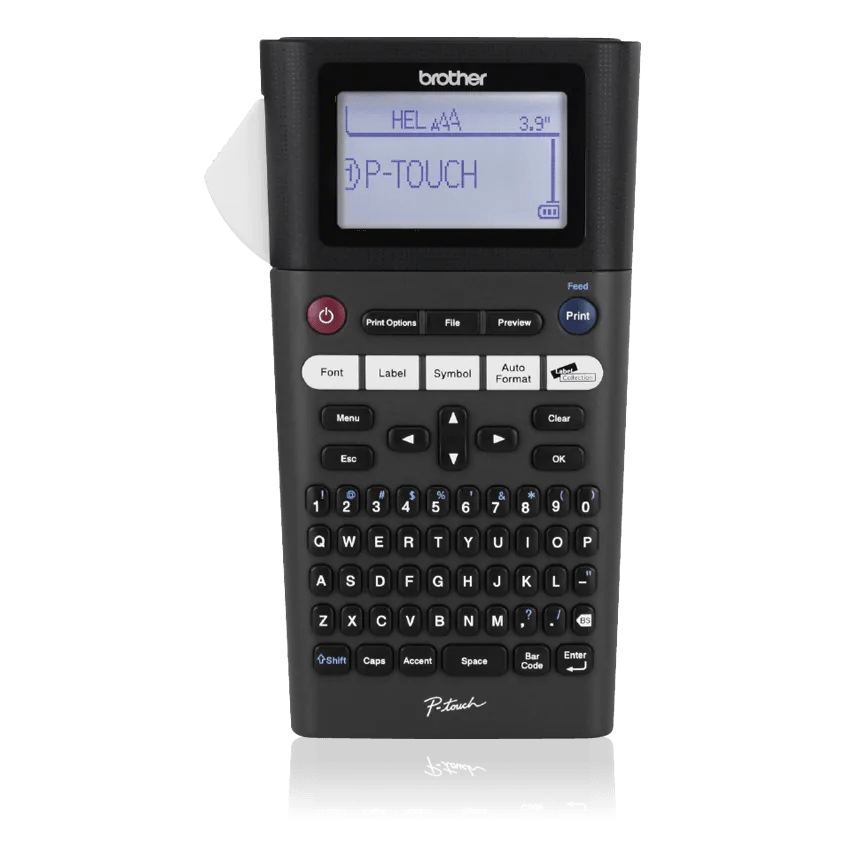
Explore this need in the finder →The Brother P-touch PT-H300 is a handheld, keypad-operated TZe label maker for jobs that move around the room or building: storage bins, supply shelves, equipment names and simple cable identification. Its QWERTY keys and backlit graphical display keep label entry on the machine, and it accepts standard TZe cassettes up to 18 mm wide. Unlike the later PT-H500LI, the H300 has no documented USB computer-design route or automatic cutter. Its value is a familiar, portable typing workflow rather than computer batch layout.
Wider tape in a handheld, on-device workflow
The main practical step up from smaller handhelds such as the PT-H110 is the H300's 18 mm TZe ceiling. That gives more room for a larger identifier or multiple lines on a label, while remaining a cassette-based thermal-transfer system rather than a roll of generic direct-thermal paper. Brother's shared US User's Guide for PT-H300 and PT-H300LI lists TZe widths from 3.5 to 18 mm and a maximum print height of 15.8 mm when using 18 mm tape. The manual gives different line limits by cassette: five lines on 18 mm, three on 12 mm, two on 9 or 6 mm, and one on 3.5 mm. Brother's current product-page specification table instead lists a two-line maximum. Because those official statements conflict, do not buy it on the assumption that a five-line layout will be clear or accepted; test the exact format, or choose another machine if the line count is a hard requirement.
The unit has a physical QWERTY keyboard, shortcut keys for common formatting and a backlit graphical display. Its screen is intended to help compose and preview a short label, not to replace checking the output on the target tape width. Official sources also disagree about screen-row and stored-file counts: the current web table lists a 15-character by three-line display and 30 saved labels; the older shared manual describes two text lines plus a guidance area and up to 50 saved files. Those counts are not used to qualify the H300 in the finder. For repetitive names, try the actual layout and save one correctly before making a run.
Separate the base H300 from the rechargeable package
The exact PT-H300 base package includes an 18 mm by 4 m black-on-white laminated TZe starter cassette, six AA cells, a wrist strap and the user's guide. The PT-H300LI offer is a related package with the same 18 mm TZe capability but a rechargeable BA-E001 Li-ion battery and AD-E001 AC adapter included instead of the six AA cells. The base H300 can use those rechargeable and adapter options too, but they are not in its box. The H300LI does not increase media width or add computer connectivity; it changes the power kit. Check the model suffix on the offer rather than assuming “rechargeable” describes every PT-H300 package.
For the standard PT-H300, the six included AA batteries make an off-desk start possible. Brother's shared guide also documents six Ni-MH rechargeables, the optional BA-E001 battery and AD-E001 adapter. It says the AD-E001 is the correct adapter for this device and warns against other adapters, so do not substitute the AD-24ESA used on some smaller P-touch handhelds. If most labels will be made at a fixed counter, the H300LI kit may be a neater source-backed choice; if ordinary AA cells are preferable, the base H300 package is simpler.
Manual cutting and media still set the pace
The H300 is a manual-cutter handheld, not an automatic feed-and-cut printer. You press Print and operate the cutter when the label is ready. Its Chain margin setting can reduce waste between consecutive labels, but chain printing still needs a final cut at the indicated marks. This is fine for occasional labels and small sets; when many identical short tags need to be produced, the repeated feed and handling become a real tradeoff. The PT-H500LI adds an automatic cutter, computer design and 24 mm TZe support, while the desktop PT-D610BT is another option for a larger connected station with automatic cutting.
TZe is the supported cassette family; the H300 should not be treated as compatible with Btag cartridges, Brother color rolls, HSe tubing or another manufacturer's nominally similar tape. Brother describes TZe specialty tapes for different jobs, including stronger adhesive, flexible cable identification and fabric uses. That does not prove a particular tape will adhere to every painted, dusty, curved or frequently cleaned surface. Match the exact cassette to the surface and conditions, clean and dry the spot, and try one label before preparing a large batch.
Who should choose it?
The PT-H300 suits a person who wants a standalone QWERTY handheld, wider-than-12-mm standard TZe media and several built-in formatting shortcuts, but does not need a phone app, computer editing or automatic cutting. It can be a sensible portable labeler for a workbench, storeroom, classroom or home-organizing task where a small number of different labels are typed at the point of use. Its body is about 5.2 by 8.4 by 2.6 inches, so it is portable but not pocket-sized.
Choose the PT-H110 when 12 mm is enough and a shorter handheld matters; choose the PT-H111 if its dedicated Cable Wrap, Cable Flag and Faceplate shortcuts are the actual need. Choose PT-H500LI when 24 mm output, a PC/Mac USB route or automatic cuts matter, and PT-D410 when a stationary keyboard-and-computer desktop routine fits better. Brother's support manual index marks PT-H300 discontinued, even though the product page still presents an offer. Treat lifecycle and package availability as unsettled, and compare only after opting in to earlier models. This review covers the exact PT-H300 with the PT-H300LI kit distinction; it is not a claim about a generic P-touch handheld or every seller bundle.
Key details at a glance
| Full-color output | No |
|---|---|
| Print process | Thermal transfer |
| Maximum tape width | 18 mm |
| Compatible cassette | Brother US PT-H300/PT-H300LI guide and exact US product pages identify standard Brother TZe cassettes. Do not infer Btag, CZ/ZINK, HSe, FLe or another brand’s media from width alone. |
| Display type | Backlit graphical display; official product table and shared US guide differ in reported display layout, so exact rows are not a matching condition. |
| Maximum combined print height | 15.8 mm |
| Line-count note | The shared PT-H300/PT-H300LI User's Guide lists up to five lines on 18 mm TZe (and fewer on narrower cassettes); Brother's current PT-H300 web table says two maximum lines. The disagreement is retained; do not use an unqualified line count. |
| On-device symbols | 617 |
| Power choices | The base PT-H300 includes six AA cells. The shared manual documents six Ni-MH cells and optional BA-E001 Li-ion battery and AD-E001 AC adapter. PT-H300LI is a distinct exact package that includes BA-E001 and AD-E001; those are not included with base PT-H300. |
| Body dimensions | Approx. 5.2 in W x 8.4 in D x 2.6 in H from Brother US page and H300/H300LI guide; allow room for the tape exit and cutter. |
| Tape cutting | Manual cutter. Chain margin can reduce repeated feed margins but still requires the user to make the finishing cut at the marks. |
| What the base package supplies | Brother lists an 18 mm x 4 m black-on-white laminated TZe starter cassette, six AA cells, wrist strap and guide in the PT-H300 box. The PT-H300LI kit uses the same 18 mm TZe width but includes a BA-E001 Li-ion battery and AD-E001 adapter instead of AA cells. |
| Letter-key arrangement | qwerty |
Use the exact model’s instructions for operating limits, supplied equipment and version differences.
Sources for this assessment
Put the device and its tape system together.
Match the exact model, cassette family, computer or network route and any optional power or touch-panel hardware before buying.