
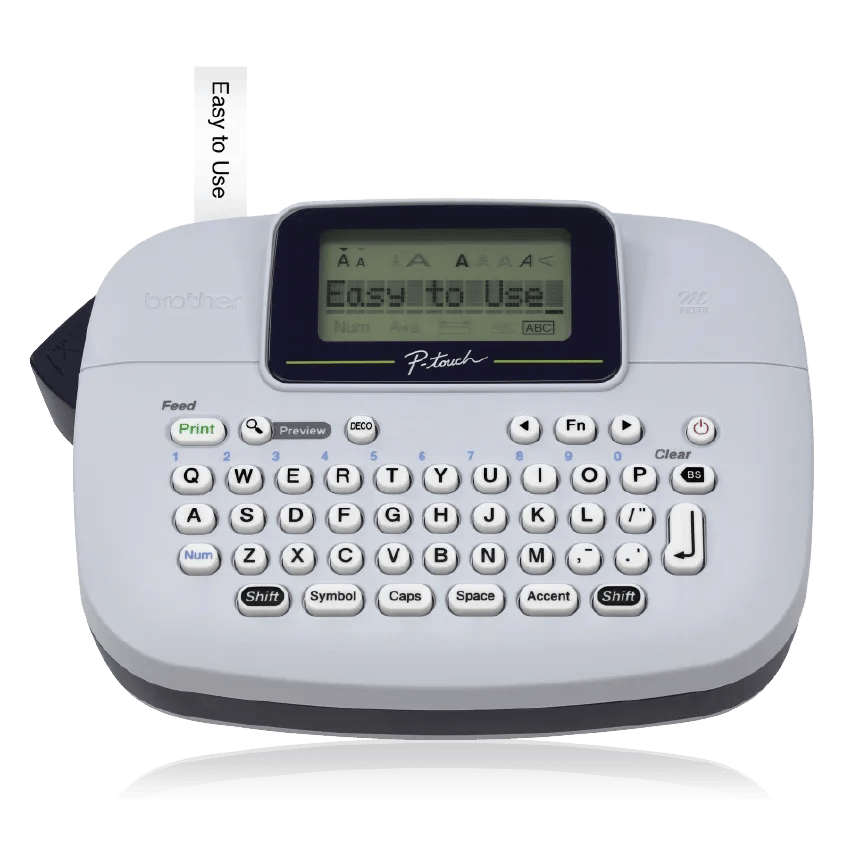
Your needs, this model
Does it fit your priorities?
Would you rather type a short label on a QWERTY keyboard than compose it on a phone?
PT-M95 is a stand-alone keyboard model: its U.S. documentation does not list a mobile app, Bluetooth, Wi-Fi or USB computer workflow. A required phone route rules it out.
Explore this need in the finder →Are Brother M cassettes the supplies you actually want to use?
The PT-M95 is documented for non-laminated M tape in 9 mm or 12 mm widths. It is not a TZe machine, even though other Brother handhelds may also accept 12 mm tape.
Explore this need in the finder →Will an approximately 6.14-inch-wide machine fit the space you have?
Brother gives approximate dimensions of 6.14 in wide by 4.37 in deep by 2.40 in high. A true maximum width below 6.14 in excludes this device.
Explore this need in the finder →A direct-keyboard option built around M tape
The PT-M95 is a small, self-contained label maker for someone who would rather type on the machine than design on a phone. Its familiar QWERTY keyboard and 12-character, single-line display keep the workflow local: enter a short label, check the text, choose a style, and print. The screen does not show a full graphical proof of every decoration, so it is better suited to straightforward household or home-office identifiers than to carefully composed layouts that need a large preview.
Brother lists nine type styles, ten frames, more than 200 symbols and eight Deco Mode patterns. You can print one or two lines on M cassettes up to 12 mm wide. Brother’s U.S. specification table lists a maximum print-height value of “8” but does not state a unit in that field. Do not silently convert that number to millimeters when a 9 mm minimum is essential; the strict requirement remains unconfirmed. The manual says the display shows one row of 12 characters even though a regular label can contain as many as 80 characters. That is useful for entering a longer string, but not the same thing as seeing every design choice at once. The text preview checks the wording and length; style, size, underline, frame and other formatting are not all represented in the preview. A required print-height limit should be verified from the exact tape and product documentation rather than inferred from that screen.
The cassette system is the decision that matters most
This machine uses Brother's non-laminated M tape in 9 mm and 12 mm widths. It does not take standard TZe cassettes, Btag, or another Brother tape just because a cassette has a similar width. If a drawer already holds M cassettes, that compatibility can make the PT-M95 a sensible simple replacement. If your existing supplies are TZe, look instead at a TZe model such as the PT-H110 or PT-D220. Check the tape family printed on a cassette before purchasing either a machine or refills.
Non-laminated tape is a meaningful limit, not a promise that every printed label is unsuitable. It does mean you should not assume the PT-M95's output has the same protective construction as a laminated tape system. Brother's user guide warns that labels can peel, become difficult to remove, change color or transfer depending on the material and conditions. It specifically cautions against damp and high-humidity use and recommends checking the surface and environment. For dry file folders, storage bins, school supplies or gift packaging, this simple tape may be enough. For frequently handled items, damp rooms or surfaces where removal matters, first consult the exact tape instructions and test a small label in an unobtrusive spot.
Use it as a small, occasional station
The PT-M95 runs on four AAA alkaline batteries. Brother's U.S. instructions say not to use rechargeable AAA cells, and the machine switches itself off after five minutes without a keypress. There is a manual cutter lever, not an automatic cutter, so a print run means operating that lever for each label. That is a straightforward trade for a compact standalone machine, but it is a poor fit if you need a hands-free automatic-cut workflow, USB computer design, Wi-Fi or app-based editing. None of those input routes is documented for this model.
There are three on-device label-file slots for saving and recalling designs. They are handy for a few repeated names or drawer labels, not a larger library: the guide says that if power is disconnected for more than three minutes, text, formatting and stored files are cleared. Keep working batteries in place if you depend on those saved labels. Deco Mode adds eight preset designs, but the manual notes that each is a fixed format, accepts one line, and may not print all entered text. Some designs may pause while the print head cools. For a one-off label, ordinary text formatting is usually the more predictable route.
What the bundle changes—and what it does not
The base PT-M95 listing includes one 12 mm black-on-white starter M cassette and a user guide. The observed PTM95BP bundle is the same PT-M95 machine packaged with additional black-on-white M tapes; Brother's bundle description identifies one sample cassette plus three additional tapes. That is a supply difference, not a new printer capability. Compare the exact pack contents because retailer packaging and stock can change. Brother's U.S. product page showed the base PT-M95 out of stock when checked on October 23, 2026, so availability may depend on another retailer or a refreshed offer.
Choose the PT-M95 when you want direct QWERTY entry, simple formatting and non-laminated M tape. Choose a standard TZe handheld such as the PT-H110 if the existing cassette family is TZe; consider the PT-D220 when a larger screen and more on-device formatting options are worth a larger body. For app design, wider tape, automatic cutting or a label that must suit a challenging surface, select a model and exact consumable built for that requirement rather than expecting this basic machine to grow into a connected printer.
Sources: Brother U.S. PT-M95 product page, Brother U.S. specifications, and the PT-M95 User's Guide v02. This assessment is based on those published specifications and instructions, not a hands-on durability test.
Key details at a glance
| Maximum tape width | 12 mm |
|---|---|
| Compatible cassette | Brother's U.S. product page and PT-M95 manual specify non-laminated Brother M cassette tape in 9 mm and 12 mm widths. Do not infer compatibility with TZe, Btag or another cassette family from width alone. |
| Built-in templates | 8 |
| On-device preview characters | 12 |
| Display type | LCD |
| Maximum lines per label | 2 |
| On-device frames | 10 |
| On-device symbols | 210 |
| Saved label files | 3 |
| Computer design route | False |
| Body dimensions | Approx. 6.14 in W x 4.37 in D x 2.40 in H; approx. 0.6 lb / 250 g without batteries or tape cassette, per Brother U.S. support specification. |
| Letter-key arrangement | qwerty |
| Built-in type styles | 9 |
Use the exact model’s instructions for operating limits, supplied equipment and version differences.
Sources for this assessment
Put the device and its tape system together.
Match the exact model, cassette family, computer or network route and any optional power or touch-panel hardware before buying.