
Your needs, this model
Does it fit your priorities?
Would you like to lay out decorative labels in a phone app without giving up a physical keyboard?
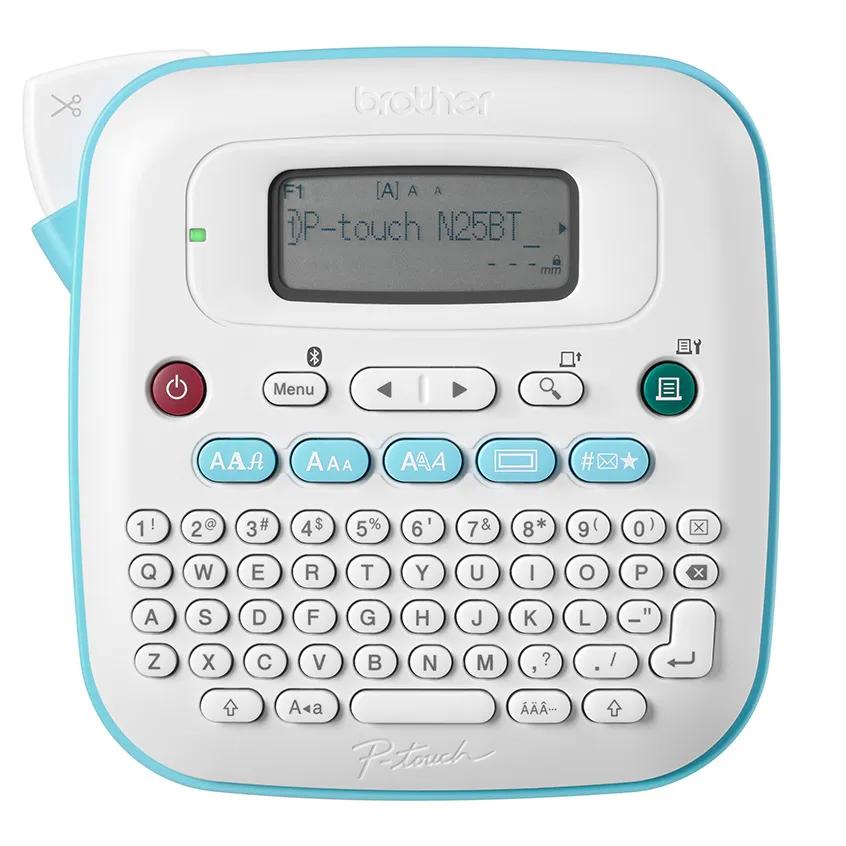
The PT-N25BT can print from Brother Design&Print 2 over Bluetooth and still has a full QWERTY keyboard for standalone entry. The app path requires pairing, so the two routes suit different moments rather than operating simultaneously.
Explore this need in the finder →Do you need the 9 mm print height and app-listed expanded symbol set?
The hardware handles two lines up to 9 mm; Brother lists 250 built-in symbols and 1,365 with the app. Very small app text should be checked on a printed sample because the manual warns that small print may look less clear than on the phone.
Explore this need in the finder →Would a three-tape starter package be more useful than the base single-sample pack?
Brother lists PTN25BT2BUND and PTN25BT3BUND packages with two or three full 4 m tapes, and PTN25BTV3 with three 2 m sample tapes. These change the included colors and amount of tape, not the machine's operating capabilities.
Explore this need in the finder →Two ways to compose, one narrow tape format
The PT-N25BT stands out because Brother adds Bluetooth and its Design&Print 2 app without removing the on-device QWERTY keyboard. It is not a phone-only printer. If the phone is nearby, the app provides templates and additional fonts, symbols, emoji and patterns; if not, you can still type and format a basic label at the machine. That flexibility is the central reason to pick it over the PT-N20. The two models share the 5.9-inch square body, 16-character display family, up-to-9-mm combined print height, 15 frames, 250 built-in symbols and ten saved label files.
The app is an optional input route, not a claim of Wi-Fi, cloud printing or computer software. Brother's manual says the PT-N25BT connects to supported mobile devices by Bluetooth and specifically identifies Design&Print 2. Pairing is part of the workflow. If you want a label maker that stays entirely on-device, the PT-N20 offers the larger preview without the additional app setup. If you need a phone-created layout, the N25BT is the model in this trio with that documented route.
Use the app for layout; keep the screen for checks
The PT-N25BT has a built-in keyboard for direct entry and a 16-character display that previews an image of the label and its length. The phone app expands the design tools: Brother lists 1,365 symbols with the app, compared with 250 available on the device. Templates and extra decorative choices may be helpful for gift labels, short classroom identifiers or a color-coded household system. More options still have to fit onto a 12 mm tape, so the available design library does not mean every small font or complex label will read well.
Brother's manual flags two useful limits: small text can print less clearly than it appears on a phone screen, and printed characters may look different because a mobile screen can have higher resolution. For an important label, create a test on the actual cassette before generating many copies. The app adds design flexibility, not a print-proof guarantee. Also note that the device has a manual cutter lever; Bluetooth does not introduce an automatic cutter or a larger printing width.
Btag-only supplies and package variants
Like the PT-N10 and N20, the N25BT is for Brother Btag cassettes, with a maximum listed tape width of 12 mm. This is a genuine supplies constraint, not merely a software preference. Brother shows Btag in multiple colors, but a 12 mm cassette from another system should not be assumed to fit. The manual warns that surface material and environment affect adhesion: labels can peel, become difficult to remove, change color or transfer; wet, dirty and uneven surfaces can also be difficult. Test a small piece on the intended surface and follow the selected cassette's instructions.
The machine's retailer codes describe different starter media, not new hardware. Brother's base PT-N25BT page lists one blue-on-white 2 m sample. PTN25BTV3 lists three 2 m sample tapes: blue-on-white, white-on-clear and black-on-light-blue. PTN25BT2BUND pairs the machine with black-on-white Btag231 and black-on-clear Btag131 4 m tapes. PTN25BT3BUND lists a three-tape Btag multi-pack with BTAGF35, BTAGL31 and BTAGP35 4 m rolls. Each variation changes what is included at the start; check the exact pack contents and do not treat an extra tape as a different printer capability.
Power and the practical setup
The PT-N25BT runs on six AAA alkaline batteries or an optional Brother AD-24ESA-01 / AD-24ESAW-01 adapter; neither power source is included in the base listing. For a table-side routine, the adapter option can be useful, but add it only if you need it and verify the exact part. The product is small enough to move between tasks, yet it is wider and squarer than the N10, and the app also means a phone, pairing and Bluetooth need to be available for app-created jobs.
Brother provides a manual tape-cut lever and ten saved label files. Its guide also describes margin settings, chain printing to reduce waste between consecutive labels, and a final manual cut. Care instructions say not to pull tape during printing or feeding and to clean the print head with a soft swab. Those details matter when a colorful design feels inexpensive to reproduce: a short tape can include blank lead and tail material, and the machine's cutter remains a hand-operated step.
Who gets value from the N25BT?
Choose it when a phone-built template or expanded symbol set is a real need and you still want a local keyboard fallback. Choose the PT-N20 if its on-device image preview and taller output are enough, but app pairing would be clutter. Choose the PT-N10 if a narrower body, basic text preview and simple battery setup are more valuable than the extra print and design capability. All three rely on the same 12 mm Btag system, so a requirement for a wider tape, a different cassette family or a surface the selected tape is not approved for points outside this family.
Key details at a glance
| Maximum tape width | 12 mm |
|---|---|
| Compatible cassette | Brother Btag cassette only; 12 mm (about 1/2 in) tape |
| On-device preview characters | 16 |
| Maximum combined print height | 9 mm |
| Maximum lines per label | 2 |
| On-device frames | 15 |
| On-device symbols | 250 |
| Symbols listed with the app | 1365 |
| Saved label files | 10 |
| Power choices | Six AAA alkaline batteries or the separately purchased AD-24ESA-01 / AD-24ESAW-01 optional adapter |
| Body dimensions | 5.9 in wide x 5.9 in deep x 2.8 in high |
| Tape cutting | Manual tape-cutter lever; a phone connection does not add an automatic cutter |
| What the base package supplies | Base listing includes one blue-on-white Btag-233 2 m sample; retailer kit SKUs PTN25BTV3, PTN25BT2BUND and PTN25BT3BUND add different tape assortments |
| Letter-key arrangement | qwerty |
| Built-in type styles | 7 |
Use the exact model’s instructions for operating limits, supplied equipment and version differences.
Sources for this assessment
Put the device and its tape system together.
Match the exact model, cassette family, computer or network route and any optional power or touch-panel hardware before buying.