
Your needs, this model
Does it fit your priorities?
Is a computer-over-USB workflow enough for your labels?
The exact US P-touch guide describes Editor Lite over USB and the product page describes a full computer-editor route. The printer has no standalone keyboard, phone app or wireless connection.
Explore this need in the finder →Do you need TZe width through 24 mm with automatic cutting?
Brother lists six TZe widths through 24 mm and automatic tape cutting, which suits a computer-created run of larger shelf, file or asset labels.
Explore this need in the finder →Can the label plan stay wired instead of requiring Wi-Fi or a phone?
This is a USB computer label maker. A hard wireless-printing or phone-app requirement calls for a different model, even though the PT-P700 cuts and prints wide TZe labels.
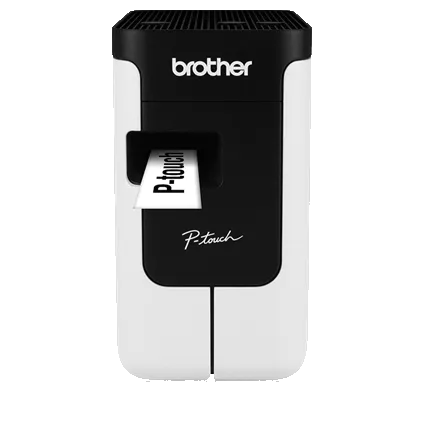
Explore this need in the finder →The Brother P-touch PT-P700 is for a label-making routine that already happens at a computer. Its blank front is not a missing feature to work around: the laptop supplies the keyboard, screen and layout tools. Connect over USB, edit on the computer, and print to laminated TZe cassettes as wide as 24 mm. For a fixed desk doing folders, storage bins, supply shelves or small batches of cable labels, that can be a simpler fit than a handheld keyboard. It is the wrong direction if phone editing or wireless printing is essential.
Let the computer do the composing
The printer has no on-device keyboard or label preview, so there is no standalone typing session. For a quick layout, the PT-P700 has P-touch Editor Lite built into the machine and Brother says it starts over USB without installing software or drivers. The fuller P-touch Editor route is more capable: Brother lists barcode and database jobs, but those require the full application and printer driver; database printing is listed for Windows. That distinction matters more than the word “computer-connected.” If the job is a few names or shelf strips, the lightweight path may be enough. If it depends on repeatable data or advanced formatting, plan time for the full desktop setup and check Brother’s current downloads for the computer you intend to use.
There is no Wi-Fi, Wireless Direct, Bluetooth or mobile-app editing route documented for this model. A 24 mm cassette and automatic cutter do not change that. In the finder, choosing computer design can leave the PT-P700 in contention; making phone or wireless printing essential should move it out of the shortlist. That is a real change in use, not a preference to dismiss after purchase.
TZe gives useful width, not color printing
Brother’s US user guide lists TZe widths of 3.5, 6, 9, 12, 18 and 24 mm. The wide cassette can carry a larger identifier, a short multi-line note or a roomy barcode layout, while narrow tape is less awkward on wire or slim drawer fronts. Brother’s product table gives four as the maximum number of lines and 18 mm as maximum print height; those are ceilings, not a promise that four readable lines fit every width. Choose type size and line count for the surface and viewing distance, then test the exact tape and layout before printing a long run.
This is a monochrome thermal-transfer label maker, not a photo or full-color sticker printer. Use Brother TZe cassettes; TZe is a separate system from Btag and the VC-500W’s CZ/ZINK color rolls, and a cassette that fits another Brother model should not be assumed compatible. Check the exact cartridge marking and adhesive instructions, especially for fabric, cables or a surface that may be exposed to heat, moisture or cleaning.
A compact desk body with a choice of power
Brother lists the housing at about 3.1 × 6.0 × 5.6 inches and 1.6 pounds before batteries or a cassette. It is compact enough to keep beside a computer, but it still needs a cord path and clearance at the tape exit. An AC adapter is included. If the work moves between rooms, six AA alkaline or Ni-MH cells are another option, but they are not in the package and the machine does not recharge Ni-MH cells. The supplied cable and computer remain part of the workflow either way.
The built-in automatic cutter is useful when making separate labels rather than pulling tape and trimming every strip by hand. It will not remove all feed margins or eliminate the occasional need to clean the print head and cutter. Brother’s guide warns against pulling the tape during printing, touching the cutter, or using a cassette that has run empty. Treat the cassette as a replaceable supply, use the cleaning guidance for the print head and cutter, and do not expect the automatic cut to make a roll of labels material-free.
When to choose it, and when to step sideways
Choose the PT-P700 if the computer is already where you design labels, a USB link is fine, you want a wide TZe option, and you value a physical automatic cut without paying for a wireless route you will not use. It is a practical match for a home office or shared workstation where a full-size computer keyboard makes data entry easier. It is less suitable for someone standing in a closet with a bin in one hand, or anyone who expects to write a label directly on the printer.
The PT-P750W keeps the same compact shape and TZe width ceiling but adds network and direct-wireless printing, mobile-device routes and NFC; choose it when several people or a phone need to send jobs. Its wireless route has an important power constraint: Brother says network printing will not work with six AA alkaline or Ni-MH batteries, so plan to use the included AC adapter or buy the optional Li-ion battery. For a phone-first device that connects by Bluetooth instead of Wi-Fi, compare the PT-P710BT; it also prints to 24 mm TZe and cuts automatically, but it uses a rechargeable battery and USB for its computer route. If color output is the priority, look at the VC-500W and its different CZ/ZINK roll system rather than expecting a TZe printer to print photographs.
Before choosing, check the Brother PT-P700 product page, its US specification and the US manuals index. The retailer’s new and refurbished offers are condition choices for the same PT-P700 machine, not separate printing systems; verify the condition and box contents on the offer you select.
Key details at a glance
| Full-color output | No |
|---|---|
| Print process | Thermal transfer |
| Maximum tape width | 24 mm |
| Compatible cassette | The Brother US guide lists TZe cassettes at 3.5, 6, 9, 12, 18 and 24 mm and instructs the user to use only TZe. The current product table also has a general media line mentioning HGe, but separately lists TZe as its compatible family; HGe compatibility is not counted as confirmed. |
| Display type | No LCD or on-device label preview; compose on the connected computer. The printer has status and Editor Lite lamps. |
| Maximum combined print height | 18 mm |
| Maximum lines per label | 4 |
| Line-count note | Brother's product specifications list a maximum of four lines; readable line count depends on tape width and layout. |
| Computer design route | P-touch Editor Lite is built into the printer and is described by Brother as usable over USB without a software or driver installation. The full P-touch Editor and driver are needed for advanced work; the product page lists barcode support and Windows-only database printing. |
| Power choices | The new product package includes the AD-E001 AC adapter. Six AA alkaline LR6 or Ni-MH HR6 cells are optional, not included; the printer does not charge rechargeable cells. |
| Body dimensions | Brother lists approximately 3.1 in W × 6.0 in D × 5.6 in H and approximately 1.6 lb without batteries or tape cassette. |
| Tape cutting | Brother lists automatic label cutting. Feeding and cutting do not eliminate tape margins; keep fingers clear of the blade and follow the guide's cleaning instructions. |
| What the base package supplies | Brother's new-package listing includes one 24 mm (0.94 in), 4 m black-on-white TZe starter cassette, AC adapter, USB cable and Editor Lite. Full P-touch Editor software/drivers are separate downloads or included media depending on the offer; check condition and exact package. |
Use the exact model’s instructions for operating limits, supplied equipment and version differences.
Sources for this assessment
Put the device and its tape system together.
Match the exact model, cassette family, computer or network route and any optional power or touch-panel hardware before buying.