
Your needs, this model
Does it fit your priorities?
Do you need both phone composition and USB computer design on one TZe printer?
PT-P710BT supports Brother’s two phone apps over Bluetooth and P-touch Editor from a Windows or Mac computer over the included USB cable. Brother says it does not support computer Bluetooth or Wi-Fi.
Explore this need in the finder →Are 18–24 mm labels and an automatic cut worth a rechargeable battery?
The guide lists TZe widths through 24 mm; Brother’s brochure specifies an 18 mm print-height ceiling and automatic cutter. It is not the 36 mm, 360 dpi CUBE XP model described in some copied page text.
Explore this need in the finder →Can your shelf fit a 5-inch body when you need the wider cassette range?
Brother lists the body at about 5 × 2.6 × 5 inches. A 4.9-inch maximum-width limit excludes it; the 12 mm PT-P300BT is shorter across the tape ceiling and remains the compact phone-only option.
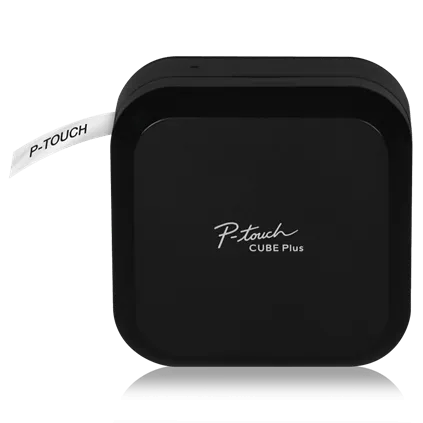
Explore this need in the finder →The Brother P-touch CUBE Plus PT-P710BT is the more capable phone-and-computer member of the small CUBE form: it prints standard TZe tape through 24 mm, uses a rechargeable Li-ion battery and automatically cuts. It makes sense when a smartphone is convenient for quick jobs but a laptop layout or wider label is also part of the real routine. It is still a blank-front printer with no keyboard or display, so choose it for the connected workflow rather than expecting a standalone label maker.
Two useful input routes, but only one for computers
For mobile work, the exact-model guide describes Brother iPrint&Label and P-touch Design&Print 2 over Bluetooth. iPrint&Label is pitched toward office jobs such as barcodes and folder tabs; Design&Print 2 leans toward home and craft layouts. The apps provide the canvas because the printer itself has status LEDs, not an LCD or preview screen.
The PT-P710BT also connects to Windows or Mac through the included USB cable and Brother P-touch Editor. Install the printer driver and software first. The manual explicitly says computer printing does not use Bluetooth and the printer does not support Wi-Fi. Brother’s shopping page muddles this by mentioning laptop and desktop printing near its Bluetooth language. For a computer job, plan on USB; for a phone, pair over Bluetooth. If you require a wireless computer queue, this is not confirmed for that use.
What the larger tape limit buys
Brother’s PT-P710BT guide lists TZe widths of 3.5, 6, 9, 12, 18 and 24 mm. Its brochure specifies an 18 mm maximum print height, with line capacity varying by software: up to seven lines in mobile apps or eight in P-touch Editor at the smallest font size. Those upper limits are not an invitation to squeeze tiny text onto every strip; a narrow cassette, larger type and multi-line layout compete for the same print area. For readable shelf, supply, cable or folder labels, choose width and layout around the actual viewing distance.
There is a notable copy problem on the current Brother product page. Its main description and specifications correctly give 24 mm as the maximum, but parts of its “Main Features” text describe the PT-P910BT CUBE XP instead, claiming 36 mm tape, 360 dpi and half/full cutting. Those are not PT-P710BT specifications. The exact P710BT support specification and English guide identify USB 2.0 Full Speed and Bluetooth; the model-specific brochure gives 24 mm, 180 dpi, 18 mm print height and an automatic cutter. Do not shop this model as a 36 mm machine: if your label needs that width, compare a genuinely supported wider printer rather than relying on copied copy.
Preview the size and print a sample before a batch. The manual warns that small text and screen previews can differ from the result. A roughly 25 mm blank lead is normal; chain-print or margin settings can reduce repeated gaps, but the automatic cutter does not eliminate feed waste.
Portable power with a maintenance decision
The PT-P710BT includes its rechargeable Li-ion battery, identified in Brother’s guide as PA-BT-005, and a USB cable. It charges from a computer or a suitable USB AC adapter; that adapter is not in the box. Brother says to charge within the stated temperature range and to recharge a stored battery every six months. The battery can be removed and replaced under a screwed cover, so it is serviceable, but it is not a pair of swap-in AAA cells. If your preferred routine is to leave a printer permanently plugged into a supplied wall adapter, compare the PT-D610BT or another mains-adapter model rather than assuming the P710 package includes one.
The housing measures about 5 × 2.6 × 5 inches and weighs about 1.4 lb with battery. Its compact cube shape is easy to keep near a desk, but it is not pocket-sized. Tape cassettes still need to be stocked, a mobile app or computer software needs to be available, and the battery needs periodic attention even if printing is infrequent. The cutter and print head also need routine care; Brother recommends a soft cloth for the exterior and the dedicated TZe-CL4 cleaning cassette or a cotton swab for the print head.
Package and condition checks
The new PT-P710BT box has a 24 mm black-on-white sample (4 m), a 24 mm black-on-premium-glitter-gold sample (2 m), the battery, USB cable and documentation. Brother’s exact refurbished RPTP710BT listing repeats those contents and shows a one-year limited warranty. It is a condition variant, not a different tape or connection model; check the exact condition and box contents before buying.
Is the Plus the right CUBE?
Choose PT-P710BT over the PT-P300BT when 18 or 24 mm TZe, an automatic cutter, a rechargeable battery or USB computer design will be used. The smaller PT-P300BT is enough for phone-made labels up to 12 mm and includes an AC adapter, but it has no computer route and a hand-operated cutter. The PT-D610BT suits someone who wants wider tape and automatic cutting too, but it adds a physical keyboard, a color display and a supplied AC-adapter routine instead of this blank, rechargeable cube. Your selection changes when a phone app is optional, when the PC must connect wirelessly, or when you need an actual keypad: those are different operating plans, not minor spec preferences.
Brother’s PT-P710BT listing, US specification and manuals page are final checks. The US index says version 02 but links an English guide marked version 03; both identify PT-P710BT. Confirm the box and new/refurbished condition.
Key details at a glance
| Maximum tape width | 24 mm |
|---|---|
| Compatible cassette | The exact PT-P710BT User’s Guide lists Brother TZe cassettes at 3.5, 6, 9, 12, 18 and 24 mm. Its limit is 24 mm, not the 36 mm stated in unrelated PT-P910BT CUBE XP boilerplate on the current PT-P710BT page. Not every specialty tape type or adhesive is right for every surface; use the cassette’s specific instructions. |
| Display type | No LCD or physical keyboard; label editing and preview are on the mobile device or computer, with status LEDs on the printer. |
| Maximum combined print height | 18 mm |
| Maximum lines per label | 8 |
| Line-count note | Brother’s exact-model brochure describes up to seven mobile-app lines or eight P-touch Editor lines at the smallest font. Maximum printable line count depends on app, type size and the 18 mm maximum print height. |
| Computer design route | Brother P-touch Editor for Windows or Mac via the included USB cable; software/driver installation required |
| Power choices | Built-in rechargeable Li-ion battery PA-BT-005. Brother includes a USB cable for charging and PC connection; a USB AC charging adapter is not included. The battery is replaceable after removing the screwed battery cover. |
| Body dimensions | Brother’s US PT-P710BT support specification gives approximately 5 × 2.6 × 5 in (W × D × H) and 1.4 lb / 640 g with the battery. The current US product listing rounds weight to 1.41 lb. |
| Tape cutting | The guide documents Auto Cut in P-touch Editor and the power button’s double-press feed-and-cut action. Special tapes can still require hand cutting. A roughly 25 mm leading margin is normal; reducing later-label gaps with chain printing or margin settings saves tape but does not make the process waste-free. |
| What the base package supplies | The new PT-P710BT package includes the printer, built-in rechargeable Li-ion battery, USB cable, documentation, a 24 mm × 4 m black-on-white TZe sample and a 24 mm × 2 m black-on-premium-glitter-gold TZe sample. The observed RPTP710BT is the same PT-P710BT hardware offered refurbished; its exact page repeats the package contents and one-year limited warranty. Check condition and package when buying. |
Use the exact model’s instructions for operating limits, supplied equipment and version differences.
Sources for this assessment
- Brother US PT-P710BT product page
- Brother US PT-P710BT technical specifications
- Brother US PT-P710BT manuals listing
- Brother PT-P710BT User’s Guide (English, version 03; US index lists version 02)
- Brother P-touch CUBE Plus PT-P710BT brochure
- Brother US refurbished RPTP710BT product page
- Brother PT-P710BT exact front rendering
Put the device and its tape system together.
Match the exact model, cassette family, computer or network route and any optional power or touch-panel hardware before buying.