
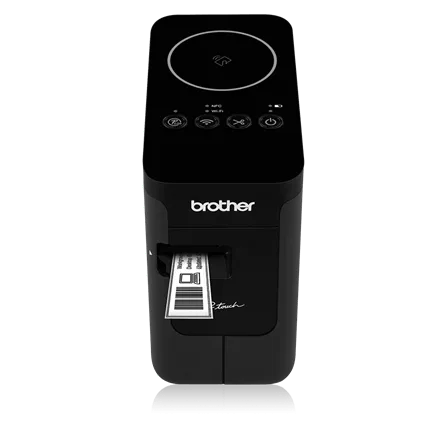
Your needs, this model
Does it fit your priorities?
Do you need a phone or computer to print over Wi-Fi or a direct wireless link?
The exact PT-P750W documentation describes infrastructure Wi-Fi and Wireless Direct for computer and mobile-device use; it does not use Bluetooth.
Explore this need in the finder →Can phone-made 24 mm labels and an automatic cutter use a powered wireless route?
The P750W supports mobile printing, TZe through 24 mm and automatic cutting, but Brother says the Wi-Fi route needs the AC adapter or optional BA-E001 Li-ion battery rather than AA alkaline/Ni-MH cells.
Explore this need in the finder →Will a 3.1-inch-wide P750W fit the opening when wireless printing is essential?
Brother lists the body at 3.1 inches wide and 5.6 inches high. A 4-inch width cap fits it, but a 4-inch height cap does not; the wireless TZe route still needs AC or optional Li-ion power.
Explore this need in the finder →The Brother P-touch PT-P750W makes the most sense when its wireless path will actually be used. It is a desktop TZe cassette printer with no keyboard or editing screen, but it can accept jobs from a computer over USB, from computers on a Wi-Fi network, or from compatible iOS and Android devices through Brother’s app route. That flexibility is more than the PT-P700’s USB-only workflow. It is not Bluetooth, and its wireless mode brings a power condition that is easy to miss when shopping from a short feature list.
Two kinds of wireless connection
The PT-P750W can join a household or office WLAN, where a shared printer can take jobs from more than one device, or it can use Wireless Direct to create a local direct connection when there is no router nearby. The online guide describes both methods, and Brother also lists USB for a single computer. The printer itself has buttons and status lamps rather than a full editor or preview. You still compose on a laptop or phone; the P750W only changes where the file can come from.
Wireless Direct is not the same thing as joining your normal network: the manual warns that this direct connection does not provide Internet access through the printer. Use the infrastructure Wi-Fi route if you want to stay on your usual network, or use Direct for a nearby device-to-printer link. NFC can shorten the Android connection step on compatible phones, but it is a pairing aid, not a screen or an additional label editor. Brother says a dedicated app is needed for NFC printing.
Power determines whether the wireless advantage is available. The supplied AC adapter supports the network workflow; the specification also lists an optional rechargeable Li-ion battery. Brother’s guide specifically says the P750W cannot establish a wireless network connection while powered by six AA alkaline or Ni-MH batteries. Those cells remain an option for a wired, away-from-outlet session, but do not plan on them for Wi-Fi. If phone or network printing is essential, use the AC adapter or budget for the optional compatible Li-ion battery.
Same width ceiling, more ways to reach it
The P750W uses Brother TZe cassettes in 3.5, 6, 9, 12, 18 and 24 mm widths. Its product page lists an 18 mm maximum print height and up to four lines, with graphics and barcode support available through the fuller P-touch Editor software. Narrow tapes still leave less room for large lettering; a four-line maximum is not a guarantee that a four-line label will read well on a slim strip. A 24 mm cassette is the option for bigger type, more lines or a broader identifier, not a way to print a full sheet.
This is thermal-transfer label printing, not a full-color photo or sticker system. Select a TZe cassette for the required width, background, print color and adhesive. Brother’s product page lists specialty types such as flexible-ID, extra-strength adhesive and iron-on fabric, but material names alone do not promise that a label will hold on every surface or through every wash or temperature. Test the intended material and follow the cassette instructions. TZe also remains separate from Btag and the VC-500W’s CZ/ZINK color rolls.
Setup, software and batch work
For the straightforward USB route, the P750W includes Editor Lite software in the printer. More advanced computer work uses the downloadable P-touch Editor and driver; barcode and automatic layout features require the fuller application. Wi-Fi configuration can take an extra step: the guide describes using a USB connection and Brother’s setting tools or WPS to configure a router, while Wireless Direct is configured as its own link. That setup can pay off when different people print routine labels, but it is unnecessary complexity for a single laptop that is always within reach.
Brother promotes the P750W’s automatic half or full cutter and repeat-print support for multi-label jobs. The cutter saves the manual trim after each label, but it does not erase the tape needed for feeding or margins. The body is about 3.1 × 6.0 × 5.6 inches; Brother lists 1.8 pounds before batteries and cassette. Keep space at the outlet and tape exit, and plan regular print-head and cutter cleaning instead of expecting a compact printer to be maintenance-free.
Who should choose it?
Choose the P750W if a shared Wi-Fi printer or a phone-created TZe label matters, and if a router or Wireless Direct setup plus AC power is acceptable. A small office, craft station or household with several potential senders is a better fit than a person who wants to type on-device. The finder should change its answer when you require wireless printing: the PT-P700 may still suit a USB-only desk, but it does not offer this route. The P750W also fits a question that requires both a computer USB connection and a wireless route because it supports both modes on one device.
For a single PC and no need for mobile or network printing, the PT-P700 offers the same general body footprint, maximum TZe width and automatic cutting with a simpler wired plan. If the phone is the main control and direct pairing is more appealing than joining a Wi-Fi network, the PT-P710BT offers Bluetooth phone editing plus USB computer printing; it does not add Wi-Fi. If the goal is full-color output rather than durable single-color TZe tape, compare Brother’s VC-500W instead. The P750W’s extra connection choices are useful only when they solve the actual path between your device and printer.
Check the Brother PT-P750W product listing, US specifications and US manuals index before buying; confirm current software compatibility with your devices.
Key details at a glance
| Full-color output | No |
|---|---|
| Print process | Thermal transfer |
| Maximum tape width | 24 mm |
| Compatible cassette | Brother's US product page, specification and guide identify TZe cassettes in 3.5, 6, 9, 12, 18 and 24 mm. TZe is not interchangeable with Btag or the VC-500W's CZ/ZINK color rolls. |
| Display type | No LCD, keypad or on-device layout preview; use a connected computer or mobile device. Status, Wi-Fi, NFC and battery lamps show machine state. |
| Maximum combined print height | 18 mm |
| Maximum lines per label | 4 |
| Line-count note | Brother's product specifications list a maximum of four lines; readable line count depends on cassette width and layout. |
| Computer design route | Editor Lite supports simple USB jobs; the full P-touch Editor and driver are used for advanced computer work and network printing. Brother lists barcode features with full software. |
| Power choices | The package includes the AD-E001 AC adapter and supports six AA alkaline LR6 or Ni-MH HR6 cells. The optional rechargeable Li-ion battery is BA-E001. Brother's online guide says wireless networking cannot be established using AA alkaline or Ni-MH cells; use AC or the optional Li-ion battery for that route. The machine does not charge AA rechargeable cells. |
| Body dimensions | Brother lists approximately 3.1 in W × 6.0 in D × 5.6 in H and 1.8 lb without batteries or tape cassette. |
| Tape cutting | Brother lists automatic half or full cutting and repeat printing. Cutting still consumes leading and trailing tape; follow Brother's instructions for cleaning the print head and cutter. |
| What the base package supplies | Brother's new-package listing includes one 24 mm (0.94 in), 4 m black-on-white TZe starter cassette, AC adapter, USB cable and Editor Lite. Confirm the selected offer's exact condition and contents. |
Use the exact model’s instructions for operating limits, supplied equipment and version differences.
Sources for this assessment
Put the device and its tape system together.
Match the exact model, cassette family, computer or network route and any optional power or touch-panel hardware before buying.