
Your needs, this model
Does it fit your priorities?
Do you need broad 36 mm TZe output from a computer-only station?
The exact PT-P900C supports TZe through 36 mm and USB computer printing; the user guide gives a 32 mm maximum print dimension, and it does not document Wi-Fi.
Explore this need in the finder →Would dedicated HSe tubing be more useful than ordinary narrow label tape?
The PT-P900C US manual and series sheet list HSe tube cassettes; maximum cassette width across the printer is not the same as each HSe width.
Explore this need in the finder →Can this unit fit a five-inch-wide bench location if a wired setup is acceptable?
Brother lists 4.65 inches of body width, but the machine is 5.75 inches tall and needs tape-exit clearance.
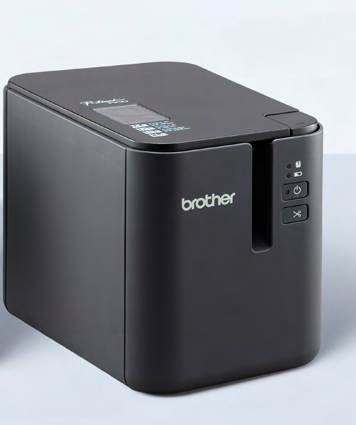
Explore this need in the finder →The Brother P-touch PT-P900C is for a desk where labels are designed on a computer, not typed on the machine. Its central advantage over a handheld P-touch is the 36 mm cassette bay, a high-resolution thermal-transfer head and a cutter built for producing repeated, peelable labels. Its central limitation is equally important: the exact model is a USB/serial printer, not a wireless version of the PT-P900 series. If you want labels from a phone, shared Wi-Fi or Ethernet, compare the PT-P900WC or PT-P950NW instead.
Start with the connection, not the family name
Brother’s US PT-P900C page identifies USB 2.0 and RS-232C serial as its communications interfaces. The serial connection requires an optional adapter. The model-specific Brother series sheet likewise assigns USB and serial to the PT-P900C while giving Wi-Fi to the PT-P900WC and Wi-Fi plus Ethernet to the PT-P950NW. That matters because some broader promotional copy on the P900C page mentions the Pro Label Tool mobile app; the precise connection table does not give the C model a phone or network route. Do not buy it expecting phone printing based on a family-level feature sentence. Its dependable plan is a Windows computer running Brother’s P-touch Editor over USB, with a compatible optional serial arrangement when a controlled device workflow requires it.
There is no keypad, LCD composition screen or self-contained label editor on the base machine. You prepare the layout on a connected computer, then send the job. That is a useful change from the PT-D610BT or PT-P710BT, both of which combine a computer connection with other forms of input, but it means this is not the convenient choice for one quick pantry label with no computer nearby. Brother lists barcode and QR-code design through P-touch Editor; that is a software route, not evidence that this unit has a stand-alone scanner or screen.
Wide tapes are the real reason to consider it
The PT-P900C accepts Brother TZe cassettes through 36 mm, while the manual gives a maximum printable width of 32 mm. Do not confuse the width printed on a cassette with the usable print area. A 36 mm tape is a broad strip for shelf, asset, cabinet or equipment identification; it is still a narrow continuous label, not a page printer. The current Brother documentation also lists HGe tape, HSe heat-shrink tubing, FLe die-cut labels and TZeSL self-laminating cartridges. Those are different jobs and consumables: HSe tubing is shrunk around a cable with heat, and Brother describes FLe as a dedicated die-cut flag-label format. Check the precise cassette, label size and compatible application before committing to a media stockpile.
Brother specifies 360 dpi thermal-transfer output and advertises speeds up to about 3.1 inches per second. The US specification distinguishes standard, high-resolution, high-speed and high-quality modes; the high-speed and high-resolution modes require AC power and compatible black-ink TZe or HGe laminated tape, and the high-speed mode trades resolution. This is a practical batch machine rather than a promise that every cassette prints at the top advertised rate. For long equipment labels, barcodes or repeated identifiers, software layout and a 36 mm width can be more useful than a short burst-speed headline.
Cutting, power and placement
The machine has an automatic dual-blade cutter with half-cut and full-cut behavior. Half cutting keeps the backing strip together so a run of labels is easier to peel apart; it does not remove the feed and margin material that the printer uses around a job. The specification describes automatic full cutting and a crack-and-peel cut for laminated tape. Brother’s guide treats these as different cut options rather than a universal zero-waste mode. Plan to set a cut style appropriate to the label and application, and clean the head and cutter according to the manual.
Its standard power path is the AD9100ESA AC adapter. Brother also lists the PA-BT-4000LI rechargeable battery as an optional route, used with the separately sold battery base; it is not a handheld unit running on ordinary AA cells. The US support specification places the body at about 4.65 inches wide, 7.56 inches deep and 5.75 inches tall, weighing about 3.27 pounds without cassette or battery hardware. Leave room for the tape exit and for changing the cassette instead of measuring only the outer shell.
Who should choose it?
Choose the PT-P900C when a fixed computer station, serial integration or broad specialty media matters more than wireless convenience. It gives a small office, repair bench or organized workshop a direct path to repeatable labels, cable materials and 36 mm TZe without adding a Wi-Fi setup. If 24 mm TZe is enough and a physical keypad helps, the PT-D610BT is a simpler desk option. If mobile jobs or a shared Wi-Fi printer are essential, the PT-P900WC preserves the wide-media format and adds wireless networking. The PT-P950NW is the step to consider when wired Ethernet, a barcode-scanner host port or an optional touch-panel workflow is part of the plan.
For ordinary home organization, this is likely more machine and media complexity than needed: the 36 mm industrial cassette system, computer software and optional accessories earn their space only if you will use them. Verify the exact PTP900C listing, current operating-system support, cable or serial accessory, supply type and package condition before purchase. Brother’s current note excludes Windows 8, Windows 7 and Vista for the PT-P900c; an older PT-P900 manual is not a guarantee of modern software support.
Key details at a glance
| Full-color output | No |
|---|---|
| Print process | Laminated thermal transfer |
| Maximum tape width | 36 mm |
| Compatible cassette | Brother documents TZe and HGe tape through 36 mm, HSe heat-shrink tubing, FLe 21 × 45 mm die-cut labels and TZeSL self-laminating cartridges. The 36 mm cassette is not a 36 mm print field; the reviewed US documentation specifies a 32 mm maximum printing dimension. Check each cartridge family and task separately. |
| Built-in templates | 99 |
| Display type | No integrated text-entry display on the base printer. P950NW can be fitted with optional PA-TDU-003 touch panel/display for prepared template work. |
| Maximum combined print height | 32 mm |
| Line-count note | Maximum line count varies with layout, font and cassette; no single useful line limit is asserted here. |
| Computer design route | Brother P-touch Editor computer software; use the exact model’s supported OS and driver. P-touch Template is an integration route, not an on-device label editor. |
| Power choices | Brother lists the AD9100ESA AC adapter as the standard/in-box power route and the PA-BT-4000LI rechargeable Li-ion battery as optional. Optional battery operation needs the compatible base/accessory configuration; confirm exact package contents. |
| Body dimensions | Approx. 4.65 in W × 7.56 in D × 5.75 in H; about 3.27 lb without cassette, battery base or batteries (Brother US PT-P900 / PT-P900c support specification). |
| Tape cutting | Automatic half/full cutting and laminated-tape crack-and-peel behavior are documented. Feed length and margins still consume media; use the exact tape and cutter instructions. |
| What the base package supplies | The 900 Series datasheet lists a printer, standard-adhesive 36 mm TZe261 starter cassette, AD9100ESA AC adapter and cord, and USB cable. Verify the exact new/refurbished seller offer; optional battery, base, Bluetooth and display accessories are not implied. |
| Maximum printable dimension | 32 mm |
| Wired Ethernet | No |
| USB host for barcode scanner | No |
| Optional touch-panel templates | No |
| Optional Bluetooth adapter | No |
| Specialist media limits | FLe is 21 × 45 mm and HSe is listed through 23.6 mm in the model family manual; the manufacturer datasheet confirms TZeSL compatibility but does not state its widths, so no TZeSL width is inferred. A 36 mm maximum applies to TZe/HGe, not all specialist media. |
Use the exact model’s instructions for operating limits, supplied equipment and version differences.
Sources for this assessment
- Brother US PT-P900C exact product and compatibility page
- Brother US PT-P900 / PT-P900c support specification
- Brother US PT-P900 / PT-P900c manuals index
- Brother PT-P900 US English User’s Guide; official PT-P900c specification-change notice points P900c customers to the original PT-P900 manual
- Brother PT-P900c/PT-P900Wc specification change notification (2022)
- Brother P-touch 900 Series datasheet naming PT-P900C, PT-P900WC and PT-P950NW
Put the device and its tape system together.
Match the exact model, cassette family, computer or network route and any optional power or touch-panel hardware before buying.