
Your needs, this model
Does it fit your priorities?
Would you rather type labels on a familiar QWERTY keyboard built into the machine?
Brother’s exact PT540 U.S. page lists QWERTY, and its linked model brochure shows a full on-device keyboard. It is an earlier discontinued machine; app and computer routes are not established by the reviewed sources.
Explore this need in the finder →Do two-line labels and a page-listed TZe route fit your routine, without relying on an unconfirmed wide tape?
Brother’s exact U.S. page lists two lines and TZe, but its TZe545G recommendation is an 18 mm cartridge while the same PT540 specification table lists widths only through 12 mm. A need for 18 mm is not treated as confirmed.
Explore this need in the finder →Can you use the brochure-described six-AA package without requiring an adapter or a specific adapter-in-box?
The exact PT-540 brochure says its original package includes six AA batteries. It does not establish an AC-adapter route or adapter inclusion, and the direct manual URL now returns generic support HTML.
Explore this need in the finder →A desktop-style P-touch, not a small handheld
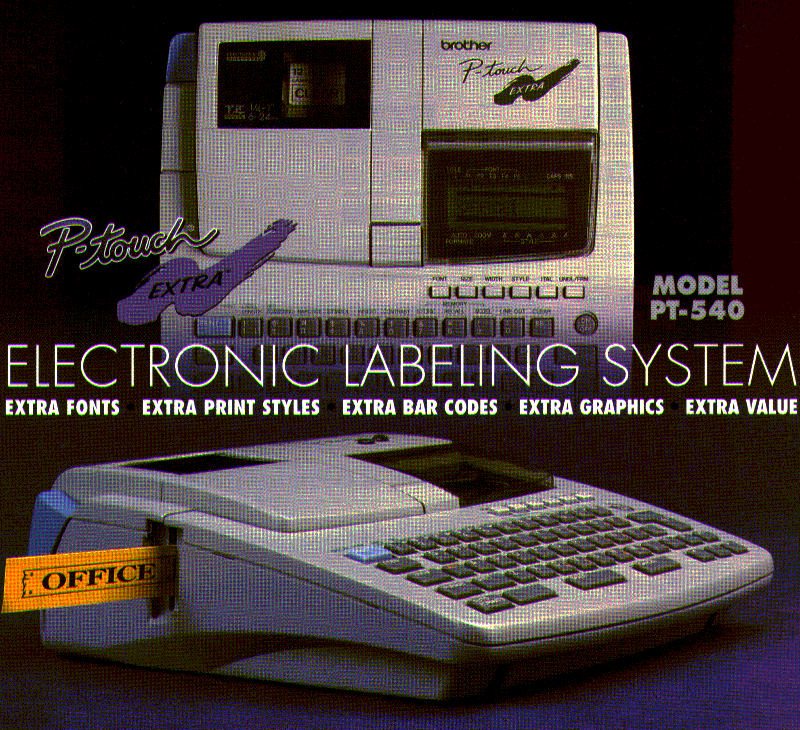
The PT540 is an earlier Brother labeler worth understanding if you have found one used, are replacing a cartridge in an existing machine, or are comparing older keyboard-led equipment with today’s compact models. Brother’s exact U.S. page marks PT540 discontinued. Its linked brochure places “MODEL PT-540” beside a broad, low-profile machine with a full QWERTY key field, screen and label outlet. That gives a much different desk routine from a pocketable handheld: you sit the unit down and type on the machine instead of composing on a phone. The illustration is brochure art, not an independent photograph, and Brother does not publish the PT540’s body dimensions on the page we reviewed.
What the on-device workflow offers
The exact U.S. listing says the keyboard layout is QWERTY, the label length can be set, and a label can use up to two printed lines. The PT-540 brochure adds a WYSIWYG-style display intended to show a label as it will print, plus font, print-style, barcode and graphic choices. Those are meaningful on-machine controls if you prefer entering one label at a time without first building a design on a larger screen. The brochure does not enumerate the fonts, styles or barcode types, so do not treat its broad feature language as a measured list of options. Brother’s table says “Standard Memory 15,” but does not explain whether that is a count of saved labels or some other memory figure; it should not be read as fifteen stored designs without the manual.
The two-line ceiling is a useful boundary, not a promise of a particular character size or print height. The available sources give no numeric maximum print height, and the exact manual link now resolves to Brother’s generic Support page rather than a PT540 guide. If a small label must remain legible at a particular distance, check the actual label layout and lettering on the unit before committing to a job. A two-line claim alone cannot prove that the text will fit at the size you need.
Keep the tape-width conflict visible
Brother’s current PT540 specification table lists laminated thermal-transfer TZe tape and widths of 3.5, 6, 9 and 12 mm. The same product record recommends specific TZe supplies, including TZe-545; Brother identifies that tape as 18 mm wide. Those two first-party records do not agree on a maximum width. The product page is useful evidence that Brother associates TZe media with PT540, but it does not settle which widths the original machine can reliably print. The brochure’s included black-on-clear starter tape has no part number or width. We therefore treat the 18 mm capability as unconfirmed, not a reason to buy a cartridge by width alone. For a used machine, ask for the exact cartridge part number supported by its manual or test one that Brother explicitly lists for that serial/model configuration.
This matters because cassette width is part of the job, not a cosmetic detail. If your work needs 18 mm or wider labels, choose a model whose current manual states that width rather than inferring it from the PT540’s recommended-supplies panel. If all you need is an ordinary short name or folder label, its page-listed TZe family and several narrower widths may appear promising, but the missing manual still makes the cartridge question worth confirming before purchase.
What the brochure says is in the box
The linked PT-540 brochure says its package includes one black-on-clear tape, a tape separator/lettering stick and six AA batteries. That is specific evidence for the original brochure package, not a guarantee that any used seller still has those pieces or that every market bundle was identical. The brochure does not establish an AC-adapter route, and the generic product page provides no dimensions, weight, cutter type or software-connection details. Do not assume a particular adapter, computer cable, phone workflow, automatic cutter or carrying case is present. The exact page’s inventory data is not a useful measure of current availability for a discontinued unit.
When it fits—and when another model is safer
The PT540 is most relevant to someone who already owns this exact machine, can verify the cartridge in hand and wants a local QWERTY workflow for short office or home labels. It is not an easy default buy: its discontinued status, unresolved 18 mm conflict and missing manual increase the burden on the buyer. The smaller PT-70 has a documented handheld body and a manual-backed M-tape route, so it is not a media-equivalent substitute. A current Brother PT-D220 or PT-D410 has its own separate review and support record; compare its exact cassette, controls and power path rather than assuming the later model behaves like the PT540.
In the finder, the PT540 belongs only when you opt into earlier machines. A QWERTY and two-line requirement can match its exact U.S. page claims. A required 18 mm TZe label, numeric print height, adapter, automatic cutter, computer connection, phone app, exact body-size cap or included case does not pass on the evidence available here. Unknown is not the same as yes. If none of those uncertainties is acceptable, choose a better-documented current machine; if you are evaluating a specific PT540, confirm the model plate and tape route before paying, then test a short label on your own intended surface.
Key details at a glance
| Print process | Thermal transfer |
|---|---|
| Compatible cassette | The exact PT540 U.S. page lists TZe, laminated thermal-transfer media and widths 3.5/6/9/12 mm, while its own supplies recommendations include TZe545G (18 mm). Treat TZe family as page-listed but keep maximum width unknown until an exact manual resolves the conflict. |
| Display type | WYSIWYG display described in the exact PT-540 brochure; physical display technology and dimensions are not stated. |
| Maximum lines per label | 2 |
| Line-count note | Exact PT540 U.S. specifications table: maximum print lines 2. |
| Power choices | The exact PT-540 brochure says the original package includes six AA batteries. It does not establish other supported power routes. |
| Body dimensions | No exact dimensions or weight were found in the reviewed exact U.S. page, brochure or accessible support content. |
| What the base package supplies | The Brother PT-540 brochure says the original package includes one black-on-clear tape, a tape separator/lettering stick and six AA batteries. It does not establish contents of a used listing or every regional bundle. |
| Letter-key arrangement | qwerty |
Use the exact model’s instructions for operating limits, supplied equipment and version differences.
Sources for this assessment
- Brother U.S. Office & Home directory row at offset 90/index 103
- Brother U.S. PT540 exact product page
- Brother U.S. PT540 support landing page
- Brother PT-540 brochure linked from its U.S. product page
- Brother U.S. TZe545G exact supply page
- Brother U.S. historical PT540 user-guide URL retrieval response (not a manual)
Put the device and its tape system together.
Match the exact model, cassette family, computer or network route and any optional power or touch-panel hardware before buying.