
Your needs, this model
Does it fit your priorities?
Would local QWERTY typing and Brother’s current listed TZe route work for the labels you make?
The exact current U.S. ST1150 page lists QWERTY and TZe, up to 12 mm. The older manual’s TZ/STZ-only instruction conflicts with that page, so inspect the cassette code on a used unit and do not rely on both families fitting.
Explore this need in the finder →Are the old guide’s TZ/STZ cassette widths sufficient, or is 18 mm original TZ essential?
The model-named guide lists Stanley STZ/Brother TZ at 6, 9 and 12 mm. Its original-TZ plan does not reach an essential 18 mm requirement.
Explore this need in the finder →Would an optional AD-30 route work, or must the adapter be included in the original box?
The guide identifies an optional AD-30. The brochure’s base package lists batteries and one cassette but no adapter, so adapter compatibility is not adapter-in-box evidence.
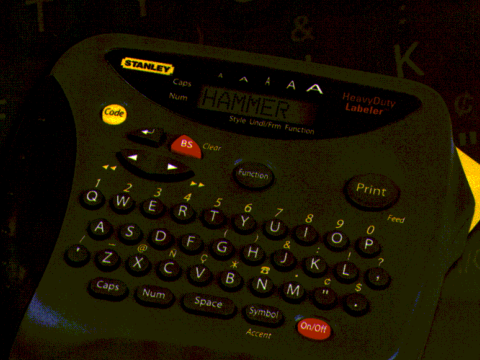
Explore this need in the finder →The discontinued Brother P-touch ST1150 is a small keyboard label maker sold under Stanley’s “Heavy Duty Labeler” name in Brother’s model-specific brochure. It is an earlier, self-contained device for someone who would rather type at the machine than compose on a phone. Brother’s materials promote it for workshop and worksite organization, but that is a use-case description—not a durability test or a promise that any label will stick to every surface.
A compact keyboard workflow, not a phone printer
The exact Brother listing calls out a QWERTY keyboard, laminated thermal-transfer tape and a two-line ceiling. The ST-1150/1150DX user guide gives useful detail behind that summary: an eight-character, one-row LCD acts as a moving window over text up to 55 characters. You can type and revise a short line without a companion device, but you do not get a wide preview of a long label. The guide also describes frames, several character sizes and styles, and groups of built-in symbols. That is enough to personalize a tool-bin or shelf label without an app; it is not computer-based page layout or a phone workflow.
Two lines are not available on every tape width. The guide says the second line can be entered with 9 mm or 12 mm tape, and that a two-line label prints at Size 1 regardless of the selected size. A buyer who needs readable multi-line type should treat those as operating limits, not assume that the broad “two lines” specification applies to the narrowest cassette. Brother does not publish a numeric print-height measurement here, so the line count cannot certify a required millimeter height.
Check the cassette generation before building a supply plan
Media is the most important qualification. Brother’s current exact-model specification page lists TZe and widths of 3.5, 6, 9 and 12 mm. The model’s user guide, by contrast, says to use Stanley STZ or Brother TZ cassettes only and documents 6, 9 and 12 mm. Both sources support the same 12 mm ceiling, but they disagree about the narrowest size and how the tape family is named. I would not turn the current page’s 3.5 mm entry into a promise that every older ST-1150 accepts that cassette, nor transfer any wider-tape claim from a similarly named P-touch model. Check the exact machine’s marking and cassette code, and use the model-specific compatibility information before buying a large supply. In the matcher, the conservative width list is the three sizes both generations support.
The guide describes laminated labels and manually pushing the tape-cutter lever after feeding. That gives the owner direct control over separating a strip, but it is not evidence of automatic cutting. Laminated tape is useful for ordinary identification; the material description alone cannot guarantee adhesion or legibility on oily, rough, hot or frequently handled surfaces. Test the actual cassette on the intended surface when removal, chemical exposure or reliable identification matters.
Power and dimensions are unusually helpful for a used model
Unlike the sparse support shell, Brother’s guide specifies six AAA alkaline cells and names the optional AD-30 adapter. The exact-model brochure measures the body at 6.1 × 5.1 × 2.5 inches and 0.9 pounds. Those details make the ST1150 easier to assess for a small workbench or drawer than a model whose page lists only media. The guide warns that text and stored files are lost if power is disconnected for more than three minutes unless the machine is connected to the adapter. Brother’s web table also shows “Standard Memory 15” without a unit; do not read that as fifteen saved labels or as a promise of long-term storage.
The brochure’s original ST-1150 package lists six batteries and one tape cassette. A discontinued-product page cannot tell you what is present in a second-hand listing. Ask for a photo of the underside model marking, the tape bay and battery compartment; verify that the text keys, feed and cutter respond; and confirm whether an AD-30 adapter and usable cassette are actually included. A brochure or a previous owner’s box contents are not evidence about the particular used unit being offered.
Who should keep looking
The ST1150 is most plausible for a person who wants direct QWERTY entry, a portable body and 6–12 mm laminated strips, and is willing to confirm media and condition. Its format is a poor fit if phone design, a verified automatic cutter, 18 mm tape, or a measured print height is essential. The current PT-D410 is a more relevant Brother starting point when an 18 mm TZe width matters; its current feature set should be evaluated on its own evidence rather than borrowed here. The ST1150’s appeal is not a modern connection feature: it is a straightforward, battery-capable keyboard workflow with a small documented footprint. For a used machine, the exact cassette, power condition and cutter action matter more than the “Heavy Duty” phrase on the brochure.
Sources: Brother’s exact ST1150 U.S. product page and ST-1150 brochure; the Brother ST-1150/1150DX user guide (LA3255001), mirrored at ManualOwl, and Brother’s parts reference list.
Key details at a glance
| Print process | Thermal transfer |
|---|---|
| Maximum tape width | 12 mm |
| Compatible cassette | Brother’s exact current U.S. page lists TZe 3.5/6/9/12 mm; the Brother-authored ST-1150/1150DX guide (LA3255001, inspected through a third-party viewer) says use Stanley STZ/Brother TZ 6/9/12 mm only. The cassette generations and width tables are source-specific; only the shared 6/9/12 mm sizes and 12 mm ceiling agree. Choose an operating plan by the cassette actually accepted by the exact unit; do not infer blanket TZe/TZ interchangeability from a used listing. |
| On-device preview characters | 8 |
| Display type | LCD |
| Maximum lines per label | 2 |
| Line-count note | Both current exact product pages state a two-line maximum. The shared guide says two lines can be entered only with the older 9 mm or 12 mm tape, and then they print at Size 1 regardless of selected size. The sources do not resolve that rule for the current-page TZe configuration. |
| Body dimensions | Exact Brother brochure dimensions/weight refer to the machine itself, not the DX carrying case. |
| Tape cutting | The guide instructs the user to advance tape and push in the cutter lever. It does not document an auto-cutter. |
| Letter-key arrangement | qwerty |
| Original TZ maximum width | 12 mm |
Use the exact model’s instructions for operating limits, supplied equipment and version differences.
Sources for this assessment
- Brother Office & Home observed row ST1150 at offset75/index80
- Exact Brother U.S. ST1150 product page
- Exact Brother U.S. ST1150 support page
- Exact Brother ST-1150 U.S. brochure
- Brother ST-1150/1150DX User’s Guide LA3255001 (viewed through a secondary manual viewer)
- Brother indexed Parts Reference List for PT-1100/ST-1150 families
Put the device and its tape system together.
Match the exact model, cassette family, computer or network route and any optional power or touch-panel hardware before buying.